
Android 패키지에 외부 라이브러리 추가
Qt Creator 애플리케이션이 사용하는 Qt 라이브러리를 자동으로 감지하여 종속성으로 추가합니다.
외부 라이브러리를 애플리케이션의 라이브러리 폴더에 복사하고 시작 시 로드하려면:
- Projects > Build Settings > Build Android APK 로 이동한 후, Details 를 선택합니다.
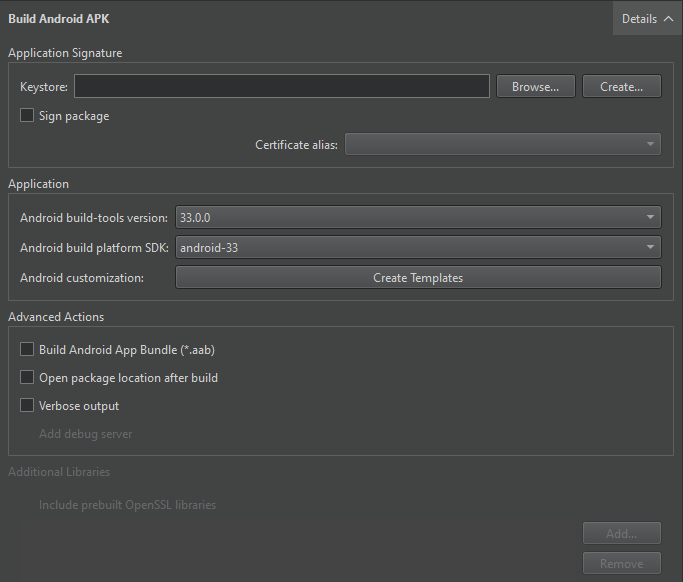
- Additional Libraries 에서 추가할 라이브러리를 선택합니다.
OpenSSL 라이브러리 추가
OpenSSL 라이브러리를 추가하려면 ‘ Additional Libraries ’ 그룹에서 ‘ Include prebuilt OpenSSL libraries ’를 선택하십시오.
이렇게 하면 ‘ Preferences > SDKs > Android OpenSSL Settings ’에서 지정한 OpenSSL 포함 프로젝트가 추가됩니다. 이 기능은 qmake 및 CMake 프로젝트 모두에서 작동합니다.
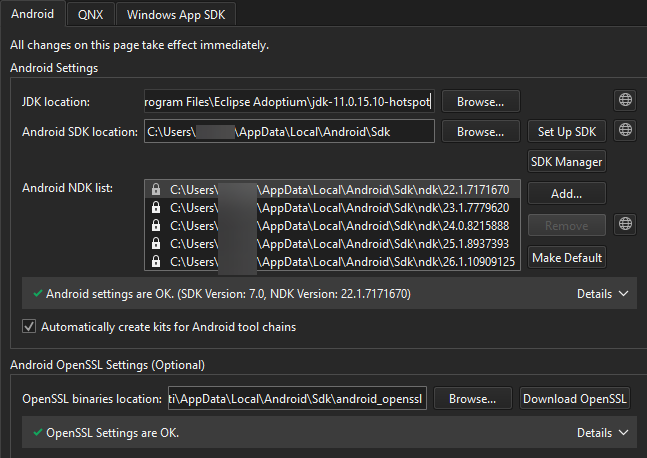
또한 Additional Libraries 필드에 필요한 libssl.so 및 libcrypto.so 라이브러리의 경로를 수동으로 추가할 수도 있습니다.
‘Android용 개발 방법’ 및 ‘Android 개발’문서도 참조하십시오 .
Copyright © The Qt Company Ltd. and other contributors. Documentation contributions included herein are the copyrights of their respective owners. The documentation provided herein is licensed under the terms of the GNU Free Documentation License version 1.3 as published by the Free Software Foundation. Qt and respective logos are trademarks of The Qt Company Ltd in Finland and/or other countries worldwide. All other trademarks are property of their respective owners.
