
마법사 추가
Qt Creator 클래스, 파일 및 프로젝트를 추가하는 마법사가 포함되어 있으며, 이를 복사하고 편집하여 자신만의 마법사를 만들 수 있습니다. 사용자 설정 디렉터리의` templates/wizards/ ` 디렉터리에 마법사 디렉터리를 생성하십시오.
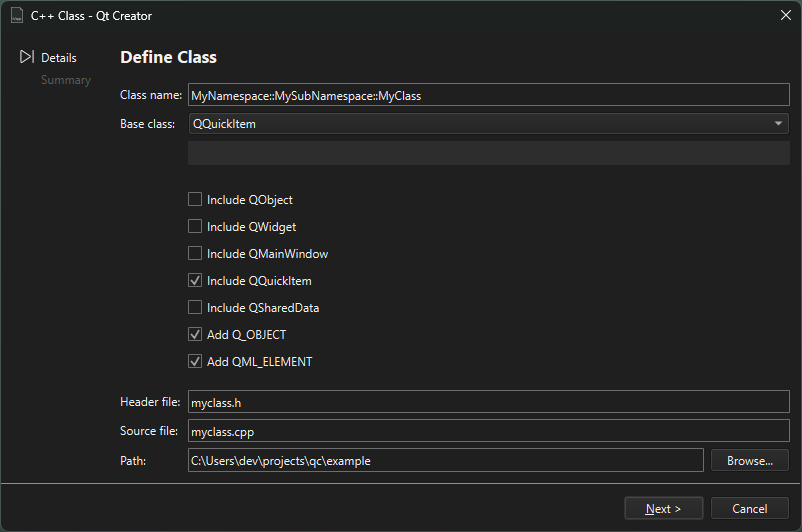
새 마법사를 만들려면:
- 마법사 개발 중에 피드백을 받으려면
-customwizard-verbose인수를 지정하여 Qt Creator 를 실행하십시오. 자세한 내용은 '상세 출력'을 참조하십시오. - '마법사 개발 팁'에 설명된 대로 Inspect 및 Factory.Reset 작업에 대한 키보드 단축키를 설정하십시오.
- 마법사가 포함된 디렉터리를 복사한 후 이름을 변경하십시오. 예를 들어,
share/qtcreator/templates/wizards/classes/cpp를$HOME/.config/QtProject/qtcreator/templates/wizards/classes/mycpp로 복사하십시오. - ' Factory.Reset ' 작업을 사용하여 ' Qt Creator'을 다시 시작하지 않고도 ' File > New File '에 마법사가 표시되도록 하십시오.
- '사용자 정의 마법사'에 설명된 대로 마법사 구성 파일인
wizard.json를 열어 편집하십시오. id를 고유한 값으로 변경하십시오. 마법사는category내에서 ID에 따라 알파벳 순서로 정렬됩니다. 앞부분에 특정 문자를 추가하여 마법사의 위치를 지정할 수 있습니다. 예를 들어,B.MyClass와 같이 설정할 수 있습니다.
'명령줄에서 Qt Creator 실행 ' 및 '사용자 지정 마법사'항목도 참조하십시오 .
Copyright © The Qt Company Ltd. and other contributors. Documentation contributions included herein are the copyrights of their respective owners. The documentation provided herein is licensed under the terms of the GNU Free Documentation License version 1.3 as published by the Free Software Foundation. Qt and respective logos are trademarks of The Qt Company Ltd in Finland and/or other countries worldwide. All other trademarks are property of their respective owners.
