
Android 기기에서 디버깅하기
Qt 5.15.9 이상 및 Qt 6.2 이상으로 개발한 안드로이드 기기에서 LLDB를 사용하여 애플리케이션을 디버그할 수 있습니다.
Qt Creator 의 최근 릴리스에서는 Android에서 LLDB를 사용한 네이티브(C++) 디버깅에 문제가 있었습니다.
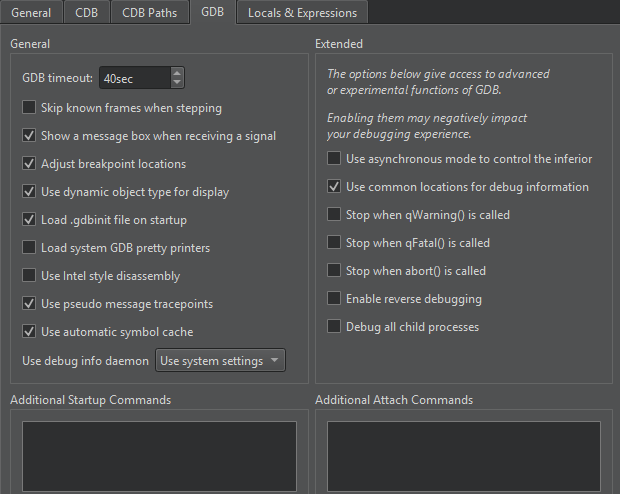
이 문제는 Qt Creator 에서 수정되었습니다. 17.0.1. 이전 릴리스에서 이 문제를 해결하려면 Preferences > Debugger > GDB 로 이동하여 Additional Attach Commands 에 다음 내용을 추가하십시오.
settings set plugin.jit-loader.gdb.enable off
기기에서 디버깅 활성화
Android 기기에 따라 디버깅을 활성화하는 방법이 다릅니다. Developer Options 아래에서 ‘ USB Debugging ’를 찾으십시오. Settings > About 에서 ‘ Build number ’를 여러 번 탭하여 ‘ Developer Options ’를 표시하십시오.
디버그 빌드 구성을 선택하세요
Projects > Build Settings 로 이동한 후, Active build configuration 에서 디버그 빌드 구성을 선택하여 디버깅용 애플리케이션을 빌드합니다.
두 번째 디버거와의 충돌 해결
Qt Creator Android Studio가 실행 중일 경우 Android 기기에서 애플리케이션을 디버그할 수 없습니다. 애플리케이션 출력( Application Output)에 다음 메시지가 나타나면 Android Studio를 닫고 다시 시도하십시오:
Ignoring second debugger -accepting and dropping.
Android 에뮬레이터 사용
Linux, macOS 또는 Windows에서 Android 기기를 에뮬레이션하려면 Android 에뮬레이터를 사용하세요. Android 에뮬레이터는 Android 가상 장치(AVD)라고 하는 가상 머신에서 Android 운영 체제를 실행합니다.
‘방법: Android용 개발’, ‘Android용 개발’ 및 ‘기기 내 개발자 옵션 구성’항목도 참조하세요 .
Copyright © The Qt Company Ltd. and other contributors. Documentation contributions included herein are the copyrights of their respective owners. The documentation provided herein is licensed under the terms of the GNU Free Documentation License version 1.3 as published by the Free Software Foundation. Qt and respective logos are trademarks of The Qt Company Ltd in Finland and/or other countries worldwide. All other trademarks are property of their respective owners.
