
Qbs 프로필 편집
키트와 연결된 Qbs 프로필을 보려면, ‘ Preferences ’ > ‘ Qbs ’ > ‘ Profiles ’을 선택하십시오.
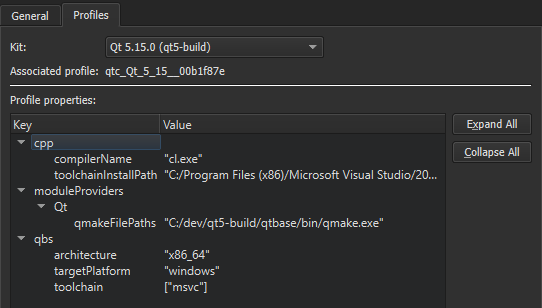
프로필에 키와 값을 추가하거나 제거할 수 있으며, 기존 값을 수정할 수도 있습니다. 사용 가능한 키 및 값 목록은 Qbs 매뉴얼의 '모듈 목록(List of Modules )'을 참조하십시오.
키트와 연결된 Qbs 프로필을 편집하려면:
- Preferences > Kits 에서 키트를 선택한 다음, ‘ Qbs profile additions ’ 옆의 ‘ Change ’을 선택하여 ‘ Custom Properties ’ 대화 상자를 엽니다.
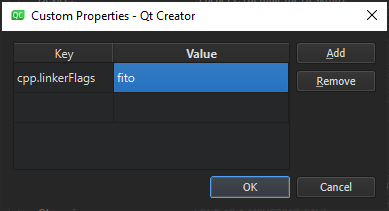
- ' Key ' 열의 빈 셀을 두 번 클릭하여 추가하거나 수정할 키를 다음과 같이 지정합니다:
<module_name>.<property_name>. - Value 열의 같은 행에 있는 셀을 두 번 클릭하여 JSON 리터럴로 값을 지정합니다.
- ' Add '을 선택하여 키-값 쌍을 추가합니다.
- OK 을 선택합니다.
기존 값을 수정하려면 ‘ Value ’ 필드에서 해당 값을 두 번 클릭하십시오.
선택한 속성을 제거하려면 ‘ Remove ’를 선택하십시오.
‘프로젝트에 키트 활성화하기’, ‘키트 추가하기’ 및 ‘키트관리하기’도 참조하십시오 .
Copyright © The Qt Company Ltd. and other contributors. Documentation contributions included herein are the copyrights of their respective owners. The documentation provided herein is licensed under the terms of the GNU Free Documentation License version 1.3 as published by the Free Software Foundation. Qt and respective logos are trademarks of The Qt Company Ltd in Finland and/or other countries worldwide. All other trademarks are property of their respective owners.
