
Qt 문서에서 정보 찾기
Qt Creator 설치 프로그램, Qt Online Installer 및 기타 Qt 배포물에는 문서가 .qch 파일로 포함되어 있습니다. Help 모드에서 문서를 확인하십시오. 현재 열려 있는 문서를 온라인으로 보려면  (Open Online Documentation)를 선택하십시오.
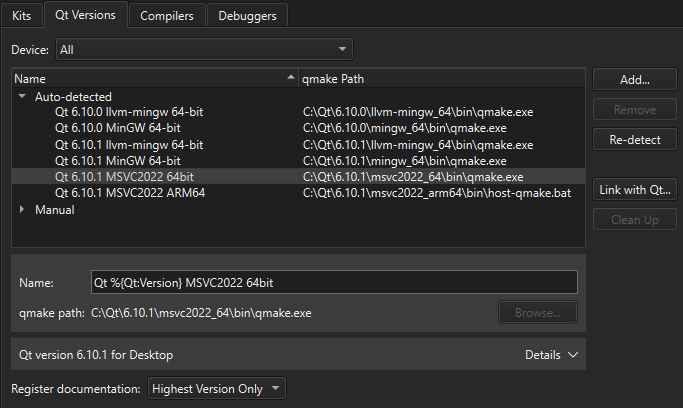
기본적으로 Qt Creator 는 설치된 각 Qt 모듈에 대해 사용 가능한 최신 버전의 문서만 등록합니다. 설치된 모든 문서를 등록하려면 Preferences > Kits > Qt Versions 로 이동하여 Register documentation 에서 옵션을 선택하십시오.
도움말 모드 사이드바 보기
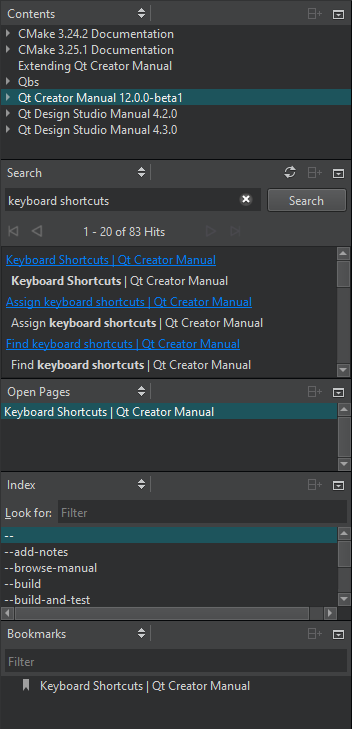
Help ] 모드에서 문서 내 정보를 찾으려면 다음을 선택하십시오:
- Bookmarks 북마크를 추가한 페이지 목록을 보려면:
- Contents 개발용 PC에 설치된 모든 문서를 확인하고 문서 내용을 탐색하려면:
- Index 설치된 모든 문서에서 키워드 목록을 기반으로 정보를 찾으려면 여기를 선택하십시오.
- Open Pages 현재 열려 있는 문서 페이지 목록을 보려면:
- Search 설치된 모든 문서에서 검색하려면:
참조: 사용 방법: 문서 읽기, 설치, Qt 가져오기 및 설치.
Copyright © The Qt Company Ltd. and other contributors. Documentation contributions included herein are the copyrights of their respective owners. The documentation provided herein is licensed under the terms of the GNU Free Documentation License version 1.3 as published by the Free Software Foundation. Qt and respective logos are trademarks of The Qt Company Ltd in Finland and/or other countries worldwide. All other trademarks are property of their respective owners.
