
git pull
원격 저장소의 변경 사항을 가져오려면 Tools > Git > Remote Repository 으로 이동하여 ' Pull'를 선택하십시오.
수정된 파일이 있는 경우, 해당 파일을 어떻게 처리할지 묻는 메시지가 표시됩니다.
커밋되지 않은 변경 사항 관리
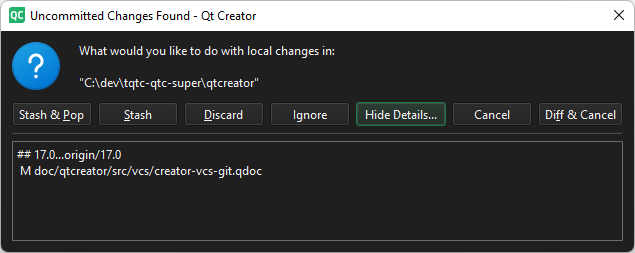
'커밋되지 않은 변경 사항 발견' 대화 상자
커밋되지 않은 변경 사항에 대해 다음과 같은 작업을 수행할 수 있습니다:
| 메뉴 항목 | 설명 |
|---|---|
| Diff & Cancel | 변경 사항의 차이점을 확인하고 ' git pull'을 취소합니다. |
| Discard | 로컬 변경 사항을 초기화하고 ' git pull'를 실행합니다. 변경 사항은 소실됩니다. |
| Ignore | 작업 디렉터리의 로컬 변경 사항을 반영하여 ' git pull '를 실행합니다. |
| Show/Hide Details | 로컬 변경 사항의 세부 정보를 표시하거나 숨깁니다. |
| Stash | 로컬 변경 사항을 스태시하고 git pull 를 실행합니다. |
| Stash & Pop | 로컬 변경 사항을 스태시하고, ` git pull`를 실행한 다음, 변경 사항을 팝합니다. |
리베이스와 함께 풀링하기
Preferences > Version Control > Git 로 이동한 다음, ‘ Pull with rebase ’을 선택하여 풀링하는 동안 리베이스 작업을 수행합니다.
참조 : Git 사용 방법 및 Git 활용.
Copyright © The Qt Company Ltd. and other contributors. Documentation contributions included herein are the copyrights of their respective owners. The documentation provided herein is licensed under the terms of the GNU Free Documentation License version 1.3 as published by the Free Software Foundation. Qt and respective logos are trademarks of The Qt Company Ltd in Finland and/or other countries worldwide. All other trademarks are property of their respective owners.
