
AVD 관리
Linux, macOS 또는 Windows에서 Android 기기를 에뮬레이션하려면 Android 에뮬레이터를 사용하세요. Android 에뮬레이터는 Android 가상 기기(AVD)라고 하는 가상 머신에서 Android 운영 체제를 실행합니다.
AVD를 확인하거나 추가하려면 Preferences > Devices 으로 이동하십시오.
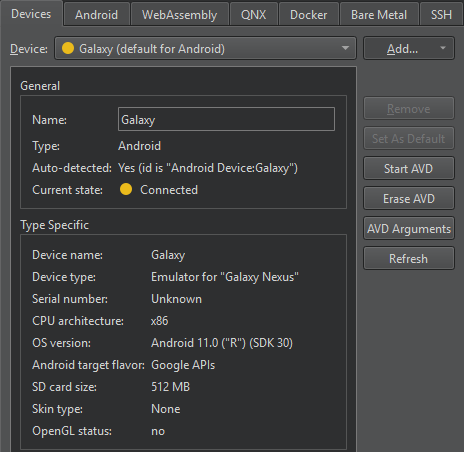
Device 에서 AVD를 선택하면 Current state 에서 해당 AVD의 상태를 확인할 수 있습니다.
상태 정보를 업데이트하려면 ‘ Refresh ’를 선택하십시오.
AVD 시작
AVD를 시작하려면 Start AVD 를 선택하십시오. 일반적으로 Qt Creator 는 키트 선택기에서 AVD를 선택하여 해당 AVD에 애플리케이션을 배포할 때 AVD를 시작합니다.
AVD 시작에 대한 기본 설정 지정
AVD 시작에 대한 기본 설정을 지정하려면 AVD Arguments 를 선택합니다.
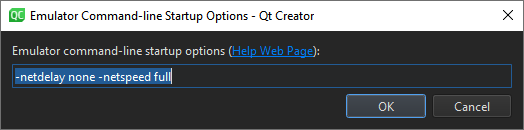
Emulator command-line startup options 에서 환경 설정을 지정합니다. 사용 가능한 옵션에 대해서는 '명령줄에서 에뮬레이터 시작'을 참조하십시오.
터미널에서 에뮬레이터를 수동으로 시작하려면 다음 명령을 입력하십시오.
cd <ANDROID_SDK_ROOT>/emulator
./emulator -avd <AVD_NAME>
AVD 제거
목록 및 키트 선택기에서 AVD를 제거하려면 ' Erase AVD'을 선택합니다.
'Android 개발 방법' 및 'Android 개발'도 참조하세요 .
Copyright © The Qt Company Ltd. and other contributors. Documentation contributions included herein are the copyrights of their respective owners. The documentation provided herein is licensed under the terms of the GNU Free Documentation License version 1.3 as published by the Free Software Foundation. Qt and respective logos are trademarks of The Qt Company Ltd in Finland and/or other countries worldwide. All other trademarks are property of their respective owners.
