
중단점 관리
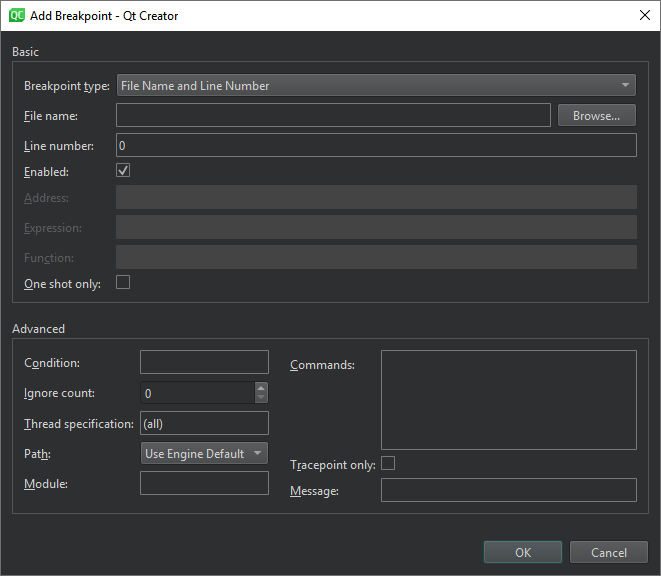
중단점 이동
중단점을 이동하려면:
- 텍스트 편집기에서 중단점 마커를 다른 줄로 드래그합니다.
- ' Breakpoint Preset ' 뷰 또는 ' Breakpoints ' 뷰에서 ' Edit Selected Breakpoints'를 선택한 다음, ' Line number'에서 줄 번호를 설정합니다.
중단점 삭제
중단점을 삭제하려면:
- 텍스트 편집기에서 중단점 마커를 선택합니다.
- ' Breakpoint Preset ' 뷰 또는 ' Breakpoints ' 뷰에서:
- 중단점을 선택한 후 ‘Delete’를 선택합니다.
- 컨텍스트 메뉴에서 ‘ Delete Selected Breakpoints ’, ‘ Delete Selected Breakpoints ’ 또는 ‘ Delete Breakpoints of File ’을 선택합니다.
중단점 켜기 및 끄기
중단점을 삭제하지 않고 조건 및 명령과 같은 관련 데이터를 유지한 채 일시적으로 비활성화하려면:
- 텍스트 편집기에서 중단점 마커를 마우스 오른쪽 버튼으로 클릭하고 ' Disable Breakpoint'을 선택합니다.
- 중단점이 설정된 줄을 선택한 다음 Ctrl+F9 (macOS에서는Ctrl+F8 )을 누릅니다.
- ‘ Breakpoint Preset ’ 뷰 또는 ‘ Breakpoints ’ 뷰에서:
- 중단점을 선택한 후 스페이스 키를 누릅니다.
- 컨텍스트 메뉴에서 ‘ Disable Breakpoint ’를 선택합니다.
텍스트 편집기 및 뷰에 비어 있는 중단점 아이콘이 표시되면 중단점이 비활성화된 상태임을 나타냅니다. 중단점을 다시 활성화하려면 위의 방법 중 하나를 사용하십시오.
데이터 중단점을 제외한 다른 중단점은 디버깅 중인 애플리케이션이 다시 시작될 때 활성화 또는 비활성화 상태를 유지합니다.
Copyright © The Qt Company Ltd. and other contributors. Documentation contributions included herein are the copyrights of their respective owners. The documentation provided herein is licensed under the terms of the GNU Free Documentation License version 1.3 as published by the Free Software Foundation. Qt and respective logos are trademarks of The Qt Company Ltd in Finland and/or other countries worldwide. All other trademarks are property of their respective owners.
