
문서에서 검색
Help 모드 Search 의 패널에서 전체 텍스트 검색을 사용하여 설치된 모든 문서에서 특정 단어를 찾을 수 있습니다. 찾고자 하는 용어를 입력하고 ' Search'를 선택하십시오. 지정된 용어가 포함된 모든 문서가 나열됩니다. 목록은 문서 버전(예: 여러 Qt 버전이 설치된 경우)과 문서의 검색 결과 수에 따라 정렬됩니다. 목록에서 문서를 선택하면 해당 문서가 열립니다.
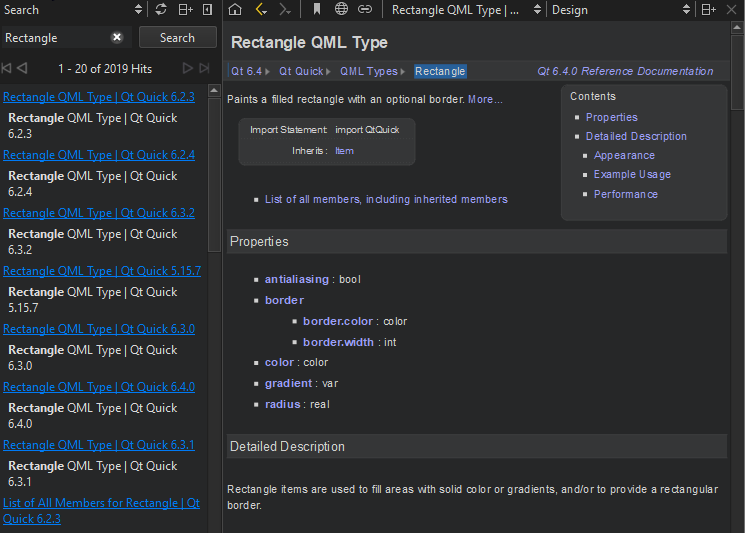
다음은 일반적인 검색 패턴의 예시입니다:
deepdeep라는 단어가 포함된 모든 문서를 나열합니다. 검색 시 대소문자를 구분하지 않습니다.deep*단어가deepdeep copydeep과copy"deep copy"다음 구문이 포함된 모든 문서를 나열합니다.deep copy
전체 텍스트 검색은 ‘ Search ’ 패널을 처음 열 때 설치된 모든 문서에 대한 색인 생성을 기반으로 합니다. 문서를 추가하거나 제거하면 Qt Creator 에서 색인을 다시 생성합니다.
분명히 존재해야 할 단어를 찾을 수 없다면 색인이 완전하지 않을 수 있습니다. 색인을 다시 생성하려면 ‘  ’을 선택하십시오(Regenerate Index).
구두점은 색인된 용어에 포함되지 않습니다. 도메인 이름과 같이 구두점이 포함된 용어를 찾으려면 별표(*)를 와일드카드로 사용하십시오. 예를 들어, Pastebin.Com 을 찾으려면 검색어 Pastebin* 을 입력하십시오.
참조: 방법: 문서 읽기.
Copyright © The Qt Company Ltd. and other contributors. Documentation contributions included herein are the copyrights of their respective owners. The documentation provided herein is licensed under the terms of the GNU Free Documentation License version 1.3 as published by the Free Software Foundation. Qt and respective logos are trademarks of The Qt Company Ltd in Finland and/or other countries worldwide. All other trademarks are property of their respective owners.
