
사이드바 표시 및 숨기기
일부 모드에서는 왼쪽 및 오른쪽 사이드바를 사용하여 다양한 보기를 프로젝트 콘텐츠별로 정리할 수 있습니다. 사이드바에는 현재 작업 중인 모드와 관련된 보기만 표시됩니다.
사이드바 메뉴(1)에서 뷰를 선택합니다:
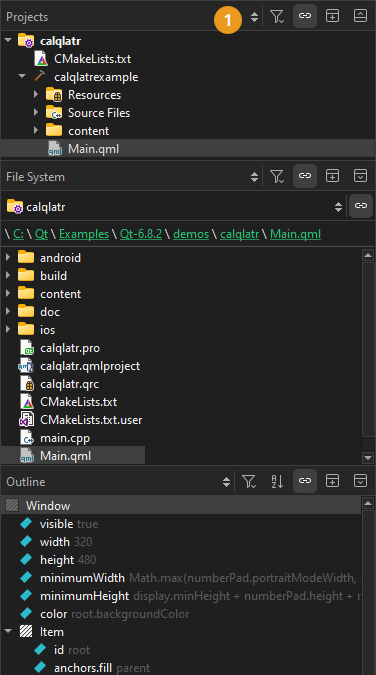
다음과 같은 방법으로 사이드바의 보기를 변경할 수 있습니다:
- 왼쪽 사이드바를 표시하거나 숨기려면 '
 ' (Hide Left Sidebar/Show Left Sidebar) 또는 Alt+0 (macOS에서는Cmd+0 )을 선택하십시오.
 - 오른쪽 사이드바를 표시하거나 숨기려면 '
 ' (Hide Right Sidebar/Show Right Sidebar)를 선택하거나 Alt+Shift+0 (macOS에서는Cmd+Shift+0 )을 누르세요.
 - 사이드바를 분할하려면 ‘
 ’ (Split)를 선택하세요. 분할된 화면에서 볼 새 콘텐츠를 선택하세요.
 - 사이드바 보기를 닫으려면 ‘
 ’ (Close)를 선택하십시오.
일부 보기에서는 마우스 오른쪽 버튼을 클릭하면 해당 보기에 나열된 개체를 관리하는 기능이 포함된 컨텍스트 메뉴가 열립니다.
‘UI 조정하기’, ‘메인 메뉴 표시 및 숨기기’, ‘모드 전환하기’ 및 ‘UI 조정하기’항목도 참조하십시오 .
Copyright © The Qt Company Ltd. and other contributors. Documentation contributions included herein are the copyrights of their respective owners. The documentation provided herein is licensed under the terms of the GNU Free Documentation License version 1.3 as published by the Free Software Foundation. Qt and respective logos are trademarks of The Qt Company Ltd in Finland and/or other countries worldwide. All other trademarks are property of their respective owners.
