
Windows에서 접합점(junction point) 사용하기
Windows에서 프로젝트 경로가 너무 길면 빌드 오류가 발생할 수 있습니다.
이러한 문제를 해결하려면:
- 절대 경로가 짧은 소스 디렉터리 이름을 사용하십시오. 예를 들어,
C:\Users\My Name\Projects대신C:\dev를 사용하십시오. - 빌드 디렉터리 경로를 짧게 설정하십시오.
- CMake용 Ninja 생성기를 사용하십시오.
- Windows에서 소스 및 빌드 디렉터리에 대해 접합점(junction point)을 사용하십시오.
접합점
접합점에서는 디렉터리가 컴퓨터상의 다른 디렉터리에 대한 별칭 역할을 합니다.
CMake의 구성, 빌드 및 설치 작업에 연결 지점을 사용하려면 Preferences > CMake > General 로 이동하여 ' Use junctions for CMake configuration and build operations'를 선택하십시오.
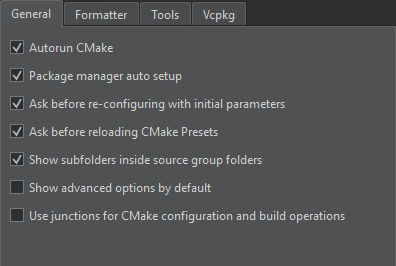
빌드 시스템은 연결 지점을 통해 프로젝트를 구성, 컴파일 및 설치하므로 명령줄 명령을 더 간결하게 작성할 수 있습니다.
환경 변수 설정
Qt Creator 접합점은 C:\ProgramData\QtCreator\Links 에 저장됩니다. 다른 경로를 사용하려면 QTC_CMAKE_JUNCTIONS_DIR 환경 변수의 값으로 해당 경로를 설정하십시오.
QTC_CMAKE_JUNCTIONS_HASH_LENGTH 환경 변수를 설정하여 MD5 해시 키 길이를 기본값인 32에서 줄일 수 있습니다.
Copyright © The Qt Company Ltd. and other contributors. Documentation contributions included herein are the copyrights of their respective owners. The documentation provided herein is licensed under the terms of the GNU Free Documentation License version 1.3 as published by the Free Software Foundation. Qt and respective logos are trademarks of The Qt Company Ltd in Finland and/or other countries worldwide. All other trademarks are property of their respective owners.
