
Autotools
Autotools를 사용하면 간단한 지시문만으로 이식성이 뛰어나고 완전하며 독립적인 GNU 빌드 시스템을 만들 수 있습니다.
Qt Creator 는 Autotools 빌드 시스템을 사용하는 프로젝트를 열 수 있습니다. Qt Creator 에서 직접 프로젝트를 빌드하고 실행할 수 있습니다.
참고: AutotoolsProjectManager 플러그인을활성화해야 사용할 수 있습니다.
Autotools 프로젝트 작업
Qt Creator 에서 Autotools 프로젝트를 다루려면:
- File > Open Project 를 선택합니다.
- 프로젝트에서
Makefile.am파일을 선택합니다. 이것이 Autotools 플러그인을 사용할 수 있는 유일한 방법입니다. - 빌드 디렉터리를 선택합니다. 현재는 소스 내 빌드만 지원됩니다.
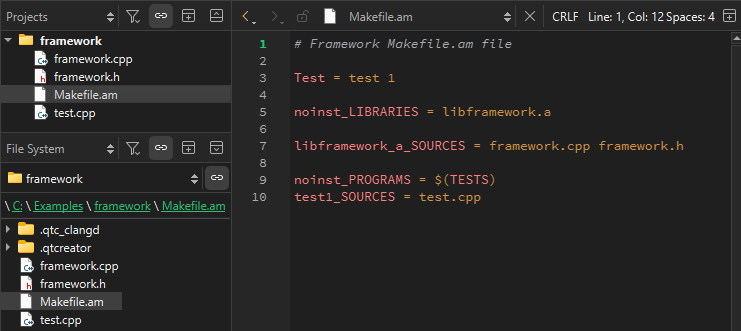
- Finish 을 선택합니다. Qt Creator 에서 프로젝트 트리 구조가 표시됩니다. 루트 노드에는 프로젝트 이름이 표시됩니다. 모든 프로젝트 파일은 그 아래에 나열되며, 목록에서 해당 파일을 열 수 있습니다.
 (Run)를 선택하여 미리 정의된 빌드 단계(
autogen.sh또는autoreconf,configure,make)를 실행합니다.애플리케이션을 처음 실행할 때는 실행 파일을 선택해야 합니다.
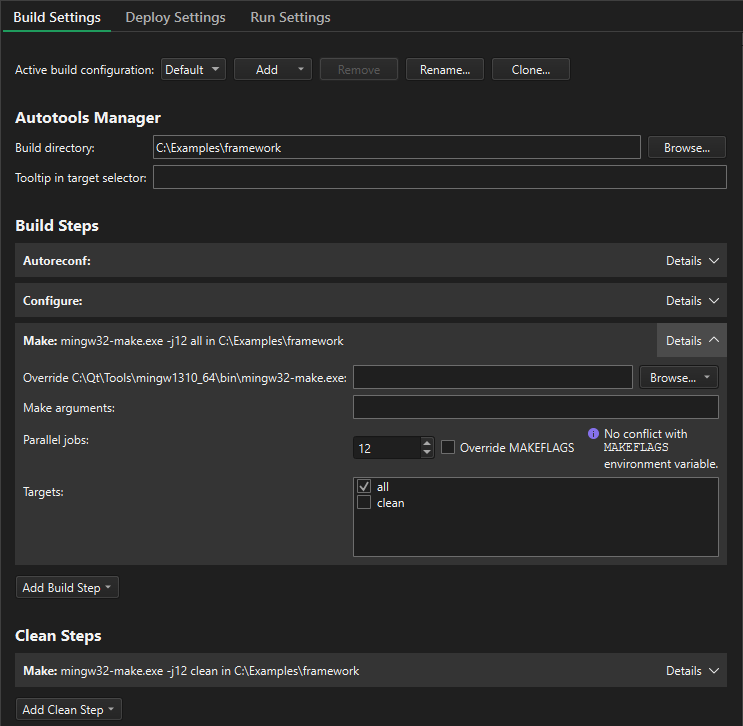
- autotools 빌드 단계를 확인하고 편집하려면 ‘ Projects ’ > ‘ Build Settings ’를 선택하십시오.
사전 정의된 autotools 빌드 단계에 매개변수를 추가할 수 있습니다.
‘플러그인 활성화 및 비활성화’항목도 참조하십시오 .
Copyright © The Qt Company Ltd. and other contributors. Documentation contributions included herein are the copyrights of their respective owners. The documentation provided herein is licensed under the terms of the GNU Free Documentation License version 1.3 as published by the Free Software Foundation. Qt and respective logos are trademarks of The Qt Company Ltd in Finland and/or other countries worldwide. All other trademarks are property of their respective owners.
