
Mercurial
Mercurial은 무료의 분산형 소스 제어 관리 도구입니다.
참고: Mercurial 플러그인을활성화해야 사용할 수 있습니다.
'일반 VCS 기능 사용'에 설명된 표준 버전 관리 시스템 기능 외에도, ' Tools ' > ' Mercurial ' 하위 메뉴에서 다음 기능을 선택할 수 있습니다.
| 메뉴 항목 | 설명 |
|---|---|
| Import | 패치 파일의 변경 사항을 적용합니다. |
| Incoming | 풀링될 변경 사항을 나열하여 원격 저장소의 상태를 모니터링합니다. |
| Outgoing | 푸시될 변경 사항을 나열하여 원격 저장소의 상태를 모니터링합니다. |
| Pull | 원격 저장소에서 변경 사항을 가져옵니다. |
| Push | 원격 저장소로 변경 사항을 푸시합니다. |
Mercurial 환경 설정
Mercurial의 환경 설정을 지정하려면, ‘ Preferences ’ > ‘ Version Control ’ > ‘ Mercurial ’을 선택하십시오.
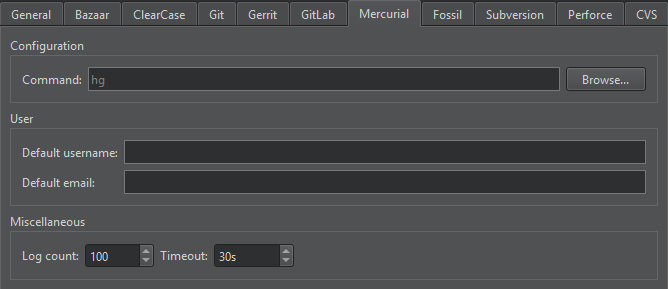
| 환경 설정 | 설명 |
|---|---|
| Command | 명령줄 클라이언트 실행 파일의 경로를 지정합니다. |
| Default username | 변경 사항을 커밋할 때 기본적으로 사용할 사용자 이름을 지정합니다. |
| Default email | 변경 사항을 커밋할 때 기본적으로 사용할 이메일 주소를 지정합니다. |
| Log count | 로그의 최대 줄 수를 설정합니다. |
| Timeout | 버전 관리 작업에 대한 시간 제한을 설정합니다. |
‘플러그인 활성화 및 비활성화’, ‘버전 관리 시스템 설정’, ‘일반적인 VCS 기능 사용’ 및 ‘버전 관리 시스템’항목도 참조하십시오 .
Copyright © The Qt Company Ltd. and other contributors. Documentation contributions included herein are the copyrights of their respective owners. The documentation provided herein is licensed under the terms of the GNU Free Documentation License version 1.3 as published by the Free Software Foundation. Qt and respective logos are trademarks of The Qt Company Ltd in Finland and/or other countries worldwide. All other trademarks are property of their respective owners.
