
查找符号
您可以搜索特定符号的引用,或搜索名称符合特定模式的符号。
查找符号引用
要在您的 Qt C++ 项目中查找特定符号的实例:
- 将光标置于编辑器中的符号上。
- 转到“Tools ” > “C++ ” > “Find References to Symbol Under Cursor ”,或按Ctrl+Shift+U。

按访问类型进行颜色标记
若要按访问类型(如读取、写入或声明)以颜色区分显示相同的结果,请转至“Tools ” > “C++ ” > “Find References with Access Type ”。
查找符合搜索条件的符号
转至Edit >Find/Replace >Advanced Find ,然后选择“C++ Symbols ”以搜索类、函数、枚举和声明(包括类型别名),搜索范围既包括项目中列出的文件,也包括代码所使用的所有文件(例如包含文件)。
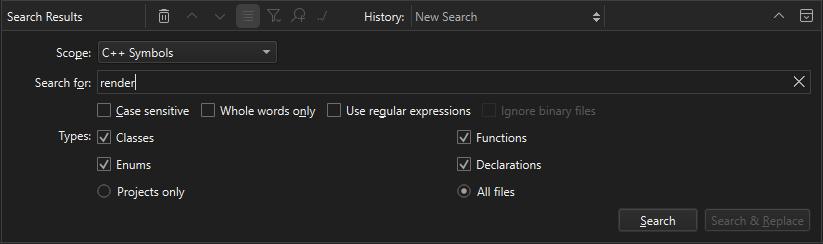
Qt Creator 搜索范围包括以下位置:
- 作为项目组成部分列出的文件
- 被项目文件直接引用的文件(例如生成的文件)
- 所用框架和库的头文件
查看找到的符号
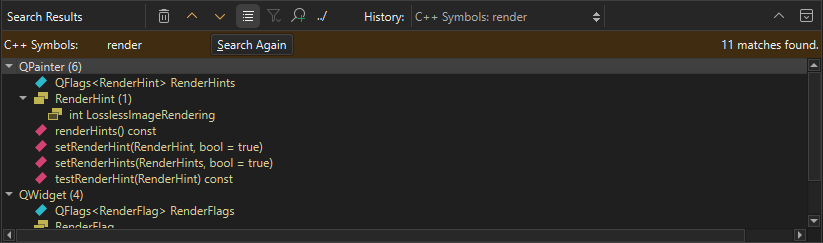
“搜索结果”视图显示了当前项目中搜索结果的位置和数量。
另请参阅 “如何操作:搜索”。
Copyright © The Qt Company Ltd. and other contributors. Documentation contributions included herein are the copyrights of their respective owners. The documentation provided herein is licensed under the terms of the GNU Free Documentation License version 1.3 as published by the Free Software Foundation. Qt and respective logos are trademarks of The Qt Company Ltd in Finland and/or other countries worldwide. All other trademarks are property of their respective owners.
