
Clangd
Clang 项目提供了用于解析 C 语言族源文件并为您提供详细诊断信息的库。clangd索引为代码补全等服务提供精确且完整的结果。
要设置 clangd 的首选项,请转至Preferences >C++ >Clangd ,然后选择“Use clangd ”。
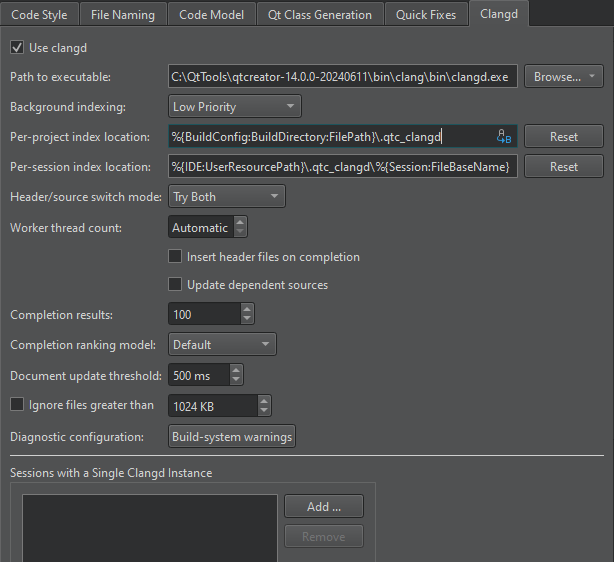
下表介绍了可用的首选项。
| 首选项 | 描述 |
|---|---|
| Path to executable | 指定 clangd 14 版或更高版本的路径。 |
| Background indexing | 选择“Off ”以使用速度更快但精度较低的内置索引器。根据您在全局符号搜索过程中更重视精度还是速度,设置索引优先级。 |
| Per-project index location | 指定用于存储每个项目索引文件的文件夹。compile-commands.json 文件也存储在此处。 |
| Per-session index location | 指定用于存储每个会话索引文件的文件夹。 |
| Header/source switch mode | 选择 C/C++ 后端,用于在头文件和源文件之间切换。如果内置代码模型未找到任何内容,Try Both 将使用 clangd。 |
| Worker thread count | 设置要使用的核心数量。默认情况下,clangd 会使用所有未被占用的核心。 |
| Insert header files on completion | 在补全符号时插入头文件。 |
| Update dependent sources | 在编辑头文件时,重新解析包含该头文件的所有源文件。取消选中此选项,则仅在保存头文件时才重新解析。 |
| Use externally provided compilation database | 使用外部编译数据库,而非由Qt Creator 生成的数据库。请在指定的索引位置放置一个compile-commands.json 文件,并确保其与项目状态保持同步。 |
| Completion results | 补全结果的最大数量。设置为 0 以取消限制。 |
| Completion ranking model | 选择用于对补全建议进行排序的 clangd 模型。Decision Forest (默认)使用机器学习。Heuristic 采用人工优化。 |
| Document update threshold | Qt Creator 在将文档更改发送至服务器前等待的时间。 |
| Ignore files greater than | 待解析文件的最大大小。启用此选项可加快解析速度。 |
| Diagnostic configuration | 要执行的 Clang 检查。选中此项可编辑检查项。 |
| Sessions with a Single Clangd Instance | 添加应使用单个 clangd 进程进行索引的会话。 |
Clang 检查
选择“Diagnostic configuration ”字段的值以打开“Diagnostic Configurations ”对话框,您可以在其中选择并编辑要执行的检查。
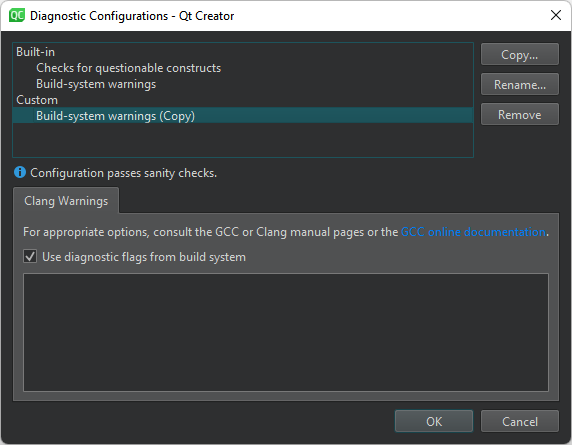
除了使用内置检查外,您还可以选择“Copy ”来创建这些检查的副本,并根据需要编辑副本。
- Build-system warnings 显示由构建系统指定的警告。
- Checks for questionable constructs 将
-Wall和-Wextra检查结合起来,用于检测容易避免的可疑结构以及一些其他问题。
Clang 检查以-W 开头。每项检查还有一个以-Wno 开头的否定版本。
请注意,某些选项会触发其他选项。有关详细信息,请参阅《请求或抑制警告的选项》或 GCC 及 Clang 的手册页。
另请参阅 《指定 clangd 设置》、《Clang 代码模型》和《代码模型》。
Copyright © The Qt Company Ltd. and other contributors. Documentation contributions included herein are the copyrights of their respective owners. The documentation provided herein is licensed under the terms of the GNU Free Documentation License version 1.3 as published by the Free Software Foundation. Qt and respective logos are trademarks of The Qt Company Ltd in Finland and/or other countries worldwide. All other trademarks are property of their respective owners.
