
Fortune Server Example
Demonstrates how to create a server for a network service.
This example is intended to be run alongside the Fortune Client example or the Blocking Fortune Client Example .
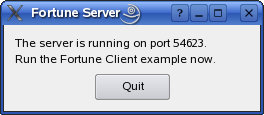
It uses
QTcpServerto accept incoming TCP connections, and a simpleQDataStreambased data transfer protocol to write a fortune to the connecting client (from the Fortune Client example), before closing the connection.class Server : public QDialog { Q_OBJECT public: explicit Server(QWidget *parent = nullptr); private slots: void sendFortune(); private: void initServer(); QLabel *statusLabel = nullptr; QTcpServer *tcpServer = nullptr; QVector<QString> fortunes; };The server is implemented using a simple class with only one slot, for handling incoming connections.
tcpServer = new QTcpServer(this);
if (!tcpServer->listen()) {
    QMessageBox::critical(this, tr("Fortune Server"),
                          tr("Unable to start the server: %1.")
                          .arg(tcpServer->errorString()));
    close();
    return;
}

QString ipAddress;
QList<QHostAddress> ipAddressesList = QNetworkInterface::allAddresses();
// use the first non-localhost IPv4 address
for (int i = 0; i < ipAddressesList.size(); ++i) {
    if (ipAddressesList.at(i) != QHostAddress::LocalHost &&
        ipAddressesList.at(i).toIPv4Address()) {
        ipAddress = ipAddressesList.at(i).toString();
        break;
    }
}
// if we did not find one, use IPv4 localhost
if (ipAddress.isEmpty())
    ipAddress = QHostAddress(QHostAddress::LocalHost).toString();
statusLabel->setText(tr("The server is running on\n\nIP: %1\nport: %2\n\n"
                        "Run the Fortune Client example now.")
                     .arg(ipAddress).arg(tcpServer->serverPort()));
In its constructor, our Server object calls
listen()to set up aQTcpServerto listen on all addresses, on an arbitrary port. In then displays the portQTcpServerpicked in a label, so that user knows which port the fortune client should connect to.fortunes << tr("You've been leading a dog's life. Stay off the furniture.") << tr("You've got to think about tomorrow.") << tr("You will be surprised by a loud noise.") << tr("You will feel hungry again in another hour.") << tr("You might have mail.") << tr("You cannot kill time without injuring eternity.") << tr("Computers are not intelligent. They only think they are.");Our server generates a list of random fortunes that it can send to connecting clients.
connect(tcpServer, &QTcpServer::newConnection, this, &Server::sendFortune);When a client connects to our server,
QTcpServerwill emitnewConnection(). In turn, this will invoke our sendFortune() slot:void Server::sendFortune() { QByteArray block; QDataStream out(&block, QIODevice::WriteOnly); out.setVersion(QDataStream::Qt_5_10); out << fortunes[QRandomGenerator::global()->bounded(fortunes.size())];The purpose of this slot is to select a random line from our list of fortunes, encode it into a
QByteArrayusingQDataStream, and then write it to the connecting socket. This is a common way to transfer binary data usingQTcpSocket. First we create aQByteArrayand aQDataStreamobject, passing the bytearray toQDataStream‘s constructor. We then explicitly set the protocol version ofQDataStreamtoQt_4_0to ensure that we can communicate with clients from future versions of Qt (seesetVersion()). We continue by streaming in a random fortune.QTcpSocket *clientConnection = tcpServer->nextPendingConnection(); connect(clientConnection, &QAbstractSocket::disconnected, clientConnection, &QObject::deleteLater);We then call
nextPendingConnection(), which returns theQTcpSocketrepresenting the server side of the connection. By connectingdisconnected()todeleteLater(), we ensure that the socket will be deleted after disconnecting.clientConnection->write(block); clientConnection->disconnectFromHost(); }The encoded fortune is written using
write(), and we finally calldisconnectFromHost(), which will close the connection afterQTcpSockethas finished writing the fortune to the network. BecauseQTcpSocketworks asynchronously, the data will be written after this function returns, and control goes back to Qt’s event loop. The socket will then close, which in turn will causedeleteLater()to delete it.
© 2022 The Qt Company Ltd. Documentation contributions included herein are the copyrights of their respective owners. The documentation provided herein is licensed under the terms of the GNU Free Documentation License version 1.3 as published by the Free Software Foundation. Qt and respective logos are trademarks of The Qt Company Ltd. in Finland and/or other countries worldwide. All other trademarks are property of their respective owners.