
2D Painting Example
The 2D Painting example shows how
QPainterandQOpenGLWidgetcan be used together to display accelerated 2D graphics on supported hardware.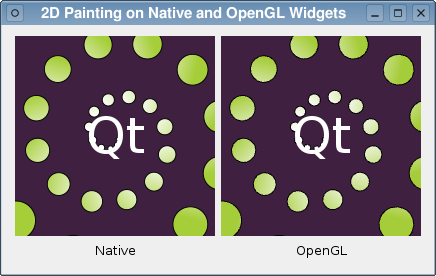
The
QPainterclass is used to draw 2D graphics primitives onto paint devices provided byQPaintDevicesubclasses, such asQWidgetandQImage.Since
QOpenGLWidgetis a subclass ofQWidget, it is possible to reimplement itspaintEvent()and useQPainterto draw on the device, just as you would with aQWidget. The only difference is that the painting operations will be accelerated in hardware if it is supported by your system’s OpenGL drivers.In this example, we perform the same painting operations on a
QWidgetand aQOpenGLWidget. TheQWidgetis shown with anti-aliasing enabled, and theQOpenGLWidgetwill also use anti-aliasing if the required extensions are supported by your system’s OpenGL driver.
Overview
To be able to compare the results of painting onto a
QOpenGLWidgetsubclass with native drawing in aQWidgetsubclass, we want to show both kinds of widget side by side. To do this, we derive subclasses ofQWidgetandQOpenGLWidget, using a separateHelperclass to perform the same painting operations for each, and lay them out in a top-level widget, itself provided a theWindowclass.
Helper Class Definition
In this example, the painting operations are performed by a helper class. We do this because we want the same painting operations to be performed for both our
QWidgetsubclass and theQOpenGLWidgetsubclass.The
Helperclass is minimal:class Helper { public: Helper(); public: void paint(QPainter *painter, QPaintEvent *event, int elapsed); private: QBrush background; QBrush circleBrush; QFont textFont; QPen circlePen; QPen textPen; };Apart from the constructor, it only provides a
paint()function to paint using a painter supplied by one of our widget subclasses.
Helper Class Implementation
The constructor of the class sets up the resources it needs to paint content onto a widget:
Helper::Helper()
{
    QLinearGradient gradient(QPointF(50, -20), QPointF(80, 20));
    gradient.setColorAt(0.0, Qt::white);
    gradient.setColorAt(1.0, QColor(0xa6, 0xce, 0x39));

    background = QBrush(QColor(64, 32, 64));
    circleBrush = QBrush(gradient);
    circlePen = QPen(Qt::black);
    circlePen.setWidth(1);
    textPen = QPen(Qt::white);
    textFont.setPixelSize(50);
}
The actual painting is performed in the
paint()function. This takes aQPainterthat has already been set up to paint onto a paint device (either aQWidgetor aQOpenGLWidget), aQPaintEventthat provides information about the region to be painted, and a measure of the elapsed time (in milliseconds) since the paint device was last updated.void Helper::paint(QPainter *painter, QPaintEvent *event, int elapsed) { painter->fillRect(event->rect(), background); painter->translate(100, 100);We begin painting by filling in the region contained in the paint event before translating the origin of the coordinate system so that the rest of the painting operations will be displaced towards the center of the paint device.
We draw a spiral pattern of circles, using the elapsed time specified to animate them so that they appear to move outward and around the coordinate system’s origin:
painter->save();
painter->setBrush(circleBrush);
painter->setPen(circlePen);
painter->rotate(elapsed * 0.030);

qreal r = elapsed / 1000.0;
int n = 30;
for (int i = 0; i < n; ++i) {
    painter->rotate(30);
    qreal factor = (i + r) / n;
    qreal radius = 0 + 120.0 * factor;
    qreal circleRadius = 1 + factor * 20;
    painter->drawEllipse(QRectF(radius, -circleRadius,
                                circleRadius * 2, circleRadius * 2));
}
painter->restore();
Since the coordinate system is rotated many times during this process, we
save()theQPainter‘s state beforehand andrestore()it afterwards.painter->setPen(textPen); painter->setFont(textFont); painter->drawText(QRect(-50, -50, 100, 100), Qt::AlignCenter, QStringLiteral("Qt")); }We draw some text at the origin to complete the effect.
Widget Class Definition
The
Widgetclass provides a basic custom widget that we use to display the simple animation painted by theHelperclass.class Helper; class Widget : public QWidget { Q_OBJECT public: Widget(Helper *helper, QWidget *parent); public slots: void animate(); protected: void paintEvent(QPaintEvent *event) override; private: Helper *helper; int elapsed; };Apart from the constructor, it only contains a
paintEvent()function, that lets us draw customized content, and a slot that is used to animate its contents. One member variable keeps track of theHelperthat the widget uses to paint its contents, and the other records the elapsed time since it was last updated.
Widget Class Implementation
The constructor only initializes the member variables, storing the
Helperobject supplied and calling the base class’s constructor, and enforces a fixed size for the widget:Widget::Widget(Helper *helper, QWidget *parent) : QWidget(parent), helper(helper) { elapsed = 0; setFixedSize(200, 200); }The
animate()slot is called whenever a timer, which we define later, times out:void Widget::animate() { elapsed = (elapsed + qobject_cast<QTimer*>(sender())->interval()) % 1000; update(); }Here, we determine the interval that has elapsed since the timer last timed out, and we add it to any existing value before repainting the widget. Since the animation used in the
Helperclass loops every second, we can use the modulo operator to ensure that theelapsedvariable is always less than 1000.Since the
Helperclass does all of the actual painting, we only have to implement a paint event that sets up aQPainterfor the widget and calls the helper’spaint()function:void Widget::paintEvent(QPaintEvent *event) { QPainter painter; painter.begin(this); painter.setRenderHint(QPainter::Antialiasing); helper->paint(&painter, event, elapsed); painter.end(); }
GLWidget Class Definition
The
GLWidgetclass definition is basically the same as theWidgetclass except that it is derived fromQOpenGLWidget.class Helper; class GLWidget : public QOpenGLWidget { Q_OBJECT public: GLWidget(Helper *helper, QWidget *parent); public slots: void animate(); protected: void paintEvent(QPaintEvent *event) override; private: Helper *helper; int elapsed; };Again, the member variables record the
Helperused to paint the widget and the elapsed time since the previous update.
GLWidget Class Implementation
The constructor differs a little from the
Widgetclass’s constructor:GLWidget::GLWidget(Helper *helper, QWidget *parent) : QOpenGLWidget(parent), helper(helper) { elapsed = 0; setFixedSize(200, 200); setAutoFillBackground(false); }As well as initializing the
elapsedmember variable and storing theHelperobject used to paint the widget, the base class’s constructor is called with the format that specifies theSampleBuffersflag. This enables anti-aliasing if it is supported by your system’s OpenGL driver.The
animate()slot is exactly the same as that provided by theWidgetclass:void GLWidget::animate() { elapsed = (elapsed + qobject_cast<QTimer*>(sender())->interval()) % 1000; update(); }The
paintEvent()is almost the same as that found in theWidgetclass:void GLWidget::paintEvent(QPaintEvent *event) { QPainter painter; painter.begin(this); painter.setRenderHint(QPainter::Antialiasing); helper->paint(&painter, event, elapsed); painter.end(); }Since anti-aliasing will be enabled if available, we only need to set up a
QPainteron the widget and call the helper’spaint()function to display the widget’s contents.
Window Class Definition
The
Windowclass has a basic, minimal definition:class Window : public QWidget { Q_OBJECT public: Window(); private: Helper helper; };It contains a single
Helperobject that will be shared between all widgets.
Window Class Implementation
The constructor does all the work, creating a widget of each type and inserting them with labels into a layout:
Window::Window()
{
    setWindowTitle(tr("2D Painting on Native and OpenGL Widgets"));

    Widget *native = new Widget(&helper, this);
    GLWidget *openGL = new GLWidget(&helper, this);
    QLabel *nativeLabel = new QLabel(tr("Native"));
    nativeLabel->setAlignment(Qt::AlignHCenter);
    QLabel *openGLLabel = new QLabel(tr("OpenGL"));
    openGLLabel->setAlignment(Qt::AlignHCenter);

    QGridLayout *layout = new QGridLayout;
    layout->addWidget(native, 0, 0);
    layout->addWidget(openGL, 0, 1);
    layout->addWidget(nativeLabel, 1, 0);
    layout->addWidget(openGLLabel, 1, 1);
    setLayout(layout);

    QTimer *timer = new QTimer(this);
    connect(timer, &QTimer::timeout, native, &Widget::animate);
    connect(timer, &QTimer::timeout, openGL, &GLWidget::animate);
    timer->start(50);
}
A timer with a 50 millisecond time out is constructed for animation purposes, and connected to the
animate()slots of theWidgetandGLWidgetobjects. Once started, the widgets should be updated at around 20 frames per second.
Running the Example
The example shows the same painting operations performed at the same time in a
Widgetand aGLWidget. The quality and speed of rendering in theGLWidgetdepends on the level of support for multisampling and hardware acceleration that your system’s OpenGL driver provides. If support for either of these is lacking, the driver may fall back on a software renderer that may trade quality for speed.
© 2022 The Qt Company Ltd. Documentation contributions included herein are the copyrights of their respective owners. The documentation provided herein is licensed under the terms of the GNU Free Documentation License version 1.3 as published by the Free Software Foundation. Qt and respective logos are trademarks of The Qt Company Ltd. in Finland and/or other countries worldwide. All other trademarks are property of their respective owners.