
Move Blocks Example
The Move Blocks example shows how to animate items in a
QGraphicsSceneusing aQStateMachinewith a custom transition.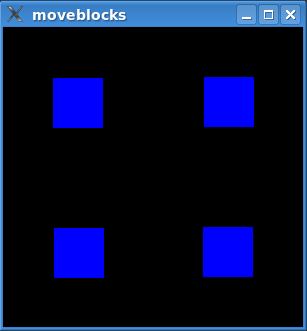
The example animates the blue blocks that you can see in the image above. The animation moves the blocks between four preset positions.
The example consists of the following classes:
StateSwitcherinheritsQStateand can addStateSwitchTransitions to other states. When entered, it will randomly transition to one of these states.
StateSwitchTransitionis a custom transition that triggers onStateSwitchEvents.
StateSwitchEventis aQEventthat triggersStateSwitchTransitions.
QGraphicsRectWidgetis a QGraphicsWidget that simply paints its background in a solidbluecolor.The blocks are instances of
QGraphicsRectWidgetand are animated in aQGraphicsScene. We do this by building a state graph, which we insert animations into. The graph is then executed in aQStateMachine. All this is done inmain(). Let’s look at themain()function first.
The
main()
Function
After
QApplicationhas been initialized, we set up theQGraphicsScenewith itsQGraphicsRectWidgets.QGraphicsRectWidget *button1 = new QGraphicsRectWidget; QGraphicsRectWidget *button2 = new QGraphicsRectWidget; QGraphicsRectWidget *button3 = new QGraphicsRectWidget; QGraphicsRectWidget *button4 = new QGraphicsRectWidget; button2->setZValue(1); button3->setZValue(2); button4->setZValue(3); QGraphicsScene scene(0, 0, 300, 300); scene.setBackgroundBrush(Qt::black); scene.addItem(button1); scene.addItem(button2); scene.addItem(button3); scene.addItem(button4);After adding the scene to a
QGraphicsView, it is time to build the state graph. Let’s first look at a statechart of what we are trying to build.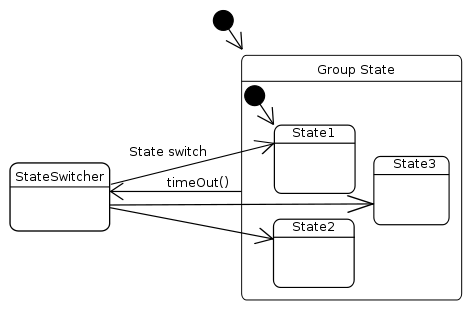
Note that the
grouphas seven sub states, but we have only included three of them in the diagram. The code that builds this graph will be examined line-by-line, and will show how the graph works. First off, we construct thegroupstate:QStateMachine machine; QState *group = new QState(); group->setObjectName("group"); QTimer timer; timer.setInterval(1250); timer.setSingleShot(true); QObject::connect(group, &QState::entered, &timer, QOverload<>::of(&QTimer::start));The timer is used to add a delay between each time the blocks are moved. The timer is started when
groupis entered. As we will see later,grouphas a transition back to theStateSwitcherwhen the timer times out.groupis the initial state in the machine, so an animation will be scheduled when the example is started.QState *state1; QState *state2; QState *state3; QState *state4; QState *state5; QState *state6; QState *state7; state1 = createGeometryState(button1, QRect(100, 0, 50, 50), button2, QRect(150, 0, 50, 50), button3, QRect(200, 0, 50, 50), button4, QRect(250, 0, 50, 50), group); ... state7 = createGeometryState(button1, QRect(0, 0, 50, 50), button2, QRect(250, 0, 50, 50), button3, QRect(0, 250, 50, 50), button4, QRect(250, 250, 50, 50), group); group->setInitialState(state1);
createGeometryState()returns aQStatethat will set the geometry of our items upon entry. It also assignsgroupas the parent of this state.A
QPropertyAnimationinserted into a transition will use the values assigned to aQState(withassignProperty()), i.e., the animation will interpolate between the current values of the properties and the values in the target state. We add animated transitions to the state graph later.QParallelAnimationGroup animationGroup; QSequentialAnimationGroup *subGroup; QPropertyAnimation *anim = new QPropertyAnimation(button4, "geometry"); anim->setDuration(1000); anim->setEasingCurve(QEasingCurve::OutElastic); animationGroup.addAnimation(anim);We move the items in parallel. Each item is added to
animationGroup, which is the animation that is inserted into the transitions.subGroup = new QSequentialAnimationGroup(&animationGroup); subGroup->addPause(100); anim = new QPropertyAnimation(button3, "geometry"); anim->setDuration(1000); anim->setEasingCurve(QEasingCurve::OutElastic); subGroup->addAnimation(anim);The sequential animation group,
subGroup, helps us insert a delay between the animation of each item.StateSwitcher *stateSwitcher = new StateSwitcher(&machine); stateSwitcher->setObjectName("stateSwitcher"); group->addTransition(&timer, &QTimer::timeout, stateSwitcher); stateSwitcher->addState(state1, &animationGroup); stateSwitcher->addState(state2, &animationGroup); ... stateSwitcher->addState(state7, &animationGroup);A StateSwitchTransition is added to the state switcher in
StateSwitcher::addState(). We also add the animation in this function. SinceQPropertyAnimationuses the values from the states, we can insert the sameQPropertyAnimationinstance in allStateSwitchTransitions.As mentioned previously, we add a transition to the state switcher that triggers when the timer times out.
machine.addState(group);
machine.setInitialState(group);
machine.start();
Finally, we can create the state machine, add our initial state, and start execution of the state graph.
The
createGeometryState()
Function
In
createGeometryState(), we set up the geometry for each graphics item.QState *createGeometryState(QObject *w1, const QRect &rect1, QObject *w2, const QRect &rect2, QObject *w3, const QRect &rect3, QObject *w4, const QRect &rect4, QState *parent) { QState *result = new QState(parent); result->assignProperty(w1, "geometry", rect1); result->assignProperty(w2, "geometry", rect2); result->assignProperty(w3, "geometry", rect3); result->assignProperty(w4, "geometry", rect4); return result; }As mentioned before,
QAbstractTransitionwill set up an animation added withaddAnimation()using property values set withassignProperty().
The StateSwitcher Class
StateSwitcherhas state switch transitions to eachQStates we created withcreateGeometryState(). Its job is to transition to one of these states at random when it is entered.All functions in
StateSwitcherare inlined. We’ll step through its definition.class StateSwitcher : public QState { Q_OBJECT public: StateSwitcher(QStateMachine *machine) : QState(machine), m_stateCount(0), m_lastIndex(0) { }
StateSwitcheris a state designed for a particular purpose and will always be a top-level state. We usem_stateCountto keep track of how many states we are managing, andm_lastIndexto remember which state was the last state to which we transitioned.void onEntry(QEvent *) override { int n; while ((n = QRandomGenerator::global()->bounded(m_stateCount) + 1) == m_lastIndex) { } m_lastIndex = n; machine()->postEvent(new StateSwitchEvent(n)); } void onExit(QEvent *) override {}We select the next state we are going to transition to, and post a
StateSwitchEvent, which we know will trigger theStateSwitchTransitionto the selected state.void addState(QState *state, QAbstractAnimation *animation) { StateSwitchTransition *trans = new StateSwitchTransition(++m_stateCount); trans->setTargetState(state); addTransition(trans); trans->addAnimation(animation); }This is where the magic happens. We assign a number to each state added. This number is given to both a StateSwitchTransition and to StateSwitchEvents. As we have seen, state switch events will trigger a transition with the same number.
The StateSwitchTransition Class
StateSwitchTransitioninheritsQAbstractTransitionand triggers onStateSwitchEvents. It contains only inline functions, so let’s take a look at itseventTest()function, which is the only function that we define..bool eventTest(QEvent *event) override { return (event->type() == QEvent::Type(StateSwitchEvent::StateSwitchType)) && (static_cast<StateSwitchEvent *>(event)->rand() == m_rand); }
eventTestis called byQStateMachinewhen it checks whether a transition should be triggered–a return value of true means that it will. We simply check if our assigned number is equal to the event’s number (in which case we fire away).
The StateSwitchEvent Class
StateSwitchEventinheritsQEvent, and holds a number that has been assigned to a state and state switch transition byStateSwitcher. We have already seen how it is used to triggerStateSwitchTransitions inStateSwitcher.class StateSwitchEvent: public QEvent { public: StateSwitchEvent() : QEvent(Type(StateSwitchType)) { } explicit StateSwitchEvent(int rand) : QEvent(Type(StateSwitchType)), m_rand(rand) { } enum { StateSwitchType = QEvent::User + 256 }; int rand() const { return m_rand; } private: int m_rand; };We only have inlined functions in this class, so a look at its definition will do.
The QGraphicsRectWidget Class
QGraphicsRectWidget inherits QGraphicsWidget and simply paints its
rect()blue. We inlinepaintEvent(), which is the only function we define. Here is the QGraphicsRectWidget class definition:class QGraphicsRectWidget : public QGraphicsWidget { public: void paint(QPainter *painter, const QStyleOptionGraphicsItem *, QWidget *) override { painter->fillRect(rect(), Qt::blue); } };
Moving On
The technique shown in this example works equally well for all
QPropertyAnimations. As long as the value to be animated is a Qt property, you can insert an animation of it into a state graph.QState::addAnimation() takes a
QAbstractAnimation, so any type of animation can be inserted into the graph.
© 2022 The Qt Company Ltd. Documentation contributions included herein are the copyrights of their respective owners. The documentation provided herein is licensed under the terms of the GNU Free Documentation License version 1.3 as published by the Free Software Foundation. Qt and respective logos are trademarks of The Qt Company Ltd. in Finland and/or other countries worldwide. All other trademarks are property of their respective owners.