
Star Delegate Example
The Star Delegate example shows how to create a delegate that can paint itself and that supports editing.
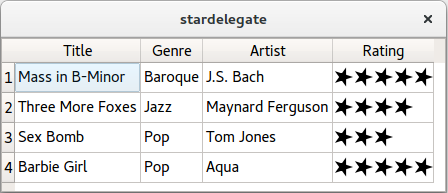
When displaying data in a
QListView,QTableView, orQTreeView, the individual items are drawn by a delegate . Also, when the user starts editing an item (for example, by double-clicking the item), the delegate provides an editor widget that is placed on top of the item while editing takes place.Delegates are subclasses of
QAbstractItemDelegate. Qt providesQStyledItemDelegate, which inheritsQAbstractItemDelegateand handles the most common data types (notablyintandQString). If we need to support custom data types, or want to customize the rendering or the editing for existing data types, we can subclassQAbstractItemDelegateorQStyledItemDelegate. See Delegate Classes for more information about delegates, and Model/View Programming if you need a high-level introduction to Qt’s model/view architecture (including delegates).In this example, we will see how to implement a custom delegate to render and edit a “star rating” data type, which can store values such as “1 out of 5 stars”.
The example consists of the following classes:
StarRatingis the custom data type. It stores a rating expressed as stars, such as “2 out of 5 stars” or “5 out of 6 stars”.
StarDelegateinheritsQStyledItemDelegateand provides support forStarRating(in addition to the data types already handled byQStyledItemDelegate).
StarEditorinheritsQWidgetand is used byStarDelegateto let the user edit a star rating using the mouse.To show the
StarDelegatein action, we will fill aQTableWidgetwith some data and install the delegate on it.
StarDelegate Class Definition
Here’s the definition of the
StarDelegateclass:class StarDelegate : public QStyledItemDelegate { Q_OBJECT public: using QStyledItemDelegate::QStyledItemDelegate; void paint(QPainter *painter, const QStyleOptionViewItem &option, const QModelIndex &index) const override; QSize sizeHint(const QStyleOptionViewItem &option, const QModelIndex &index) const override; QWidget *createEditor(QWidget *parent, const QStyleOptionViewItem &option, const QModelIndex &index) const override; void setEditorData(QWidget *editor, const QModelIndex &index) const override; void setModelData(QWidget *editor, QAbstractItemModel *model, const QModelIndex &index) const override; private slots: void commitAndCloseEditor(); };All public functions are reimplemented virtual functions from
QStyledItemDelegateto provide custom rendering and editing.
StarDelegate Class Implementation
The
paint()function is reimplemented fromQStyledItemDelegateand is called whenever the view needs to repaint an item:void StarDelegate::paint(QPainter *painter, const QStyleOptionViewItem &option, const QModelIndex &index) const { if (index.data().canConvert<StarRating>()) { StarRating starRating = qvariant_cast<StarRating>(index.data()); if (option.state & QStyle::State_Selected) painter->fillRect(option.rect, option.palette.highlight()); starRating.paint(painter, option.rect, option.palette, StarRating::EditMode::ReadOnly); } else { QStyledItemDelegate::paint(painter, option, index); }The function is invoked once for each item, represented by a
QModelIndexobject from the model. If the data stored in the item is aStarRating, we paint it ourselves; otherwise, we letQStyledItemDelegatepaint it for us. This ensures that theStarDelegatecan handle the most common data types.If the item is a
StarRating, we draw the background if the item is selected, and we draw the item usingStarRating::paint(), which we will review later.
StartRatings can be stored in aQVariantthanks to theQ_DECLARE_METATYPE()macro appearing instarrating.h. More on this later.The
createEditor()function is called when the user starts editing an item:QWidget *StarDelegate::createEditor(QWidget *parent, const QStyleOptionViewItem &option, const QModelIndex &index) const { if (index.data().canConvert<StarRating>()) { StarEditor *editor = new StarEditor(parent); connect(editor, &StarEditor::editingFinished, this, &StarDelegate::commitAndCloseEditor); return editor; } return QStyledItemDelegate::createEditor(parent, option, index); }If the item is a
StarRating, we create aStarEditorand connect itseditingFinished()signal to ourcommitAndCloseEditor()slot, so we can update the model when the editor closes.Here’s the implementation of
commitAndCloseEditor():void StarDelegate::commitAndCloseEditor() { StarEditor *editor = qobject_cast<StarEditor *>(sender()); emit commitData(editor); emit closeEditor(editor); }When the user is done editing, we emit
commitData()andcloseEditor()(both declared inQAbstractItemDelegate), to tell the model that there is edited data and to inform the view that the editor is no longer needed.The
setEditorData()function is called when an editor is created to initialize it with data from the model:void StarDelegate::setEditorData(QWidget *editor, const QModelIndex &index) const { if (index.data().canConvert<StarRating>()) { StarRating starRating = qvariant_cast<StarRating>(index.data()); StarEditor *starEditor = qobject_cast<StarEditor *>(editor); starEditor->setStarRating(starRating); } else { QStyledItemDelegate::setEditorData(editor, index); } }We simply call
setStarRating()on the editor.The
setModelData()function is called to commit data from the editor to the model when editing is finished:void StarDelegate::setModelData(QWidget *editor, QAbstractItemModel *model, const QModelIndex &index) const { if (index.data().canConvert<StarRating>()) { StarEditor *starEditor = qobject_cast<StarEditor *>(editor); model->setData(index, QVariant::fromValue(starEditor->starRating())); } else { QStyledItemDelegate::setModelData(editor, model, index); } }The
sizeHint()function returns an item’s preferred size:QSize StarDelegate::sizeHint(const QStyleOptionViewItem &option, const QModelIndex &index) const { if (index.data().canConvert<StarRating>()) { StarRating starRating = qvariant_cast<StarRating>(index.data()); return starRating.sizeHint(); } return QStyledItemDelegate::sizeHint(option, index); }We simply forward the call to
StarRating.
StarEditor Class Definition
The
StarEditorclass was used when implementingStarDelegate. Here’s the class definition:class StarEditor : public QWidget { Q_OBJECT public: StarEditor(QWidget *parent = nullptr); QSize sizeHint() const override; void setStarRating(const StarRating &starRating) { myStarRating = starRating; } StarRating starRating() { return myStarRating; } signals: void editingFinished(); protected: void paintEvent(QPaintEvent *event) override; void mouseMoveEvent(QMouseEvent *event) override; void mouseReleaseEvent(QMouseEvent *event) override; private: int starAtPosition(int x) const; StarRating myStarRating; };The class lets the user edit a
StarRatingby moving the mouse over the editor. It emits theeditingFinished()signal when the user clicks on the editor.The protected functions are reimplemented from
QWidgetto handle mouse and paint events. The private functionstarAtPosition()is a helper function that returns the number of the star under the mouse pointer.
StarEditor Class Implementation
Let’s start with the constructor:
StarEditor::StarEditor(QWidget *parent)
    : QWidget(parent)
{
    setMouseTracking(true);
    setAutoFillBackground(true);
}
We enable
mouse trackingon the widget so we can follow the cursor even when the user doesn’t hold down any mouse button. We also turn onQWidget‘sauto-fill backgroundfeature to obtain an opaque background. (Without the call, the view’s background would shine through the editor.)The
paintEvent()function is reimplemented fromQWidget:void StarEditor::paintEvent(QPaintEvent *) { QPainter painter(this); myStarRating.paint(&painter, rect(), palette(), StarRating::EditMode::Editable); }We simply call
StarRating::paint()to draw the stars, just like we did when implementingStarDelegate.void StarEditor::mouseMoveEvent(QMouseEvent *event) { const int star = starAtPosition(event->x()); if (star != myStarRating.starCount() && star != -1) { myStarRating.setStarCount(star); update(); } QWidget::mouseMoveEvent(event); }In the mouse event handler, we call
setStarCount()on the private data membermyStarRatingto reflect the current cursor position, and we callupdate()to force a repaint.void StarEditor::mouseReleaseEvent(QMouseEvent *event) { emit editingFinished(); QWidget::mouseReleaseEvent(event); }When the user releases a mouse button, we simply emit the
editingFinished()signal.int StarEditor::starAtPosition(int x) const { const int star = (x / (myStarRating.sizeHint().width() / myStarRating.maxStarCount())) + 1; if (star <= 0 || star > myStarRating.maxStarCount()) return -1; return star; }The
starAtPosition()function uses basic linear algebra to find out which star is under the cursor.
StarRating Class Definition
class StarRating
{
public:
    enum class EditMode { Editable, ReadOnly };

    explicit StarRating(int starCount = 1, int maxStarCount = 5);

    void paint(QPainter *painter, const QRect &rect,
               const QPalette &palette, EditMode mode) const;
    QSize sizeHint() const;
    int starCount() const { return myStarCount; }
    int maxStarCount() const { return myMaxStarCount; }
    void setStarCount(int starCount) { myStarCount = starCount; }
    void setMaxStarCount(int maxStarCount) { myMaxStarCount = maxStarCount; }

private:
    QPolygonF starPolygon;
    QPolygonF diamondPolygon;
    int myStarCount;
    int myMaxStarCount;
};

Q_DECLARE_METATYPE(StarRating)
The
StarRatingclass represents a rating as a number of stars. In addition to holding the data, it is also capable of painting the stars on aQPaintDevice, which in this example is either a view or an editor. ThemyStarCountmember variable stores the current rating, andmyMaxStarCountstores the highest possible rating (typically 5).The
Q_DECLARE_METATYPE()macro makes the typeStarRatingknown toQVariant, making it possible to storeStarRatingvalues inQVariant.
StarRating Class Implementation
The constructor initializes
myStarCountandmyMaxStarCount, and sets up the polygons used to draw stars and diamonds:StarRating::StarRating(int starCount, int maxStarCount) : myStarCount(starCount), myMaxStarCount(maxStarCount) { starPolygon << QPointF(1.0, 0.5); for (int i = 1; i < 5; ++i) starPolygon << QPointF(0.5 + 0.5 * std::cos(0.8 * i * 3.14), 0.5 + 0.5 * std::sin(0.8 * i * 3.14)); diamondPolygon << QPointF(0.4, 0.5) << QPointF(0.5, 0.4) << QPointF(0.6, 0.5) << QPointF(0.5, 0.6) << QPointF(0.4, 0.5); }The
paint()function paints the stars in thisStarRatingobject on a paint device:void StarRating::paint(QPainter *painter, const QRect &rect, const QPalette &palette, EditMode mode) const { painter->save(); painter->setRenderHint(QPainter::Antialiasing, true); painter->setPen(Qt::NoPen); painter->setBrush(mode == EditMode::Editable ? palette.highlight() : palette.windowText()); const int yOffset = (rect.height() - PaintingScaleFactor) / 2; painter->translate(rect.x(), rect.y() + yOffset); painter->scale(PaintingScaleFactor, PaintingScaleFactor); for (int i = 0; i < myMaxStarCount; ++i) { if (i < myStarCount) painter->drawPolygon(starPolygon, Qt::WindingFill); else if (mode == EditMode::Editable) painter->drawPolygon(diamondPolygon, Qt::WindingFill); painter->translate(1.0, 0.0); } painter->restore(); }We first set the pen and brush we will use for painting. The
modeparameter can be eitherEditableorReadOnly. Ifmodeis editable, we use theHighlightcolor instead of theForegroundcolor to draw the stars.Then we draw the stars. If we are in
Editmode, we paint diamonds in place of stars if the rating is less than the highest rating.The
sizeHint()function returns the preferred size for an area to paint the stars on:QSize StarRating::sizeHint() const { return PaintingScaleFactor * QSize(myMaxStarCount, 1); }The preferred size is just enough to paint the maximum number of stars. The function is called by both
StarDelegate::sizeHint()andStarEditor::sizeHint().
The
main()
Function
Here’s the program’s
main()function:int main(int argc, char *argv[]) { QApplication app(argc, argv); QTableWidget tableWidget(4, 4); tableWidget.setItemDelegate(new StarDelegate); tableWidget.setEditTriggers(QAbstractItemView::DoubleClicked | QAbstractItemView::SelectedClicked); tableWidget.setSelectionBehavior(QAbstractItemView::SelectRows); tableWidget.setHorizontalHeaderLabels({"Title", "Genre", "Artist", "Rating"}); populateTableWidget(&tableWidget); tableWidget.resizeColumnsToContents(); tableWidget.resize(500, 300); tableWidget.show(); return app.exec(); }The
main()function creates aQTableWidgetand sets aStarDelegateon it.DoubleClickedandSelectedClickedare set asedit triggers, so that the editor is opened with a single click when the star rating item is selected.The
populateTableWidget()function fills theQTableWidgetwith data:void populateTableWidget(QTableWidget *tableWidget) { static constexpr struct { const char *title; const char *genre; const char *artist; int rating; } staticData[] = { { "Mass in B-Minor", "Baroque", "J.S. Bach", 5 }, ... { nullptr, nullptr, nullptr, 0 } }; for (int row = 0; staticData[row].title != nullptr; ++row) { QTableWidgetItem *item0 = new QTableWidgetItem(staticData[row].title); QTableWidgetItem *item1 = new QTableWidgetItem(staticData[row].genre); QTableWidgetItem *item2 = new QTableWidgetItem(staticData[row].artist); QTableWidgetItem *item3 = new QTableWidgetItem; item3->setData(0, QVariant::fromValue(StarRating(staticData[row].rating))); tableWidget->setItem(row, 0, item0); tableWidget->setItem(row, 1, item1); tableWidget->setItem(row, 2, item2); tableWidget->setItem(row, 3, item3); } }Notice the call to
fromValueto convert aStarRatingto aQVariant.
Possible Extensions and Suggestions
There are many ways to customize Qt’s model/view framework . The approach used in this example is appropriate for most custom delegates and editors. Examples of possibilities not used by the star delegate and star editor are:
It is possible to open editors programmatically by calling
edit(), instead of relying on edit triggers. This could be used to support other edit triggers than those offered by theEditTriggerenum. For example, in the Star Delegate example, hovering over an item with the mouse might make sense as a way to pop up an editor.By reimplementing
editorEvent(), it is possible to implement the editor directly in the delegate, instead of creating a separateQWidgetsubclass.
© 2022 The Qt Company Ltd. Documentation contributions included herein are the copyrights of their respective owners. The documentation provided herein is licensed under the terms of the GNU Free Documentation License version 1.3 as published by the Free Software Foundation. Qt and respective logos are trademarks of The Qt Company Ltd. in Finland and/or other countries worldwide. All other trademarks are property of their respective owners.