
Event Transitions Example
The Event Transitions example shows how to use event transitions, a feature of The State Machine Framework .
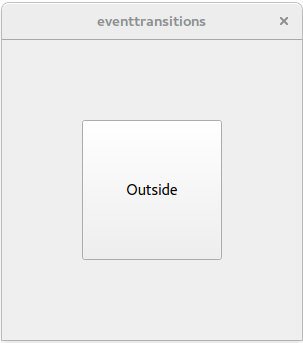
The Event Transitions Example illustrates how states change when a user enters or leaves the area of a button. The states are handled by a
QStateMachineobject. The screen consists of aQVBoxLayoutwith a central button.When the mouse is outside the button, the text in the button displays “Outside”. When the mouse enters the button, it displays “Inside”.
 class Window : public QWidget { public: Window(QWidget *parent = nullptr) : QWidget(parent) { QPushButton *button = new QPushButton(this); button->setSizePolicy(QSizePolicy::Expanding, QSizePolicy::Expanding); QVBoxLayout *layout = new QVBoxLayout; layout->addWidget(button); layout->setContentsMargins(80, 80, 80, 80); setLayout(layout);
class Window : public QWidget
{
public:
    Window(QWidget *parent = nullptr)
        : QWidget(parent)
    {
        QPushButton *button = new QPushButton(this);
        button->setSizePolicy(QSizePolicy::Expanding, QSizePolicy::Expanding);

        QVBoxLayout *layout = new QVBoxLayout;
        layout->addWidget(button);
        layout->setContentsMargins(80, 80, 80, 80);
        setLayout(layout);
The
Windowclass’s constructors begins by creating a button. This button is added tolayout, which is aQVBoxLayoutobject. Then two states are created:s1is the state “Outside”, ands2is the state “Inside”.QStateMachine *machine = new QStateMachine(this); QState *s1 = new QState(); s1->assignProperty(button, "text", "Outside"); QState *s2 = new QState(); s2->assignProperty(button, "text", "Inside");State
s1is the state “Outside” and states2is state “Inside”.QEventTransition *enterTransition = new QEventTransition(button, QEvent::Enter); enterTransition->setTargetState(s2); s1->addTransition(enterTransition);When the button receives an event of type
Enterand the state machine is in states1, the machine will transition to states2.QEventTransition *leaveTransition = new QEventTransition(button, QEvent::Leave); leaveTransition->setTargetState(s1); s2->addTransition(leaveTransition);When the button receives an event of type
Leaveand the state machine is in states2, the machine will transition back to states1.QState *s3 = new QState(); s3->assignProperty(button, "text", "Pressing..."); QEventTransition *pressTransition = new QEventTransition(button, QEvent::MouseButtonPress); pressTransition->setTargetState(s3); s2->addTransition(pressTransition); QEventTransition *releaseTransition = new QEventTransition(button, QEvent::MouseButtonRelease); releaseTransition->setTargetState(s2); s3->addTransition(releaseTransition);Next, state
s3is created.s3will be entered when the button receives an event of typeMouseButtonPressand the state machine is in states2. When the button receives an event of typeMouseButtonReleaseand the state machine is in states3, the machine will revert to states2.machine->addState(s1); machine->addState(s2); machine->addState(s3); machine->setInitialState(s1); machine->start(); } };Finally, the states are added to the machine as top-level states, the initial state is set to be
s1(“Outside”), and the machine is started.int main(int argc, char **argv) { QApplication app(argc, argv); Window window; window.resize(300, 300); window.show(); return app.exec(); }The main() function constructs a Window object that displays the
QVBoxLayoutobjectlayoutwith itsbutton.
© 2022 The Qt Company Ltd. Documentation contributions included herein are the copyrights of their respective owners. The documentation provided herein is licensed under the terms of the GNU Free Documentation License version 1.3 as published by the Free Software Foundation. Qt and respective logos are trademarks of The Qt Company Ltd. in Finland and/or other countries worldwide. All other trademarks are property of their respective owners.