
Rogue Example
The Rogue example shows how to use the Qt state machine for event handling.
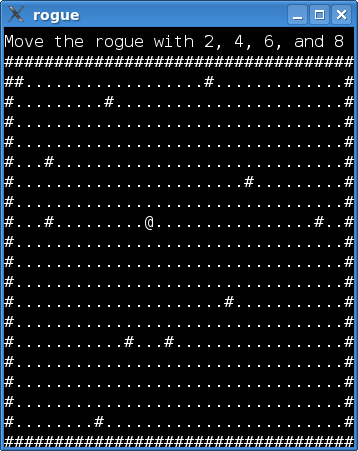
This example implements a simple text based game. Do you see the
@in the screenshot? That’s you, the rogue. The#characters are walls, and the dots represent floor. In a real game, other ASCII characters would represent all kinds of objects and creatures, for instance, ancient dragons (Ds) or food rations (%s). But let’s not get carried away. In this game, the rogue is simply running around in an empty room.The rogue is moved with the keypad (2, 4, 8, 6). That aside, we have implemented a
quitcommand that triggers if the player typesq. The player is then asked if he/she really wants to quit.Most games have commands that need more than one key press (we think of consecutive presses, i.e., not of several keys being pressed at the same time). In this game, only the
quitcommand falls under this category, but for the sake of argument, let’s imagine a fully-fledged game with a rich set of commands. If we were to implement these by catching key events inkeyPressEvent(), we would have to keep a lot of class member variables to track the sequence of keys already typed (or find some other way of deducing the current state of a command). This can easily lead to spaghetti, which is–as we all well know, I’m sure–unpleasant. With a state machine, on the other hand, separate states can wait for a single key press, and that makes our lives a lot simpler.The example consists of two classes:
Windowdraws the text display of the game and sets up the state machine. The window also has a status bar above the area in which the rouge moves.
MovementTransitionis a transition that carries out a single move of the rogue.Before we embark on a code walkthrough, it is necessary to take a closer look at the design of the machine. Here is a state chart that shows what we want to achieve:
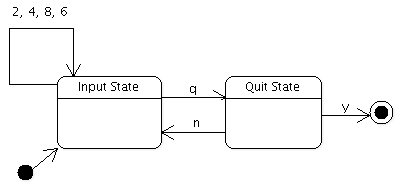
The input state waits for a key press to start a new command. When receiving a key it recognizes, it transitions to one of the two commands of the game; though, as we will see, movement is handled by the transition itself. The quit state waits for the player to answer yes or no (by typing
yorn) when asked whether he/she really wants to quit the game.The chart demonstrates how we use one state to wait for a single key press. The press received may trigger one of the transitions connected to the state.
Window Class Definition
The
Windowclass is a widget that draws the text display of the game. It also sets up the state machine, i.e., creates and connects the states in the machine. It is the key events from this widget that are used by the machine.class Window : public QWidget { Q_OBJECT Q_PROPERTY(QString status READ status WRITE setStatus) public: enum Direction { Up, Down, Left, Right }; Window(); void movePlayer(Direction direction); void setStatus(const QString &status); QString status() const; QSize sizeHint() const override; protected: void paintEvent(QPaintEvent *event) override;
Directionspecifies the direction in which the rogue is to move. We use this inmovePlayer(), which moves the rogue and repaints the window. The game has a status line above the area in which the rogue moves. Thestatusproperty contains the text of this line. We use a property because theQStateclass allows setting any Qt property when entered. More on this later.private: void buildMachine(); void setupMap(); QChar map[WIDTH][HEIGHT]; int pX, pY; QStateMachine *machine; QString myStatus; };The
mapis an array with the characters that are currently displayed. We set up the array insetupMap(), and update it when the rogue is moved.pXandpYis the current position of the rogue.WIDTHandHEIGHTare macros specifying the dimensions of the map.The
paintEvent()function is left out of this walkthrough. We also do not discuss other code that does not concern the state machine (thesetupMap(),status(),setStatus(),movePlayer(), andsizeHint()functions). If you wish to take a look at the code, click on the link for thewindow.cppfile at the top of this page.
Window Class Implementation
Here is the constructor of
Window:Window::Window() { pX = 5; pY = 5; ... setupMap(); buildMachine(); }The player starts off at position (5, 5). We then set up the map and statemachine. Let’s proceed with the
buildMachine()function:void Window::buildMachine() { machine = new QStateMachine; QState *inputState = new QState(machine); inputState->assignProperty(this, "status", "Move the rogue with 2, 4, 6, and 8"); MovementTransition *transition = new MovementTransition(this); inputState->addTransition(transition);We enter
inputStatewhen the machine is started and from thequitStateif the user wants to continue playing. We then set the status to a helpful reminder of how to play the game.First, the
Movementtransition is added to the input state. This will enable the rogue to be moved with the keypad. Notice that we don’t set a target state for the movement transition. This will cause the transition to be triggered (and theonTransition()function to be invoked), but the machine will not leave theinputState. If we had setinputStateas the target state, we would first have left and then entered theinputStateagain.QState *quitState = new QState(machine); quitState->assignProperty(this, "status", "Really quit(y/n)?"); QKeyEventTransition *yesTransition = new QKeyEventTransition(this, QEvent::KeyPress, Qt::Key_Y); yesTransition->setTargetState(new QFinalState(machine)); quitState->addTransition(yesTransition); QKeyEventTransition *noTransition = new QKeyEventTransition(this, QEvent::KeyPress, Qt::Key_N); noTransition->setTargetState(inputState); quitState->addTransition(noTransition);When we enter
quitState, we update the status bar of the window.
QKeyEventTransitionis a utility class that removes the hassle of implementing transitions forQKeyEvents. We simply need to specify the key on which the transition should trigger and the target state of the transition.QKeyEventTransition *quitTransition = new QKeyEventTransition(this, QEvent::KeyPress, Qt::Key_Q); quitTransition->setTargetState(quitState); inputState->addTransition(quitTransition);The transition from
inputStateallows triggering the quit state when the player typesq.machine->setInitialState(inputState); connect(machine, &QStateMachine::finished, qApp, &QApplication::quit); machine->start(); }The machine is set up, so it’s time to start it.
The MovementTransition Class
MovementTransitionis triggered when the player request the rogue to be moved (by typing 2, 4, 6, or 8) when the machine is in theinputState.class MovementTransition : public QEventTransition { Q_OBJECT public: MovementTransition(Window *window) : QEventTransition(window, QEvent::KeyPress) { this->window = window; }In the constructor, we tell
QEventTransitionto only sendKeyPressevents to theeventTest()function:protected: bool eventTest(QEvent *event) override { if (event->type() == QEvent::StateMachineWrapped && static_cast<QStateMachine::WrappedEvent *>(event)->event()->type() == QEvent::KeyPress) { QEvent *wrappedEvent = static_cast<QStateMachine::WrappedEvent *>(event)->event(); QKeyEvent *keyEvent = static_cast<QKeyEvent *>(wrappedEvent); int key = keyEvent->key(); return key == Qt::Key_2 || key == Qt::Key_8 || key == Qt::Key_6 || key == Qt::Key_4 || key == Qt::Key_Down || key == Qt::Key_Up || key == Qt::Key_Right || key == Qt::Key_Left; } return false; }The KeyPress events come wrapped in
WrappedEvents.eventmust be confirmed to be a wrapped event because Qt uses other events internally. After that, it is simply a matter of checking which key has been pressed.Let’s move on to the
onTransition()function:void onTransition(QEvent *event) override { QKeyEvent *keyEvent = static_cast<QKeyEvent *>( static_cast<QStateMachine::WrappedEvent *>(event)->event()); int key = keyEvent->key(); switch (key) { case Qt::Key_Left: case Qt::Key_4: window->movePlayer(Window::Left); break; case Qt::Key_Up: case Qt::Key_8: window->movePlayer(Window::Up); break; case Qt::Key_Right: case Qt::Key_6: window->movePlayer(Window::Right); break; case Qt::Key_Down: case Qt::Key_2: window->movePlayer(Window::Down); break; default: ; } }When
onTransition()is invoked, we know that we have aKeyPressevent with 2, 4, 6, or 8, and can askWindowto move the player.
The Roguelike Tradition
You might have been wondering why the game features a rogue. Well, these kinds of text based dungeon exploration games date back to a game called, yes, “Rogue”. Although outflanked by the technology of modern 3D computer games, roguelikes have a solid community of hard-core, devoted followers.
Playing these games can be surprisingly addictive (despite the lack of graphics). Angband, the perhaps most well-known rougelike, is found here: http://rephial.org/ .
© 2022 The Qt Company Ltd. Documentation contributions included herein are the copyrights of their respective owners. The documentation provided herein is licensed under the terms of the GNU Free Documentation License version 1.3 as published by the Free Software Foundation. Qt and respective logos are trademarks of The Qt Company Ltd. in Finland and/or other countries worldwide. All other trademarks are property of their respective owners.