
Plug & Paint Example
Demonstrates how to extend Qt applications using plugins.
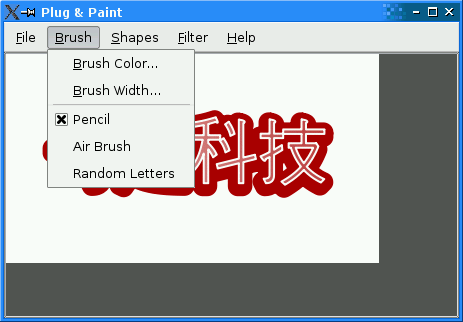
A plugin is a dynamic library that can be loaded at run-time to extend an application. Qt makes it possible to create custom plugins and to load them using
QPluginLoader. To ensure that plugins don’t get lost, it is also possible to link them statically to the executable. The Plug & Paint example uses plugins to support custom brushes, shapes, and image filters. A single plugin can provide multiple brushes, shapes, and/or filters.If you want to learn how to make your own application extensible through plugins, we recommend that you start by reading this overview, which explains how to make an application use plugins. Afterwards, you can read the Basic Tools and Extra Filters overviews, which show how to implement static and dynamic plugins, respectively.
Plug & Paint consists of the following classes:
MainWindowis aQMainWindowsubclass that provides the menu system and that contains aPaintAreaas the central widget.
PaintAreais aQWidgetthat allows the user to draw using a brush and to insert shapes.
PluginDialogis a dialog that shows information about the plugins detected by the application.
BrushInterface,ShapeInterface, andFilterInterfaceare abstract base classes that can be implemented by plugins to provide custom brushes, shapes, and image filters.
The Plugin Interfaces
We will start by reviewing the interfaces defined in
interfaces.h. These interfaces are used by the Plug & Paint application to access extra functionality. They are implemented in the plugins.class BrushInterface { public: virtual ~BrushInterface() = default; virtual QStringList brushes() const = 0; virtual QRect mousePress(const QString &brush, QPainter &painter, const QPoint &pos) = 0; virtual QRect mouseMove(const QString &brush, QPainter &painter, const QPoint &oldPos, const QPoint &newPos) = 0; virtual QRect mouseRelease(const QString &brush, QPainter &painter, const QPoint &pos) = 0; };The
BrushInterfaceclass declares four pure virtual functions. The first pure virtual function,brushes(), returns a list of strings that identify the brushes provided by the plugin. By returning aQStringListinstead of aQString, we make it possible for a single plugin to provide multiple brushes. The other functions have abrushparameter to identify which brush (among those returned bybrushes()) is used.
mousePress(),mouseMove(), andmouseRelease()take aQPainterand one or twoQPoints, and return aQRectidentifying which portion of the image was altered by the brush.The class also has a virtual destructor. Interface classes usually don’t need such a destructor (because it would make little sense to
deletethe object that implements the interface through a pointer to the interface), but some compilers emit a warning for classes that declare virtual functions but no virtual destructor. We provide the destructor to keep these compilers happy.class ShapeInterface { public: virtual ~ShapeInterface() = default; virtual QStringList shapes() const = 0; virtual QPainterPath generateShape(const QString &shape, QWidget *parent) = 0; };The
ShapeInterfaceclass declares ashapes()function that works the same asBrushInterface‘sbrushes()function, and agenerateShape()function that has ashapeparameter. Shapes are represented by aQPainterPath, a data type that can represent arbitrary 2D shapes or combinations of shapes. Theparentparameter can be used by the plugin to pop up a dialog asking the user to specify more information.class FilterInterface { public: virtual ~FilterInterface() = default; virtual QStringList filters() const = 0; virtual QImage filterImage(const QString &filter, const QImage &image, QWidget *parent) = 0; };The
FilterInterfaceclass declares afilters()function that returns a list of filter names, and afilterImage()function that applies a filter to an image.#define BrushInterface_iid "org.qt-project.Qt.Examples.PlugAndPaint.BrushInterface/1.0" Q_DECLARE_INTERFACE(BrushInterface, BrushInterface_iid) #define ShapeInterface_iid "org.qt-project.Qt.Examples.PlugAndPaint.ShapeInterface/1.0" Q_DECLARE_INTERFACE(ShapeInterface, ShapeInterface_iid) #define FilterInterface_iid "org.qt-project.Qt.Examples.PlugAndPaint.FilterInterface/1.0" Q_DECLARE_INTERFACE(FilterInterface, FilterInterface_iid)To make it possible to query at run-time whether a plugin implements a given interface, we must use the
Q_DECLARE_INTERFACE()macro. The first argument is the name of the interface. The second argument is a string identifying the interface in a unique way. By convention, we use a “Java package name” syntax to identify interfaces. If we later change the interfaces, we must use a different string to identify the new interface; otherwise, the application might crash. It is therefore a good idea to include a version number in the string, as we did above.The Basic Tools plugin and the Extra Filters plugin shows how to derive from
BrushInterface,ShapeInterface, andFilterInterface.A note on naming: It might have been tempting to give the
brushes(),shapes(), andfilters()functions a more generic name, such askeys()orfeatures(). However, that would have made multiple inheritance impractical. When creating interfaces, we should always try to give unique names to the pure virtual functions.
The MainWindow Class
The
MainWindowclass is a standardQMainWindowsubclass, as found in many of the other examples (e.g., Application ). Here, we’ll concentrate on the parts of the code that are related to plugins.void MainWindow::loadPlugins() { const auto staticInstances = QPluginLoader::staticInstances(); for (QObject *plugin : staticInstances) populateMenus(plugin);The
loadPlugins()function is called from theMainWindowconstructor to detect plugins and update the Brush, Shapes, and Filters menus. We start by handling static plugins (available throughstaticInstances())To the application that uses the plugin, a Qt plugin is simply a
QObject. ThatQObjectimplements plugin interfaces using multiple inheritance.pluginsDir = QDir(QCoreApplication::applicationDirPath()); #if defined(Q_OS_WIN) if (pluginsDir.dirName().toLower() == "debug" || pluginsDir.dirName().toLower() == "release") pluginsDir.cdUp(); #elif defined(Q_OS_MAC) if (pluginsDir.dirName() == "MacOS") { pluginsDir.cdUp(); pluginsDir.cdUp(); pluginsDir.cdUp(); } #endif pluginsDir.cd("plugins");The next step is to load dynamic plugins. We initialize the
pluginsDirmember variable to refer to thepluginssubdirectory of the Plug & Paint example. On Unix, this is just a matter of initializing theQDirvariable withapplicationDirPath(), the path of the executable file, and to do acd(). On Windows and macOS, this file is usually located in a subdirectory, so we need to take this into account.const auto entryList = pluginsDir.entryList(QDir::Files); for (const QString &fileName : entryList) { QPluginLoader loader(pluginsDir.absoluteFilePath(fileName)); QObject *plugin = loader.instance(); if (plugin) { populateMenus(plugin); pluginFileNames += fileName; } }We use
entryList()to get a list of all files in that directory. Then we iterate over the result using a range-based for loop and try to load the plugin usingQPluginLoader.The
QObjectprovided by the plugin is accessible throughinstance(). If the dynamic library isn’t a Qt plugin, or if it was compiled against an incompatible version of the Qt library,instance()returns a null pointer.If
instance()is non-null, we add it to the menus.brushMenu->setEnabled(!brushActionGroup->actions().isEmpty()); shapesMenu->setEnabled(!shapesMenu->actions().isEmpty()); filterMenu->setEnabled(!filterMenu->actions().isEmpty()); }At the end, we enable or disable the Brush, Shapes, and Filters menus based on whether they contain any items.
void MainWindow::populateMenus(QObject *plugin)
{
    auto iBrush = qobject_cast<BrushInterface *>(plugin);
    if (iBrush)
        addToMenu(plugin, iBrush->brushes(), brushMenu, &MainWindow::changeBrush,
                  brushActionGroup);

    auto iShape = qobject_cast<ShapeInterface *>(plugin);
    if (iShape)
        addToMenu(plugin, iShape->shapes(), shapesMenu, &MainWindow::insertShape);

    auto iFilter = qobject_cast<FilterInterface *>(plugin);
    if (iFilter)
        addToMenu(plugin, iFilter->filters(), filterMenu, &MainWindow::applyFilter);
}
For each plugin (static or dynamic), we check which interfaces it implements using
qobject_cast(). First, we try to cast the plugin instance to aBrushInterface; if it works, we call the private functionaddToMenu()with the list of brushes returned bybrushes(). Then we do the same with theShapeInterfaceand theFilterInterface.void MainWindow::aboutPlugins() { PluginDialog dialog(pluginsDir.path(), pluginFileNames, this); dialog.exec(); }The
aboutPlugins()slot is called on startup and can be invoked at any time through the About Plugins action. It pops up aPluginDialog, providing information about the loaded plugins.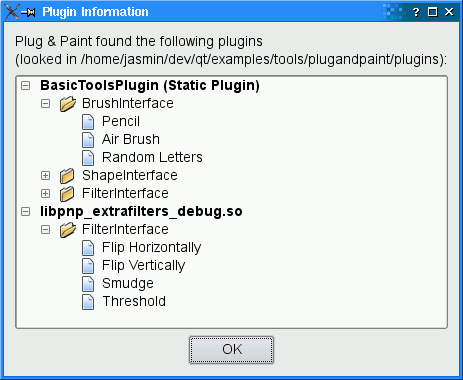
The
addToMenu()function is called fromloadPlugin()to createQActions for custom brushes, shapes, or filters and add them to the relevant menu. TheQActionis created with the plugin from which it comes from as the parent; this makes it convenient to get access to the plugin later.void MainWindow::changeBrush() { auto action = qobject_cast<QAction *>(sender()); if (!action) return; auto iBrush = qobject_cast<BrushInterface *>(action->parent()); if (!iBrush) return; const QString brush = action->text(); paintArea->setBrush(iBrush, brush); }The
changeBrush()slot is invoked when the user chooses one of the brushes from the Brush menu. We start by finding out which action invoked the slot usingsender(). Then we get theBrushInterfaceout of the plugin (which we conveniently passed as theQAction‘s parent) and we callPaintArea::setBrush()with theBrushInterfaceand the string identifying the brush. Next time the user draws on the paint area,PaintAreawill use this brush.void MainWindow::insertShape() { auto action = qobject_cast<QAction *>(sender()); if (!action) return; auto iShape = qobject_cast<ShapeInterface *>(action->parent()); if (!iShape) return; const QPainterPath path = iShape->generateShape(action->text(), this); if (!path.isEmpty()) paintArea->insertShape(path); }The
insertShape()is invoked when the use chooses one of the shapes from the Shapes menu. We retrieve theQActionthat invoked the slot, then theShapeInterfaceassociated with thatQAction, and finally we callShapeInterface::generateShape()to obtain aQPainterPath.void MainWindow::applyFilter() { auto action = qobject_cast<QAction *>(sender()); if (!action) return; auto iFilter = qobject_cast<FilterInterface *>(action->parent()); if (!iFilter) return; const QImage image = iFilter->filterImage(action->text(), paintArea->image(), this); paintArea->setImage(image); }The
applyFilter()slot is similar: We retrieve theQActionthat invoked the slot, then theFilterInterfaceassociated to thatQAction, and finally we callFilterInterface::filterImage()to apply the filter onto the current image.
The PaintArea Class
The
PaintAreaclass contains some code that deals withBrushInterface, so we’ll review it briefly.void PaintArea::setBrush(BrushInterface *brushInterface, const QString &brush) { this->brushInterface = brushInterface; this->brush = brush; }In
setBrush(), we simply store theBrushInterfaceand the brush that are given to us byMainWindow.void PaintArea::mouseMoveEvent(QMouseEvent *event) { if ((event->buttons() & Qt::LeftButton) && lastPos != QPoint(-1, -1)) { if (brushInterface) { QPainter painter(&theImage); setupPainter(painter); const QRect rect = brushInterface->mouseMove(brush, painter, lastPos, event->pos()); update(rect); } lastPos = event->pos(); } }In the
mouse move event handler, we call theBrushInterface::mouseMove()function on the currentBrushInterface, with the current brush. The mouse press and mouse release handlers are very similar.
The PluginDialog Class
The
PluginDialogclass provides information about the loaded plugins to the user. Its constructor takes a path to the plugins and a list of plugin file names. It callsfindPlugins()to fill the QTreeWdiget with information about the plugins:void PluginDialog::findPlugins(const QString &path, const QStringList &fileNames) { label->setText(tr("Plug & Paint found the following plugins\n" "(looked in %1):") .arg(QDir::toNativeSeparators(path))); const QDir dir(path); const auto staticInstances = QPluginLoader::staticInstances(); for (QObject *plugin : staticInstances) populateTreeWidget(plugin, tr("%1 (Static Plugin)") .arg(plugin->metaObject()->className())); for (const QString &fileName : fileNames) { QPluginLoader loader(dir.absoluteFilePath(fileName)); QObject *plugin = loader.instance(); if (plugin) populateTreeWidget(plugin, fileName); } }The
findPlugins()is very similar toMainWindow::loadPlugins(). It usesQPluginLoaderto access the static and dynamic plugins. Its helper functionpopulateTreeWidget()usesqobject_cast()to find out which interfaces are implemented by the plugins:void PluginDialog::populateTreeWidget(QObject *plugin, const QString &text) { auto pluginItem = new QTreeWidgetItem(treeWidget); pluginItem->setText(0, text); pluginItem->setExpanded(true); QFont boldFont = pluginItem->font(0); boldFont.setBold(true); pluginItem->setFont(0, boldFont); if (plugin) { auto iBrush = qobject_cast<BrushInterface *>(plugin); if (iBrush) addItems(pluginItem, "BrushInterface", iBrush->brushes()); auto iShape = qobject_cast<ShapeInterface *>(plugin); if (iShape) addItems(pluginItem, "ShapeInterface", iShape->shapes()); auto iFilter = qobject_cast<FilterInterface *>(plugin); if (iFilter) addItems(pluginItem, "FilterInterface", iFilter->filters()); } }
Importing Static Plugins
The Basic Tools plugin is built as a static plugin, to ensure that it is always available to the application. This requires using the
Q_IMPORT_PLUGIN()macro somewhere in the application (in a.cppfile) and specifying the plugin in the.profile.For Plug & Paint, we have chosen to put
Q_IMPORT_PLUGIN()inmain.cpp:#include "mainwindow.h" #include <QApplication> #include <QtPlugin> Q_IMPORT_PLUGIN(BasicToolsPlugin) int main(int argc, char *argv[]) { QApplication app(argc, argv); MainWindow window; window.show(); return app.exec(); }The argument to
Q_IMPORT_PLUGIN()is the plugin name, which corresponds with the name of the class that declares metadata for the plugin withQ_PLUGIN_METADATA().In the
.profile, we need to specify the static library. Here’s the project file for building Plug & Paint:<Code snippet "tools/plugandpaint/app/app.pro:0" not found>The
LIBSline variable specifies the librarypnp_basictoolslocated in the../plugandpaint/plugins/basictoolsdirectory. (Although theLIBSsyntax has a distinct Unix flavor,qmakesupports it on all platforms.)The
CONFIG()code at the end is necessary for this example because the example is part of the Qt distribution and Qt can be configured to be built simultaneously in debug and in release modes. You don’t need to for your own plugin applications.This completes our review of the Plug & Paint application. At this point, you might want to take a look at the Basic Tools example plugin.
© 2022 The Qt Company Ltd. Documentation contributions included herein are the copyrights of their respective owners. The documentation provided herein is licensed under the terms of the GNU Free Documentation License version 1.3 as published by the Free Software Foundation. Qt and respective logos are trademarks of The Qt Company Ltd. in Finland and/or other countries worldwide. All other trademarks are property of their respective owners.