
Part 2 - Adding Addresses
Describes the code for inserting records in the Address Book Example.
The next step in creating the address book is to implement some user interactions.
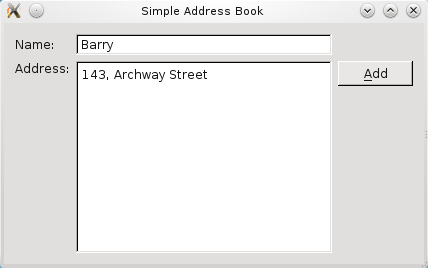
We will provide a push button that the user can click to add a new contact. Also, some form of data structure is needed to store these contacts in an organized way.
Defining the AddressBook Class
Now that we have the labels and input fields set up, we add push buttons to complete the process of adding a contact. This means that our
addressbook.hfile now has threeQPushButtonobjects declared and three corresponding public slots.public slots: void addContact(); void submitContact(); void cancel();A slot is a function that responds to a particular signal. We will discuss this concept in further detail when implementing the
AddressBookclass. However, for an overview of Qt’s signals and slots concept, you can refer to the Signals and Slots document.Three
QPushButtonobjects (addButton,submitButton, andcancelButton) are now included in our private variable declarations, along withnameLineandaddressText.private: QPushButton *addButton; QPushButton *submitButton; QPushButton *cancelButton; QLineEdit *nameLine; QTextEdit *addressText;We need a container to store our address book contacts, so that we can traverse and display them. A
QMapobject,contacts, is used for this purpose as it holds a key-value pair: the contact’s name as the key , and the contact’s address as the value .QMap<QString, QString> contacts; QString oldName; QString oldAddress; };We also declare two private
QStringobjects,oldNameandoldAddress. These objects are needed to hold the name and address of the contact that was last displayed, before the user clicked Add. So, when the user clicks Cancel, we can revert to displaying the details of the last contact.
Implementing the AddressBook Class
Within the constructor of
AddressBook, we set thenameLineandaddressTextto read-only, so that we can only display but not edit existing contact details.... nameLine->setReadOnly(true); ... addressText->setReadOnly(true);Then, we instantiate our push buttons:
addButton,submitButton, andcancelButton.addButton = new QPushButton(tr("&Add")); addButton->show(); submitButton = new QPushButton(tr("&Submit")); submitButton->hide(); cancelButton = new QPushButton(tr("&Cancel")); cancelButton->hide();The
addButtonis displayed by invoking theshow()function, while thesubmitButtonandcancelButtonare hidden by invokinghide(). These two push buttons will only be displayed when the user clicks Add and this is handled by theaddContact()function discussed below.connect(addButton, &QPushButton::clicked, this, &AddressBook::addContact); connect(submitButton, &QPushButton::clicked, this, &AddressBook::submitContact); connect(cancelButton, &QPushButton::clicked, this, &AddressBook::cancel);We connect the push buttons’
clicked()signal to their respective slots. The figure below illustrates this.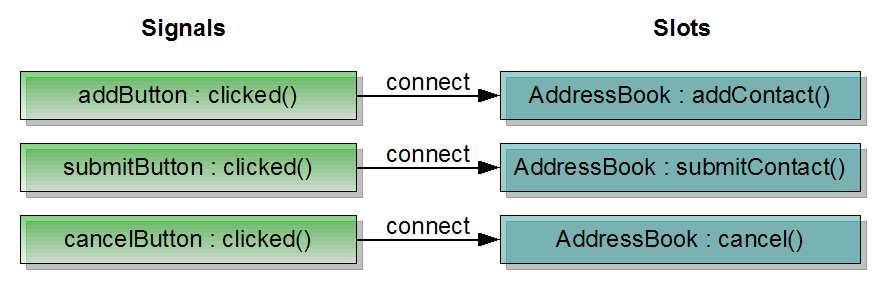
Next, we arrange our push buttons neatly to the right of our address book widget, using a
QVBoxLayoutto line them up vertically.QVBoxLayout *buttonLayout1 = new QVBoxLayout; buttonLayout1->addWidget(addButton, Qt::AlignTop); buttonLayout1->addWidget(submitButton); buttonLayout1->addWidget(cancelButton); buttonLayout1->addStretch();The
addStretch()function is used to ensure the push buttons are not evenly spaced, but arranged closer to the top of the widget. The figure below shows the difference between usingaddStretch()and not using it.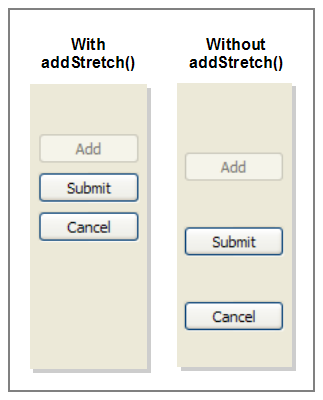
We then add
buttonLayout1tomainLayout, usingaddLayout(). This gives us nested layouts asbuttonLayout1is now a child ofmainLayout.QGridLayout *mainLayout = new QGridLayout; mainLayout->addWidget(nameLabel, 0, 0); mainLayout->addWidget(nameLine, 0, 1); mainLayout->addWidget(addressLabel, 1, 0, Qt::AlignTop); mainLayout->addWidget(addressText, 1, 1); mainLayout->addLayout(buttonLayout1, 1, 2);Our layout coordinates now look like this:
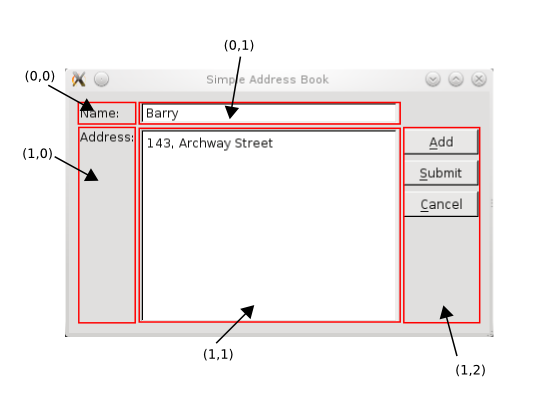
In the
addContact()function, we store the last displayed contact details inoldNameandoldAddress. Then we clear these input fields and turn off the read-only mode. The focus is set onnameLineand we displaysubmitButtonandcancelButton.void AddressBook::addContact() { oldName = nameLine->text(); oldAddress = addressText->toPlainText(); nameLine->clear(); addressText->clear(); nameLine->setReadOnly(false); nameLine->setFocus(Qt::OtherFocusReason); addressText->setReadOnly(false); addButton->setEnabled(false); submitButton->show(); cancelButton->show(); }The
submitContact()function can be divided into three parts:
We extract the contact’s details from
nameLineandaddressTextand store them inQStringobjects. We also validate to make sure that the user did not click Submit with empty input fields; otherwise, aQMessageBoxis displayed to remind the user for a name and address.void AddressBook::submitContact() { QString name = nameLine->text(); QString address = addressText->toPlainText(); if (name.isEmpty() || address.isEmpty()) { QMessageBox::information(this, tr("Empty Field"), tr("Please enter a name and address.")); return; }We then proceed to check if the contact already exists. If it does not exist, we add the contact to
contactsand we display aQMessageBoxto inform the user that the contact has been added.if (!contacts.contains(name)) { contacts.insert(name, address); QMessageBox::information(this, tr("Add Successful"), tr("\"%1\" has been added to your address book.").arg(name)); } else { QMessageBox::information(this, tr("Add Unsuccessful"), tr("Sorry, \"%1\" is already in your address book.").arg(name)); return; }If the contact already exists, again, we display a
QMessageBoxto inform the user about this, preventing the user from adding duplicate contacts. Ourcontactsobject is based on key-value pairs of name and address, hence, we want to ensure that key is unique.Once we have handled both cases mentioned above, we restore the push buttons to their normal state with the following code:
    if (contacts.isEmpty()) {
        nameLine->clear();
        addressText->clear();
    }

    nameLine->setReadOnly(true);
    addressText->setReadOnly(true);
    addButton->setEnabled(true);
    submitButton->hide();
    cancelButton->hide();
}
The screenshot below shows the
QMessageBoxobject we use to display information messages to the user.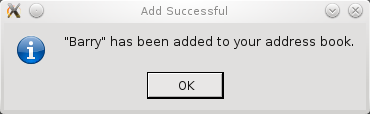
The
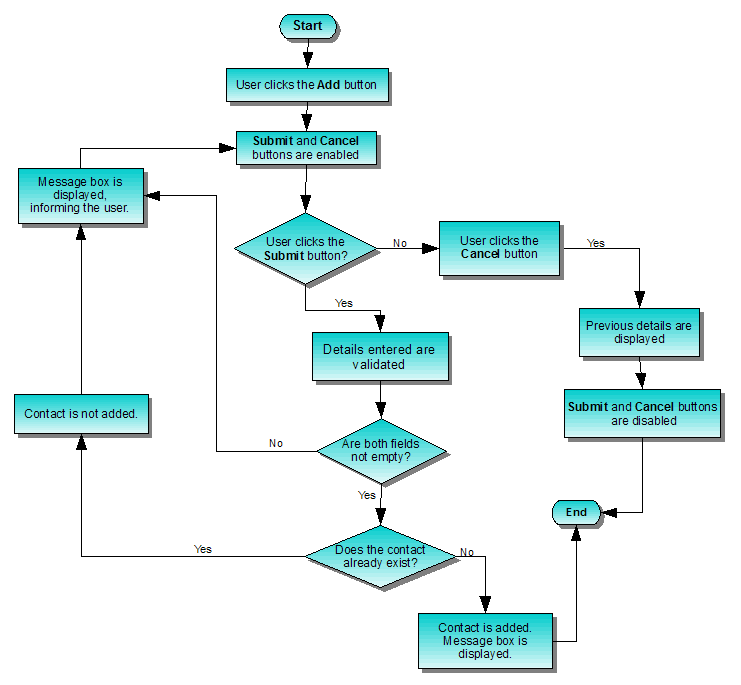
cancel()function restores the last displayed contact details and enablesaddButton, as well as hidessubmitButtonandcancelButton.void AddressBook::cancel() { nameLine->setText(oldName); nameLine->setReadOnly(true); addressText->setText(oldAddress); addressText->setReadOnly(true); addButton->setEnabled(true); submitButton->hide(); cancelButton->hide(); }The general idea behind adding a contact is to give the user the flexibility to click Submit or Cancel at any time. The flowchart below further explains this concept:
© 2022 The Qt Company Ltd. Documentation contributions included herein are the copyrights of their respective owners. The documentation provided herein is licensed under the terms of the GNU Free Documentation License version 1.3 as published by the Free Software Foundation. Qt and respective logos are trademarks of The Qt Company Ltd. in Finland and/or other countries worldwide. All other trademarks are property of their respective owners.