
The Qt Resource System
A platform-independent mechanism for storing binary files in an application.
The Qt resource system is a platform-independent mechanism for storing binary files in the application’s executable. This is useful if your application always needs a certain set of files (icons, translation files, etc.) and you don’t want to run the risk of losing the files.
The resource system is based on tight cooperation between qmake, rcc (Qt’s resource compiler), and
QFile.
Resource Collection Files (
.qrc
)
The resources associated with an application are specified in a
.qrcfile, an XML-based file format that lists files on the disk and optionally assigns them a resource name that the application must use to access the resource.Here’s an example
.qrcfile:<Code snippet "/data/snapshot-qt5full-5.15/qt5/qtbase/resource-system/application.qrc" not found>The resource files listed in the
.qrcfile are files that are part of the application’s source tree. The specified paths are relative to the directory containing the.qrcfile. Note that the listed resource files must be located in the same directory as the.qrcfile, or one of its subdirectories.Resource data can either be compiled into the binary and thus accessed immediately in application code, or a binary resource can be created and at a later point in application code registered with the resource system.
By default, resources are accessible in the application under the same file name as they have in the source tree, with a
:/prefix, or by aURLwith aqrcscheme.For example, the file path
:/images/cut.pngor the URLqrc:///images/cut.pngwould give access to thecut.pngfile, whose location in the application’s source tree isimages/cut.png. This can be changed using thefiletag’saliasattribute:<file alias="cut-img.png">images/cut.png</file>The file is then accessible as
:/cut-img.pngfrom the application. It is also possible to specify a path prefix for all files in the.qrcfile using theqresourcetag’sprefixattribute:<qresource prefix="/myresources"> <file alias="cut-img.png">images/cut.png</file> </qresource>In this case, the file is accessible as
:/myresources/cut-img.png.Some resources need to change based on the user’s locale, such as translation files or icons. This is done by adding a
langattribute to theqresourcetag, specifying a suitable locale string. For example:<qresource> <file>cut.jpg</file> </qresource> <qresource lang="fr"> <file alias="cut.jpg">cut_fr.jpg</file> </qresource>If the user’s locale is French (i.e.,
system().name() returns “fr_FR”),:/cut.jpgbecomes a reference to thecut_fr.jpgimage. For other locales,cut.jpgis used.See the
QLocaledocumentation for a description of the format to use for locale strings.See
QFileSelectorfor an additional mechanism to select locale-specific resources, in addition to the ability to select OS-specific and other features.
External Binary Resources
For an external binary resource to be created you must create the resource data (commonly given the
.rccextension) by passing the -binary switch to rcc. Once the binary resource is created you can register the resource with theQResourceAPI.For example, a set of resource data specified in a
.qrcfile can be compiled in the following way:rcc -binary myresource.qrc -o myresource.rccIn the application, this resource would be registered with code like this:
QResource::registerResource("/path/to/myresource.rcc");
Compiled-In Resources
For a resource to be compiled into the binary the
.qrcfile must be mentioned in the application’s.profile so thatqmakeknows about it. For example:<Code snippet "resource-system/application.pro:0" not found>
qmakewill produce make rules to generate a file calledqrc_application.cppthat is linked into the application. This file contains all the data for the images and other resources as static C++ arrays of compressed binary data. Theqrc_application.cppfile is automatically regenerated whenever the.qrcfile changes or one of the files that it refers to changes. If you don’t use.profiles, you can either invokerccmanually or add build rules to your build system.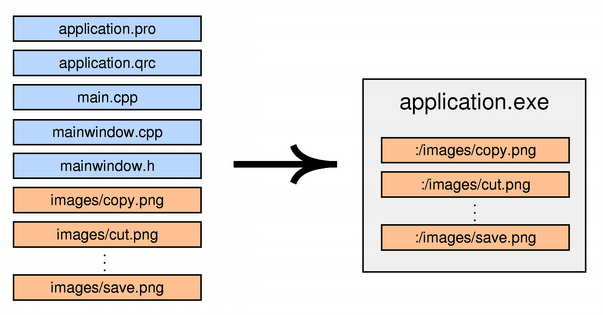
Currently, Qt always stores the data directly in the executable, even on Windows, macOS, and iOS, where the operating system provides native support for resources. This might change in a future Qt release.
Resources in a Qt for Python application
The resource collection file is converted to a Python module by using the resource compiler rcc:
rcc -g python application.qrc > application_rc.pyThe module needs to be imported in the application:
import application_rc.py
Compression
rccattempts to compress the content to optimize disk space usage in the final binaries. By default, it will perform a heuristic check to determine whether compressing is worth it and will store the content uncompressed if it fails to sufficiently compress. To control the threshold, you can use the-thresholdoption, which tellsrccthe percentage of the original file size that must be gained for it to store the file in compressed form.rcc -threshold 25 myresources.qrcThe default value is “70”, indicating that the compressed file must be 70% smaller than the original (no more than 30% of the original file size).
It is possible to turn off compression, if desired. This can be useful if your resources already contain a compressed format, such as
.pngfiles, and you do not want to incur the CPU cost at build time to confirm that it can’t be compressed. Another reason is if disk usage is not a problem and the application would prefer to keep the content as clean memory pages at runtime. You do this by giving the-no-compresscommand line argument.rcc -no-compress myresources.qrc
rccalso gives you some control over the compression level and compression algorithm, for example:rcc -compress 2 -compress-algo zlib myresources.qrcIt is also possible to use
threshold,compress, andcompress-algoas attributes in a .qrcfiletag.<qresource> <file compress="1" compress-algo="zstd">data.txt</file> </qresource>The above will select the
zstdalgorithm with compression level 1.
rccsupports the following compression algorithms and compression levels:
best: use the best algorithm among the ones below, at its highest compression level, to achieve the most compression at the expense of using a lot of CPU time during compilation. This value is useful in the XML file to indicate a file should be most compressed, regardless of which algorithmsrccsupports.
zstd: use the Zstandard library to compress contents. Valid compression levels range from 1 to 19, 1 is least compression (least CPU time) and 19 is the most compression (most CPU time). The default level is 14. A special value of 0 tells thezstdlibrary to choose an implementation-defined default.
zlib: use the zlib library to compress contents. Valid compression levels range from 1 to 9, with 1 applying the least compression (least CPU time) and 9 the most compression (most CPU time). The special value 0 means “no compression” and should not be used. The default is implementation-defined, but usually is level 6.
none: no compression. This is the same as the-no-compressoption.Support for both Zstandard and zlib are optional. If a given library was not detected at compile time, attempting to pass
-compress-algofor that library will result in an error. The default compression algorithm iszstdif it is enabled,zlibif not.
Using Resources in the Application
In the application, resource paths can be used in most places instead of ordinary file system paths. In particular, you can pass a resource path instead of a file name to the
QIcon,QImage, orQPixmapconstructor:cutAct = new QAction(QIcon(":/images/cut.png"), tr("Cu&t"), this);See the Application example for an actual application that uses Qt’s resource system to store its icons.
In memory, resources are represented by a tree of resource objects. The tree is automatically built at startup and used by
QFilefor resolving paths to resources. You can use aQDirinitialized with “:/” to navigate through the resource tree from the root.Qt’s resources support the concept of a search path list. If you then refer to a resource with
:instead of:/as the prefix, the resource will be looked up using the search path list. The search path list is empty at startup; calladdSearchPath()to add paths to it.
Using Resources in a Library
If you have resources in a library, you need to force initialization of your resources by calling
Q_INIT_RESOURCE()with the base name of the.qrcfile. For example:MyClass::MyClass() : BaseClass() { Q_INIT_RESOURCE(resources); QFile file(":/myfile.dat"); ... }This ensures that the resources are linked into the final application binary in the case of static linking. You should put the initialization code close to where the resources are used in your library, so that clients of your library will only link in the resources if they use the feature of the library that depends on them.
Note: As the resource initializers generated by rcc are declared in the global namespace, your calls to
Q_INIT_RESOURCE()also need to be done outside of any namespace.If the library includes resources that are not used internally, but instead exposed to clients of the library, the initialization needs to happen in the application code. For example:
int main(int argc, char *argv[])
{
    QApplication app(argc, argv);
    Q_INIT_RESOURCE(graphlib);

    QFile file(":/graph.png");
    ...
    return app.exec();
}
As before, this ensures that the resources are linked into the final application binary in the case of static linking, but also triggers loading of the library in the case of dynamic linking, such as plugins.
Similarly, if you must unload a set of resources explicitly (because a plugin is being unloaded or the resources are not valid any longer), you can force removal of your resources by calling
Q_CLEANUP_RESOURCE()with the same base name as above.Note: The use of
Q_INIT_RESOURCE()andQ_CLEANUP_RESOURCE()is not necessary when the resource is built as part of the application.
© 2022 The Qt Company Ltd. Documentation contributions included herein are the copyrights of their respective owners. The documentation provided herein is licensed under the terms of the GNU Free Documentation License version 1.3 as published by the Free Software Foundation. Qt and respective logos are trademarks of The Qt Company Ltd. in Finland and/or other countries worldwide. All other trademarks are property of their respective owners.