
Using the SQL Model Classes
In addition to
QSqlQuery, Qt offers three higher-level classes for accessing databases. These classes areQSqlQueryModel,QSqlTableModel, andQSqlRelationalTableModel.
QSqlQueryModelA read-only model based on an arbitrary SQL query.
QSqlTableModelA read-write model that works on a single table.
QSqlRelationalTableModelA
QSqlTableModelsubclass with foreign key support.These classes derive from
QAbstractTableModel(which in turn inherits fromQAbstractItemModel) and make it easy to present data from a database in an item view class such asQListViewandQTableView. This is explained in detail in the Presenting Data in a Table View section.Another advantage of using these classes is that it can make your code easier to adapt to other data sources. For example, if you use
QSqlTableModeland later decide to use XML files to store data instead of a database, it is essentially just a matter of replacing one data model with another.
The SQL Query Model
QSqlQueryModeloffers a read-only model based on an SQL query.Example:
model = QSqlQueryModel()
model.setQuery("SELECT * FROM employee")

for i in range(model.rowCount()):
    _id = model.record(i).value("id")
    name = model.record(i).value("name")
    print _id, name
After setting the query using
setQuery(), you can userecord(int) to access the individual records. You can also usedata()and any of the other functions inherited fromQAbstractItemModel.There’s also a
setQuery()overload that takes aQSqlQueryobject and operates on its result set. This enables you to use any features ofQSqlQueryto set up the query (e.g., prepared queries).
The SQL Table Model
QSqlTableModeloffers a read-write model that works on a single SQL table at a time.Example:
model = QSqlTableModel()
model.setTable("employee")
model.setFilter("salary > 50000")
model.setSort(2, Qt.DescendingOrder)
model.select()

for i in range(model.rowCount()):
    name = model.record(i).value("name")
    salary = model.record(i).value("salary")
    print "%s: %d" % (name, salary)
QSqlTableModelis a high-level alternative toQSqlQueryfor navigating and modifying individual SQL tables. It typically results in less code and requires no knowledge of SQL syntax.Use
record()to retrieve a row in the table, andsetRecord()to modify the row. For example, the following code will increase every employee’s salary by 10 per cent:for i in range(model.rowCount()): record = model.record(i) salary = record.value("salary") salary *= 1.1 record.setValue("salary", salary) model.setRecord(i, record) model.submitAll()You can also use
data()andsetData(), which are inherited fromQAbstractItemModel, to access the data. For example, here’s how to update a record usingsetData():model.setData(model.index(row, column), 75000) model.submitAll()Here’s how to insert a row and populate it:
model.insertRows(row, 1)
model.setData(model.index(row, 0), 1013)
model.setData(model.index(row, 1), "Peter Gordon")
model.setData(model.index(row, 2), 68500)
model.submitAll()
Here’s how to delete five consecutive rows:
model.removeRows(row, 5)
model.submitAll()
The first argument to
removeRows()is the index of the first row to delete.When you’re finished changing a record, you should always call
submitAll()to ensure that the changes are written to the database.When and whether you actually need to call submitAll() depends on the table’s
edit strategy. The default strategy isOnRowChange, which specifies that pending changes are applied to the database when the user selects a different row. Other strategies areOnManualSubmit(where all changes are cached in the model until you call submitAll()) andOnFieldChange(where no changes are cached). These are mostly useful whenQSqlTableModelis used with a view.
OnFieldChangeseems to deliver the promise that you never need to call submitAll() explicitly. There are two pitfalls, though:
Without any caching, performance may drop significantly.
If you modify a primary key, the record might slip through your fingers while you are trying to populate it.
The SQL Relational Table Model
QSqlRelationalTableModelextendsQSqlTableModelto provide support for foreign keys. A foreign key is a 1-to-1 mapping between a field in one table and the primary key field of another table. For example, if abooktable has a field calledauthoridthat refers to the author table’sidfield, we say thatauthoridis a foreign key.
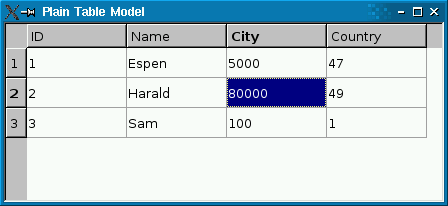
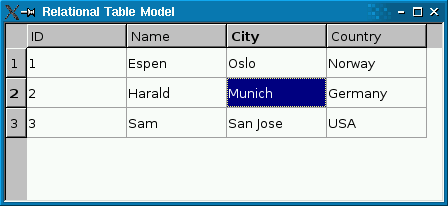
The screenshot on the left shows a plain
QSqlTableModelin aQTableView. Foreign keys (cityandcountry) aren’t resolved to human-readable values. The screenshot on the right shows aQSqlRelationalTableModel, with foreign keys resolved into human-readable text strings.The following code snippet shows how the
QSqlRelationalTableModelwas set up:model.setTable("employee") model.setRelation(2, QSqlRelation("city", "id", "name")) model.setRelation(3, QSqlRelation("country", "id", "name"))See the
QSqlRelationalTableModeldocumentation for details.
© 2022 The Qt Company Ltd. Documentation contributions included herein are the copyrights of their respective owners. The documentation provided herein is licensed under the terms of the GNU Free Documentation License version 1.3 as published by the Free Software Foundation. Qt and respective logos are trademarks of The Qt Company Ltd. in Finland and/or other countries worldwide. All other trademarks are property of their respective owners.