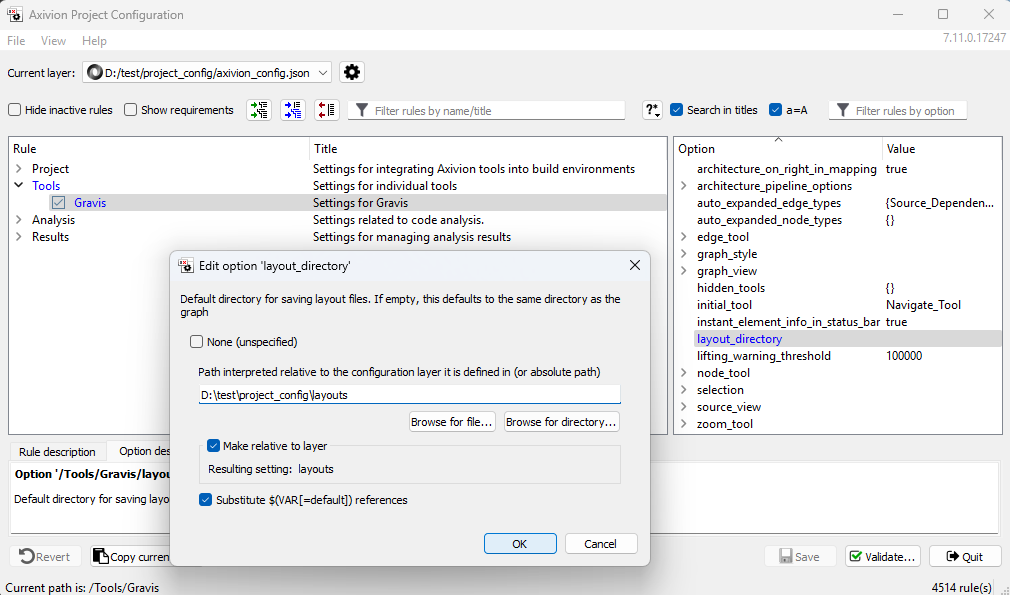
Run your architecture_check once, e.g. by running the Analysis in CI.
While the analysis is running, define a directory where the layouts shall
be stored. This directory should be distributed to all developers who need
to open the architecture check results or who need to work on the architecture
model. E.g.: choose a subdirectory of the project
configuration and store it in the VCS.
Define a way for all developers to configure the config option
Layout_Directory to this directory:
configure this directory in the User Profile of each developer in
$HOME/.bauhaus,
or configure this directory a configuration layer, either
in the project configuration or in a company/department-wide
configuration layer.
Download the result RFG from the WebUI. Please note that the file name of
this RFG is used to identify the layout directory. If you need to change the
name of the file, the layout-lookup will fail.
Open gravis with the option Layout_Directory configured to the directory and load the RFG
Open the Architecture view
If available, load a layout file that was stored when the initial
layout was created (right-click on the background, choose Layout
storage->Import layout…). Alternatively, expand and rearrange the nodes
to define the desired standard layout.
Right-click on the background to open a context menu, choose Layout
storage->Create new layout to store the layout in the defined folder
Checkin/Update the layout in your VCS
When you download the RFG and set the Layout_Directory correctly, the
Architecture view will be displayed with this layout. If you run the
architecture check from gravis, also the result view will be
displayed with this layout.