
AxisHelper QML Type
用于在 3D 场景中显示 3 个坐标轴和网格的可视化助手。更多
| Import Statement: | import QtQuick3D.Helpers |
| Inherits: |
属性
- enableAxisLines : bool
- enableXYGrid : bool
- enableXZGrid : bool
- enableYZGrid : bool
- gridColor : color
- gridOpacity : real
详细说明
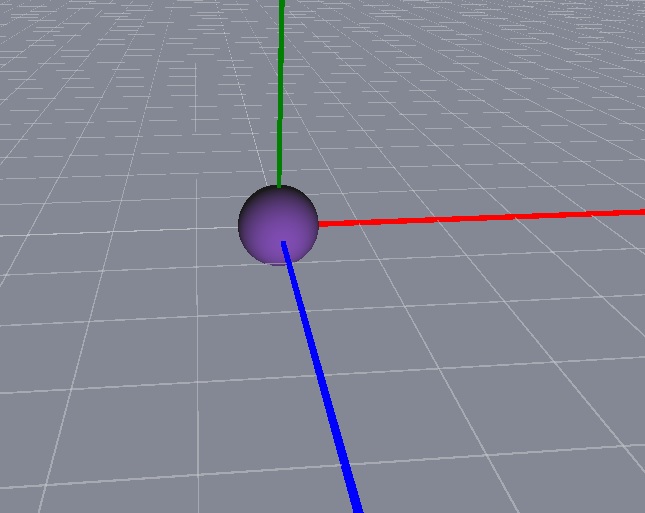
X 轴为红色,Y 轴为绿色,Z 轴为蓝色。
示例场景中有一个位于(0, 0, 0) 位置的球体和一个 AxisHelper 对象。通过WasdController helper,可以方便地浏览场景。
View3D {
    anchors.fill: parent
    camera: camera

    PerspectiveCamera {
        id: camera
        position: Qt.vector3d(0, 0, 600)
    }

    DirectionalLight {
        position: Qt.vector3d(-500, 500, -100)
        color: Qt.rgba(0.4, 0.2, 0.6, 1.0)
        ambientColor: Qt.rgba(0.1, 0.1, 0.1, 1.0)
    }

    Model {
        source: "#Sphere"
        materials: [ DefaultMaterial { } ]
    }

    AxisHelper {
    }
}

WasdController {
    controlledObject: camera
}
属性文档
enableAxisLines : bool |
启用显示轴线。默认值为 true。
enableXYGrid : bool |
启用 XY 平面上的网格。默认值为 false。
enableXZGrid : bool |
启用 XZ 平面上的网格。默认值为 true。
enableYZGrid : bool |
在 YZ 平面上启用网格。默认值为假。
gridColor : color |
指定网格的颜色。默认值为Qt.rgba(0.8, 0.8, 0.8, 1) 。
gridOpacity : real |
指定网格的不透明度。默认值为 0.5。
© 2026 The Qt Company Ltd. Documentation contributions included herein are the copyrights of their respective owners. The documentation provided herein is licensed under the terms of the GNU Free Documentation License version 1.3 as published by the Free Software Foundation. Qt and respective logos are trademarks of The Qt Company Ltd. in Finland and/or other countries worldwide. All other trademarks are property of their respective owners.
