
MapItemGroup QML Type
El tipo `MapItemGroup` es un contenedor para elementos de mapa. Más información...
| Import Statement: | import QtLocation 6.12 |
| Since: | QtLocation 5.9 |
- Lista de todos los miembros, incluidos los heredados
- MapItemGroup forma parte del complemento QML Maps.
Descripción detallada
Su objetivo es facilitar la modularización del código al permitir el uso de archivos qml que contengan elementos de mapa relacionados entre sí, así como los enlaces asociados.
Nota: El lanzamiento de esta API con Qt 5.9 es una versión preliminar (Technology Preview).
Ejemplo de uso
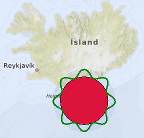
El siguiente fragmento de código muestra cómo utilizar un `MapItemGroup` para crear un ` MapCircle`, centrado en las coordenadas (63, -18) con un radio de 100 km, relleno de color rojo y rodeado por un borde verde ondulado, ambos contenidos en un círculo azul semitransparente con un ` MouseArea ` que desplaza todo el grupo. Este grupo se define en un archivo independiente llamado PolygonGroup.qml:
import QtQuick
import QtPositioning
import QtLocation

MapItemGroup {
    id: itemGroup
    property alias position: mainCircle.center
    property var radius: 100 * 1000
    property var borderHeightPct : 0.3

    MapCircle {
        id: mainCircle
        center : QtPositioning.coordinate(40, 0)
        radius: itemGroup.radius * (1.0 + borderHeightPct)
        opacity: 0.05
        visible: true
        color: 'blue'

        MouseArea{
            anchors.fill: parent
            drag.target: parent
            id: maItemGroup
        }
    }

    MapCircle {
        id: groupCircle
        center: itemGroup.position
        radius: itemGroup.radius
        color: 'crimson'

        onCenterChanged: {
            groupPolyline.populateBorder();
        }
    }

    MapPolyline {
        id: groupPolyline
        line.color: 'green'
        line.width: 3

        function populateBorder() {
            groupPolyline.path = [] // clearing the path
            var waveLength = 8.0;
            var waveAmplitude = groupCircle.radius * borderHeightPct;
            for (var i=0; i <= 360; i++) {
                var wavePhase = (i/360.0 * 2.0 * Math.PI )* waveLength
                var waveHeight = (Math.cos(wavePhase) + 1.0) / 2.0
                groupPolyline.addCoordinate(groupCircle.center.atDistanceAndAzimuth(groupCircle.radius + waveAmplitude * waveHeight , i))
            }
        }

        Component.onCompleted: {
            populateBorder()
        }
    }
}
PolygonGroup.qml es ahora un componente reutilizable que se puede utilizar en un mapa de la siguiente manera:
Map {
    id: map
    PolygonGroup {
        id: polygonGroup
        position: QtPositioning.coordinate(63,-18)
    }
}
© 2026 The Qt Company Ltd. Documentation contributions included herein are the copyrights of their respective owners. The documentation provided herein is licensed under the terms of the GNU Free Documentation License version 1.3 as published by the Free Software Foundation. Qt and respective logos are trademarks of The Qt Company Ltd. in Finland and/or other countries worldwide. All other trademarks are property of their respective owners.
