
RowLayout QML Type
Es idéntico a « GridLayout », pero solo tiene una fila. Más...
| Import Statement: | import QtQuick.Layouts |
| Inherits: |
Propiedades
- layoutDirection : enumeration
(since QtQuick.Layouts 1.1) - spacing : real
- uniformCellSizes : bool
(since QtQuick.Layouts 6.6)
Descripción detallada
Para poder utilizar este tipo de forma más eficaz, se recomienda conocer el funcionamiento general del módulo « Qt Quick Layouts». Consulte la descripción general de «Qt Quick Layouts» para obtener más información.
Está disponible para facilitar el trabajo de los desarrolladores, ya que ofrece una API más clara.
Los elementos de un RowLayout admiten estas propiedades asociadas:
- Layout.minimumWidth
- Layout.minimumHeight
- Layout.preferredWidth
- Layout.preferredHeight
- Layout.maximumWidth
- Layout.maximumHeight
- Layout.fillWidth
- Layout.fillHeight
- Layout.alignment
- Layout.margins
- Layout.leftMargin
- Layout.rightMargin
- Layout.topMargin
- Layout.bottomMargin
- Layout.horizontalStretchFactor
- Layout.verticalStretchFactor
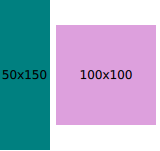
RowLayout {
    id: layout
    anchors.fill: parent
    spacing: 6
    Rectangle {
        color: 'teal'
        Layout.fillWidth: true
        Layout.minimumWidth: 50
        Layout.preferredWidth: 100
        Layout.maximumWidth: 300
        Layout.minimumHeight: 150
        Text {
            anchors.centerIn: parent
            text: parent.width + 'x' + parent.height
        }
    }
    Rectangle {
        color: 'plum'
        Layout.fillWidth: true
        Layout.minimumWidth: 100
        Layout.preferredWidth: 200
        Layout.preferredHeight: 100
        Text {
            anchors.centerIn: parent
            text: parent.width + 'x' + parent.height
        }
    }
}
Más información sobre las propiedades asociadas aquí.
Véase también « ColumnLayout» , « GridLayout », « StackLayout », « Row » y «Qt Quick: Descripción general de los diseños».
Documentación sobre propiedades
layoutDirection : enumeration [since QtQuick.Layouts 1.1]
Esta propiedad establece la dirección de disposición de la fila: controla si los elementos se disponen de izquierda a derecha o de derecha a izquierda. Si se especifica « Qt.RightToLeft », los elementos alineados a la izquierda se alinearán a la derecha y los alineados a la derecha se alinearán a la izquierda.
Valores posibles:
| Constante | Descripción |
|---|---|
Qt.LeftToRight | (por defecto) Los elementos se disponen de izquierda a derecha. |
Qt.RightToLeft | Los elementos se disponen de derecha a izquierda |
Esta propiedad se introdujo en QtQuick.Layouts 1.1.
Véase también GridLayout::layoutDirection y ColumnLayout::layoutDirection.
spacing : real
Esta propiedad determina el espaciado entre cada celda. El valor por defecto es « 5 ».
uniformCellSizes : bool [since QtQuick.Layouts 6.6]
Si esta propiedad se establece en « true », el diseño obligará a que todas las celdas tengan un tamaño uniforme.
Esta propiedad se introdujo en QtQuick.Layouts 6.6.
Véase también « GridLayout::uniformCellWidths », « GridLayout::uniformCellHeights » y « ColumnLayout::uniformCellSizes ».
© 2026 The Qt Company Ltd. Documentation contributions included herein are the copyrights of their respective owners. The documentation provided herein is licensed under the terms of the GNU Free Documentation License version 1.3 as published by the Free Software Foundation. Qt and respective logos are trademarks of The Qt Company Ltd. in Finland and/or other countries worldwide. All other trademarks are property of their respective owners.
