
Creación de gráficos de líneas
Nota: Esto forma parte del ejemplo de la Galería de Gráficos con Widgets.
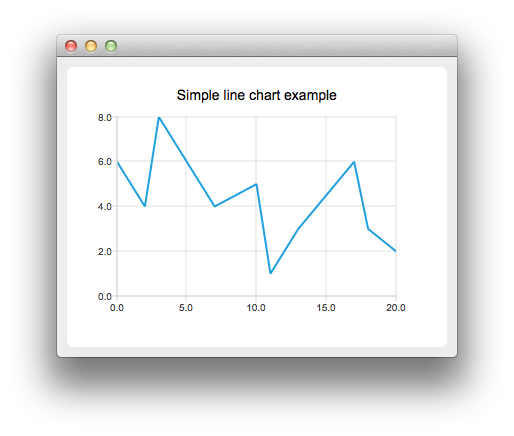
Para crear un gráfico de líneas, se necesita una instancia de QLineSeries. Vamos a crear una.
auto series = new QLineSeries;
A continuación añadimos datos a la serie. Podemos utilizar la función miembro append() o utilizar el operador stream.
series->append(0, 6);
series->append(2, 4);
series->append(3, 8);
series->append(7, 4);
series->append(10, 5);
*series << QPointF(11, 1) << QPointF(13, 3) << QPointF(17, 6) << QPointF(18, 3) << QPointF(20, 2);
Para presentar los datos en el gráfico necesitamos una instancia de QChart. Le añadimos las series, creamos los ejes por defecto y establecemos el título del gráfico.
auto chart = new QChart;
chart->legend()->hide();
chart->addSeries(series);
chart->createDefaultAxes();
chart->setTitle("Simple Line Chart");
Luego creamos un objeto QChartView con QChart como parámetro. De esta manera no necesitamos crear una escena QGraphicsView nosotros mismos.
createDefaultChartView(chart);
El gráfico está listo para ser mostrado.
© 2026 The Qt Company Ltd. Documentation contributions included herein are the copyrights of their respective owners. The documentation provided herein is licensed under the terms of the GNU Free Documentation License version 1.3 as published by the Free Software Foundation. Qt and respective logos are trademarks of The Qt Company Ltd. in Finland and/or other countries worldwide. All other trademarks are property of their respective owners.
