
Personalización de leyendas
Nota: Esto es parte del ejemplo de la Galería de Gráficos con QML.
Aquí le mostramos cómo crear su propia leyenda personalizada en lugar de utilizar la leyenda incorporada de la API ChartView.
La vista principal de la aplicación muestra un gráfico de áreas apiladas. Así es como se crea una de las áreas apiladas. Ver ChartViewStacked.qml y AnimatedAreaSeries.qml.
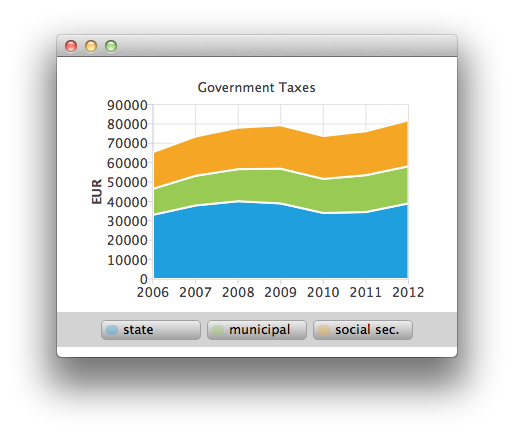
AnimatedAreaSeries {
    id: municipalSeries
    name: "municipal"
    axisX: axisX
    axisY: axisY
    borderWidth: 0
    upperSeries: LineSeries {
        id: municipalUpper
        XYPoint { x: 2006; y: 33119 + 13443 }
        XYPoint { x: 2007; y: 37941 + 15311 }
        XYPoint { x: 2008; y: 40122 + 16552 }
        XYPoint { x: 2009; y: 38991 + 17904 }
        XYPoint { x: 2010; y: 34055 + 17599 }
        XYPoint { x: 2011; y: 34555 + 19002 }
        XYPoint { x: 2012; y: 38991 + 19177 }
    }
    lowerSeries: stateUpper
}
Al pasar el ratón por encima de la leyenda se resaltará la serie sobre la que se pase el ratón. (ver CustomLegend.qml).
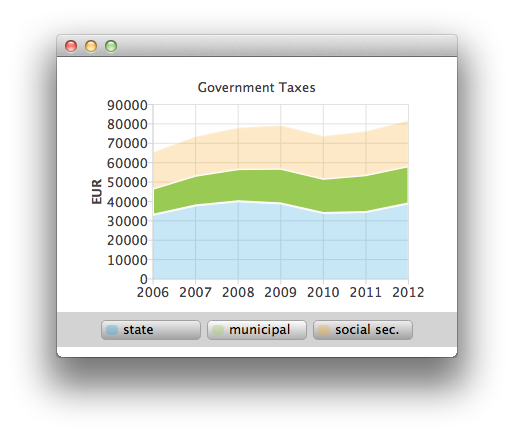
Row {
    id: legendRow
    anchors.centerIn: parent
    spacing: 10

    Repeater {
        id: legendRepeater
        model: legend.seriesCount
        delegate: legendDelegate
    }
}
Component {
    id: legendDelegate
    Rectangle {
        id: rect
    ...
        MouseArea {
            id: mouseArea
            anchors.fill: parent
            hoverEnabled: true
            onEntered: {
                rect.gradient = buttonGradientHovered;
                legend.entered(label.text);
            }
            onExited: {
                rect.gradient = buttonGradient;
                legend.exited(label.text);
                marker.opacity = 0.3;
                marker.height = 10;
            }
            onClicked: {
                legend.selected(label.text);
                marker.opacity = 1.0;
                marker.height = 12;
            }
        }
También puede seleccionar una de las áreas apiladas para verla más de cerca como una serie de líneas haciendo clic con el ratón (ver ChartViewHighlighted.qml).
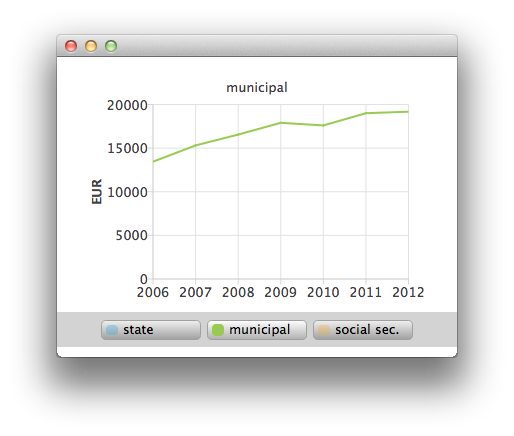
ChartView {
    id: chartViewHighlighted

    property variant selectedSeries

    signal clicked

    legend.visible: false
    margins.top: 10
    margins.bottom: 0
    antialiasing: true

    LineSeries {
        id: lineSeries

        axisX: ValueAxis {
            min: 2006
            max: 2012
            labelFormat: "%.0f"
            tickCount: 7
        }
        axisY: ValueAxis {
            id: axisY
            titleText: "EUR"
            min: 0
            max: 40000
            labelFormat: "%.0f"
            tickCount: 5
        }
    }
© 2026 The Qt Company Ltd. Documentation contributions included herein are the copyrights of their respective owners. The documentation provided herein is licensed under the terms of the GNU Free Documentation License version 1.3 as published by the Free Software Foundation. Qt and respective logos are trademarks of The Qt Company Ltd. in Finland and/or other countries worldwide. All other trademarks are property of their respective owners.
