
Hola, ejemplo de GLES3
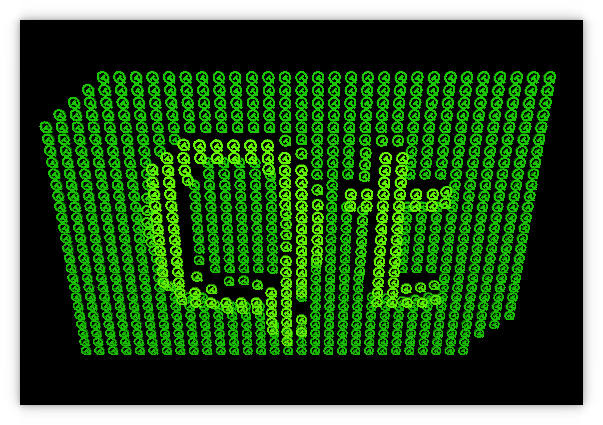
Muestra las funciones de OpenGL ES 3.0 a través de QOpenGLExtraFunctions.
Descripción general
Este ejemplo muestra cómo utilizar de forma sencilla y multiplataforma las funciones de OpenGL ES 3.0 a través de QOpenGLExtraFunctions en una aplicación que funciona de forma idéntica tanto en plataformas de escritorio con OpenGL 3.3 como en dispositivos móviles o embebidos con OpenGL ES 3.0.
Este ejemplo no tiene dependencias de QWidget, sino que utiliza QOpenGLWindow, una subclase de conveniencia de QWindow que permite implementar fácilmente ventanas que contengan contenido renderizado con OpenGL. En este sentido, complementa el ejemplo «OpenGL Window», que muestra la implementación de una ventana de OpenGL ( QWindow ) sin utilizar la subclase de conveniencia.
La implementación de la forma del logotipo de Qt se ha incluido a partir del ejemplo «Hello GL2».
En otros aspectos relacionados con el uso de OpenGL, existen las siguientes diferencias.
- La creación del contexto de OpenGL debe tener un número de versión lo suficientemente alto para las funciones que se están utilizando.
- La directiva de versión del shader es diferente.
Configuración en main.cpp
Aquí instanciamos nuestro ` QGuiApplication` y `QSurfaceformat`, y configuramos su ` depth buffer size`:
int main(int argc, char *argv[])
{
    QGuiApplication app(argc, argv);

    QSurfaceFormat fmt;
    fmt.setDepthBufferSize(24);
Solicitamos un contexto OpenGL 3.3 core u OpenGL ES 3.0, dependiendo de QOpenGLContext::openGLModuleType():
   if (QOpenGLContext::openGLModuleType()== QOpenGLContext::LibGL) {
        qDebug("Requesting 3.3 core context");
        fmt.setVersion(3, 3);
        fmt.setProfile(QSurfaceFormat::CoreProfile);
    } else {
        qDebug("Requesting 3.0 context");
        fmt.setVersion(3, 0);
    }

    QSurfaceFormat::setDefaultFormat(fmt);
Establecemos el formato predeterminado de la superficie e instanciamos nuestra ventana GLWindow glWindow.
Implementación de GLWindow
Esta clase proporciona las funcionalidades de la aplicación de ejemplo.
Para empezar, se declara ` GLWindow ` implementando una subclase de ` QOpenGLWindow`:
class GLWindow : public QOpenGLWindowLas siguientes propiedades se declaran utilizando ` Q_PROPERTY`:
{
    Q_OBJECT
    Q_PROPERTY(float z READ z WRITE setZ)
    Q_PROPERTY(float r READ r WRITE setR)
    Q_PROPERTY(float r2 READ r2 WRITE setR2)
Se declaran las siguientes funciones públicas:
public:
    GLWindow();
    ~GLWindow();

    void initializeGL();
    void resizeGL(int w, int h);
    void paintGL();

    float z() const { return m_eye.z(); }
    void setZ(float v);

    float r() const { return m_r; }
    void setR(float v);
    float r2() const { return m_r2; }
    void setR2(float v);
Se declaran los siguientes objetos privados:
private slots:
    void startSecondStage();
private:
    QOpenGLTexture *m_texture = nullptr;
    QOpenGLShaderProgram *m_program = nullptr;
    QOpenGLBuffer *m_vbo = nullptr;
    QOpenGLVertexArrayObject *m_vao = nullptr;
    Logo m_logo;
    int m_projMatrixLoc = 0;
    int m_camMatrixLoc = 0;
    int m_worldMatrixLoc = 0;
    int m_myMatrixLoc = 0;
    int m_lightPosLoc = 0;
    QMatrix4x4 m_proj;
    QMatrix4x4 m_world;
    QVector3D m_eye;
En cuanto a la implementación, aquellas funciones que no se declaran como «inline» se implementan (o se reimplementan) en glwindow.cpp. Las siguientes secciones abordan los detalles de implementación relacionados con el uso de OpenGL ES 3.0.
Animaciones
El código siguiente se refiere a las animaciones y no se analizará aquí:
GLWindow::GLWindow()
{
    m_world.setToIdentity();
    m_world.translate(0, 0, -1);
    m_world.rotate(180, 1, 0, 0);

    QSequentialAnimationGroup *animGroup = new QSequentialAnimationGroup(this);
    animGroup->setLoopCount(-1);
    QPropertyAnimation *zAnim0 = new QPropertyAnimation(this, QByteArrayLiteral("z"));
    zAnim0->setStartValue(1.5f);
    zAnim0->setEndValue(10.0f);
    zAnim0->setDuration(2000);
    animGroup->addAnimation(zAnim0);
    QPropertyAnimation *zAnim1 = new QPropertyAnimation(this, QByteArrayLiteral("z"));
    zAnim1->setStartValue(10.0f);
    zAnim1->setEndValue(50.0f);
    zAnim1->setDuration(4000);
    zAnim1->setEasingCurve(QEasingCurve::OutElastic);
    animGroup->addAnimation(zAnim1);
    QPropertyAnimation *zAnim2 = new QPropertyAnimation(this, QByteArrayLiteral("z"));
    zAnim2->setStartValue(50.0f);
    zAnim2->setEndValue(1.5f);
    zAnim2->setDuration(2000);
    animGroup->addAnimation(zAnim2);
    animGroup->start();

    QPropertyAnimation* rAnim = new QPropertyAnimation(this, QByteArrayLiteral("r"));
    rAnim->setStartValue(0.0f);
    rAnim->setEndValue(360.0f);
    rAnim->setDuration(2000);
    rAnim->setLoopCount(-1);
    rAnim->start();

    QTimer::singleShot(4000, this, &GLWindow::startSecondStage);
}

GLWindow::~GLWindow()
{
    makeCurrent();
    delete m_texture;
    delete m_program;
    delete m_vbo;
    delete m_vao;
}

void GLWindow::startSecondStage()
{
    QPropertyAnimation* r2Anim = new QPropertyAnimation(this, QByteArrayLiteral("r2"));
    r2Anim->setStartValue(0.0f);
    r2Anim->setEndValue(360.0f);
    r2Anim->setDuration(20000);
    r2Anim->setLoopCount(-1);
    r2Anim->start();
}

void GLWindow::setZ(float v)
{
    m_eye.setZ(v);
    m_uniformsDirty = true;
    update();
}

void GLWindow::setR(float v)
{
    m_r = v;
    m_uniformsDirty = true;
    update();
}

void GLWindow::setR2(float v)
{
    m_r2 = v;
    m_uniformsDirty = true;
    update();
}
Para obtener más información, consulta la documentación en QPropertyAnimation y QSequentialAnimationGroup.
Shaders
Los shaders se definen de la siguiente manera:
static const char *vertexShaderSource =
    "layout(location = 0) in vec4 vertex;\n"
    "layout(location = 1) in vec3 normal;\n"
    "out vec3 vert;\n"
    "out vec3 vertNormal;\n"
    "out vec3 color;\n"
    "uniform mat4 projMatrix;\n"
    "uniform mat4 camMatrix;\n"
    "uniform mat4 worldMatrix;\n"
    "uniform mat4 myMatrix;\n"
    "uniform sampler2D sampler;\n"
    "void main() {\n"
    "   ivec2 pos = ivec2(gl_InstanceID % 32, gl_InstanceID / 32);\n"
    "   vec2 t = vec2(float(-16 + pos.x) * 0.8, float(-18 + pos.y) * 0.6);\n"
    "   float val = 2.0 * length(texelFetch(sampler, pos, 0).rgb);\n"
    "   mat4 wm = myMatrix * mat4(1, 0, 0, 0, 0, 1, 0, 0, 0, 0, 1, 0, t.x, t.y, val, 1) * worldMatrix;\n"
    "   color = texelFetch(sampler, pos, 0).rgb * vec3(0.4, 1.0, 0.0);\n"
    "   vert = vec3(wm * vertex);\n"
    "   vertNormal = mat3(transpose(inverse(wm))) * normal;\n"
    "   gl_Position = projMatrix * camMatrix * wm * vertex;\n"
    "}\n";

static const char *fragmentShaderSource =
    "in highp vec3 vert;\n"
    "in highp vec3 vertNormal;\n"
    "in highp vec3 color;\n"
    "out highp vec4 fragColor;\n"
    "uniform highp vec3 lightPos;\n"
    "void main() {\n"
    "   highp vec3 L = normalize(lightPos - vert);\n"
    "   highp float NL = max(dot(normalize(vertNormal), L), 0.0);\n"
    "   highp vec3 col = clamp(color * 0.2 + color * 0.8 * NL, 0.0, 1.0);\n"
    "   fragColor = vec4(col, 1.0);\n"
    "}\n";
Nota: Son independientes de la versión de OpenGL. Tomamos esto y le añadimos la versión de la siguiente manera:
QByteArray versionedShaderCode(const char *src)
{
    QByteArray versionedSrc;

    if (QOpenGLContext::currentContext()->isOpenGLES())
        versionedSrc.append(QByteArrayLiteral("#version 300 es\n"));
    else
        versionedSrc.append(QByteArrayLiteral("#version 330\n"));

    versionedSrc.append(src);
    return versionedSrc;
}
Inicializando OpenGL
La inicialización del programa de sombreado se gestiona mediante ` initializeGL()`:
void GLWindow::initializeGL()
{
    QOpenGLFunctions *f = QOpenGLContext::currentContext()->functions();

    QImage img(":/qtlogo.png");
    Q_ASSERT(!img.isNull());
    delete m_texture;
    m_texture = new QOpenGLTexture(img.scaled(32, 36).flipped());

    delete m_program;
    m_program = new QOpenGLShaderProgram;
Ahora se antepone la versión de OpenGL y se configuran las distintas matrices y la posición de la luz:
    m_program->addShaderFromSourceCode(QOpenGLShader::Vertex, versionedShaderCode(vertexShaderSource));
    m_program->addShaderFromSourceCode(QOpenGLShader::Fragment, versionedShaderCode(fragmentShaderSource));
    m_program->link();

    m_projMatrixLoc = m_program->uniformLocation("projMatrix");
    m_camMatrixLoc = m_program->uniformLocation("camMatrix");
    m_worldMatrixLoc = m_program->uniformLocation("worldMatrix");
    m_myMatrixLoc = m_program->uniformLocation("myMatrix");
    m_lightPosLoc = m_program->uniformLocation("lightPos");
Aunque no es estrictamente necesario para ES 3, se crea un objeto de matriz de vértices.
    delete m_vao;
    m_vao = new QOpenGLVertexArrayObject;
    if (m_vao->create())
        m_vao->bind();

    m_program->bind();
    delete m_vbo;
    m_vbo = new QOpenGLBuffer;
    m_vbo->create();
    m_vbo->bind();
    m_vbo->allocate(m_logo.constData(), m_logo.count() * sizeof(GLfloat));
    f->glEnableVertexAttribArray(0);
    f->glEnableVertexAttribArray(1);
    f->glVertexAttribPointer(0, 3, GL_FLOAT, GL_FALSE, 6 * sizeof(GLfloat),
                             nullptr);
    f->glVertexAttribPointer(1, 3, GL_FLOAT, GL_FALSE, 6 * sizeof(GLfloat),
                             reinterpret_cast<void *>(3 * sizeof(GLfloat)));
    m_vbo->release();

    f->glEnable(GL_DEPTH_TEST);
    f->glEnable(GL_CULL_FACE);
Cambiar el tamaño de la ventana
La perspectiva debe ajustarse al nuevo tamaño de la ventana de la siguiente manera:
void GLWindow::resizeGL(int w, int h)
{
    m_proj.setToIdentity();
    m_proj.perspective(45.0f, GLfloat(w) / h, 0.01f, 100.0f);
    m_uniformsDirty = true;
}
Pintura
Utilizamos QOpenGLExtraFunctions en lugar de QOpenGLFunctions, ya que queremos ir más allá de lo que ofrece GL(ES) 2.0:
void GLWindow::paintGL()
{
    // Now use QOpenGLExtraFunctions instead of QOpenGLFunctions as we want to
    // do more than what GL(ES) 2.0 offers.
    QOpenGLExtraFunctions *f = QOpenGLContext::currentContext()->extraFunctions();
Borramos la pantalla y los búferes, y vinculamos nuestro programa de sombreado y nuestra textura:
    f->glClearColor(0, 0, 0, 1);
    f->glClear(GL_COLOR_BUFFER_BIT | GL_DEPTH_BUFFER_BIT);

    m_program->bind();
    m_texture->bind();
La lógica para gestionar una llamada inicial a ` paintGL() ` o una llamada tras una llamada a ` resizeGL() ` se implementa de la siguiente manera:
    if (m_uniformsDirty) {
        m_uniformsDirty = false;
        QMatrix4x4 camera;
        camera.lookAt(m_eye, m_eye + m_target, QVector3D(0, 1, 0));
        m_program->setUniformValue(m_projMatrixLoc, m_proj);
        m_program->setUniformValue(m_camMatrixLoc, camera);
        QMatrix4x4 wm = m_world;
        wm.rotate(m_r, 1, 1, 0);
        m_program->setUniformValue(m_worldMatrixLoc, wm);
        QMatrix4x4 mm;
        mm.setToIdentity();
        mm.rotate(-m_r2, 1, 0, 0);
        m_program->setUniformValue(m_myMatrixLoc, mm);
        m_program->setUniformValue(m_lightPosLoc, QVector3D(0, 0, 70));
    }
Por último, mostramos una función introducida en OpenGL 3.1 o OpenGL ES 3.0:
    f->glDrawArraysInstanced(GL_TRIANGLES, 0, m_logo.vertexCount(), 32 * 36);
}
Esto funciona porque anteriormente solicitamos un contexto 3.3 o 3.0.
© 2026 The Qt Company Ltd. Documentation contributions included herein are the copyrights of their respective owners. The documentation provided herein is licensed under the terms of the GNU Free Documentation License version 1.3 as published by the Free Software Foundation. Qt and respective logos are trademarks of The Qt Company Ltd. in Finland and/or other countries worldwide. All other trademarks are property of their respective owners.
