
Ejemplo de visor multipágina PDF
Un visor de PDF de Qt Quick que permite desplazarse por las páginas.
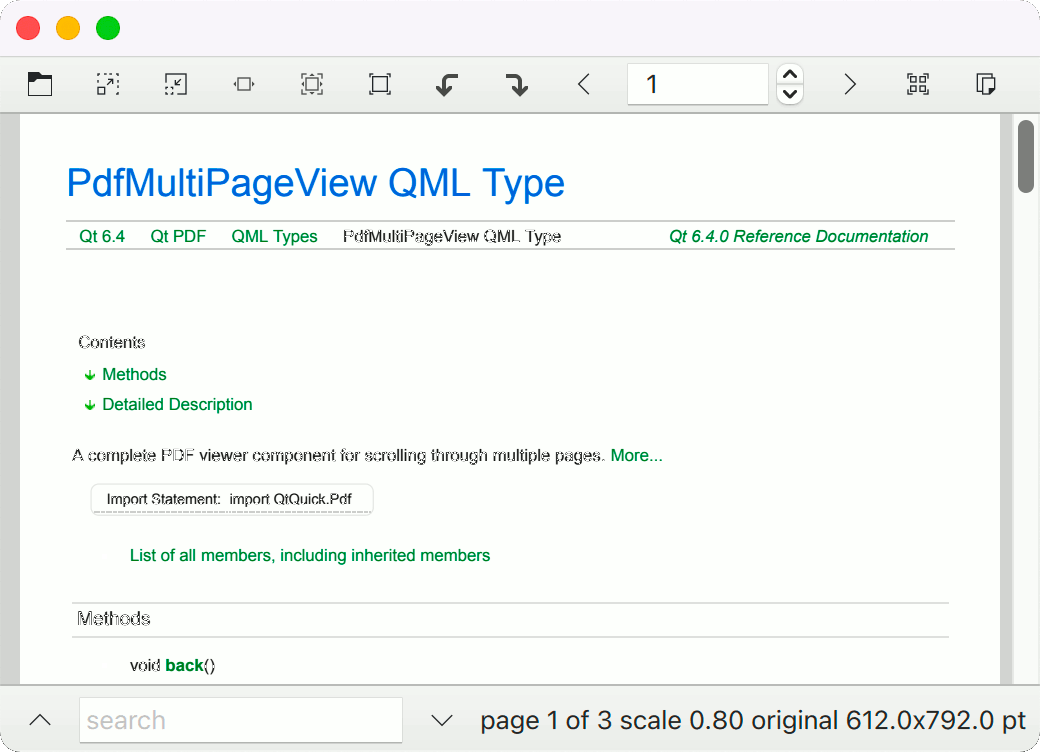
PDF Multipage Viewer demuestra cómo utilizar el componente PdfMultiPageView para representar documentos PDF y buscar texto en ellos.
Ejecución del ejemplo
Para ejecutar el ejemplo desde Qt Creatorabra el modo Welcome y seleccione el ejemplo de Examples. Para más información, consulte Qt Creator: Tutorial: Construir y ejecutar.
Creación de la ventana principal
Instancie un ApplicationWindow, vincule su título al título del documento PDF y cree una barra de herramientas:
ApplicationWindow {
    id: root
    width: 800
    height: 1024
    color: "lightgrey"
    title: doc.title
    visible: true
    property string source // for main.cpp

    header: ToolBar {
        RowLayout {
            anchors.fill: parent
            anchors.rightMargin: 6
La barra de herramientas tiene botones para la mayoría de las acciones comunes:
            ToolButton {
                action: Action {
                    shortcut: StandardKey.Open
                    icon.source: "qrc:/qt/qml/MultiPageModule/resources/document-open.svg"
                    onTriggered: fileDialog.open()
                }
            }
            ToolButton {
                action: Action {
                    shortcut: StandardKey.ZoomIn
                    enabled: view.renderScale < 10
                    icon.source: "qrc:/qt/qml/MultiPageModule/resources/zoom-in.svg"
                    onTriggered: view.renderScale *= Math.sqrt(2)
                }
            }
            ToolButton {
                action: Action {
                    shortcut: StandardKey.ZoomOut
Declare un PdfDocument y vincule la propiedad status y la señal passwordRequired para informar al usuario cuando se produzca un error o se necesite una contraseña:
    Dialog {
        id: passwordDialog
        title: "Password"
        standardButtons: Dialog.Ok | Dialog.Cancel
        modal: true
        closePolicy: Popup.CloseOnEscape
        anchors.centerIn: parent
        width: 300

        contentItem: TextField {
            id: passwordField
            placeholderText: qsTr("Please provide the password")
            echoMode: TextInput.Password
            width: parent.width
            onAccepted: passwordDialog.accept()
        }
        onOpened: passwordField.forceActiveFocus()
        onAccepted: doc.password = passwordField.text
    }

    Dialog {
        id: errorDialog
        title: "Error loading " + doc.source
        standardButtons: Dialog.Close
        modal: true
        closePolicy: Popup.CloseOnEscape
        anchors.centerIn: parent
        width: 300
        visible: doc.status === PdfDocument.Error

        contentItem: Label {
            id: errorField
            text: doc.error
        }
    }

    PdfDocument {
        id: doc
        source: Qt.resolvedUrl(root.source)
        onPasswordRequired: passwordDialog.open()
    }
Añade el componente principal, PdfMultiPageView:
    PdfMultiPageView {
        id: view
        anchors.fill: parent
        anchors.leftMargin: sidebar.position * sidebar.width
        document: doc
        searchString: searchField.text
        onCurrentPageChanged: currentPageSB.value = view.currentPage + 1
    }

    DropArea {
        anchors.fill: parent
        keys: ["text/uri-list"]
        onEntered: (drag) => {
            drag.accepted = (drag.proposedAction === Qt.MoveAction || drag.proposedAction === Qt.CopyAction) &&
                drag.hasUrls && drag.urls[0].endsWith("pdf")
        }
        onDropped: (drop) => {
            doc.source = drop.urls[0]
            drop.acceptProposedAction()
        }
    }
Un Drawer contiene un ListView para mostrar los resultados de la búsqueda del searchModel:
    Drawer {
        id: sidebar
        edge: Qt.LeftEdge
        modal: false
        width: 300
        y: root.header.height
        height: view.height
        dim: false
        clip: true

        TabBar {
            id: sidebarTabs
            x: -width
            rotation: -90
            transformOrigin: Item.TopRight
            currentIndex: 2 // bookmarks by default
            TabButton {
                text: qsTr("Info")
            }
            TabButton {
                text: qsTr("Search Results")
            }
            TabButton {
                text: qsTr("Bookmarks")
            }
            TabButton {
                text: qsTr("Pages")
            }
        }

        GroupBox {
            anchors.fill: parent
            anchors.leftMargin: sidebarTabs.height

            StackLayout {
                anchors.fill: parent
                currentIndex: sidebarTabs.currentIndex
                component InfoField: TextInput {
                    Layout.preferredWidth: parent.width
                    selectByMouse: true
                    readOnly: true
                    wrapMode: Text.WordWrap
                }
                ColumnLayout {
                    spacing: 6
                    Layout.preferredWidth: parent.width - 6
                    Label { font.bold: true; text: qsTr("Title") }
                    InfoField { text: doc.title }
                    Label { font.bold: true; text: qsTr("Author") }
                    InfoField { text: doc.author }
                    Label { font.bold: true; text: qsTr("Subject") }
                    InfoField { text: doc.subject }
                    Label { font.bold: true; text: qsTr("Keywords") }
                    InfoField { text: doc.keywords }
                    Label { font.bold: true; text: qsTr("Producer") }
                    InfoField { text: doc.producer }
                    Label { font.bold: true; text: qsTr("Creator") }
                    InfoField { text: doc.creator }
                    Label { font.bold: true; text: qsTr("Creation date") }
                    InfoField { text: doc.creationDate }
                    Label { font.bold: true; text: qsTr("Modification date") }
                    InfoField { text: doc.modificationDate }
                    Item { id: filler; Layout.fillHeight: true }
                    Label {
                        Layout.alignment: Qt.AlignBottom
                        font.bold: true
                        textFormat: Text.StyledText
                        text: qsTr("<a href='https://doc.qt.io/qt-6/qtpdf-multipage-example.html'>PdfMultiPageView example</a><br/>\n"
                                   + "Qt version %1").arg(Application.version)
                        onLinkActivated: (link) => Qt.openUrlExternally(link)
                    }
                }
                ListView {
                    id: searchResultsList
                    implicitHeight: parent.height
                    model: view.searchModel
                    currentIndex: view.searchModel.currentResult
                    ScrollBar.vertical: ScrollBar { }
                    delegate: ItemDelegate {
                        id: resultDelegate
                        required property int index
                        required property int page
                        required property string contextBefore
                        required property string contextAfter
                        width: parent ? parent.width : 0
                        RowLayout {
                            anchors.fill: parent
                            spacing: 0
                            Label {
                                text: "Page " + (resultDelegate.page + 1) + ": "
                            }
                            Label {
                                text: resultDelegate.contextBefore
                                elide: Text.ElideLeft
                                horizontalAlignment: Text.AlignRight
                                Layout.fillWidth: true
                                Layout.preferredWidth: parent.width / 2
                            }
                            Label {
                                font.bold: true
                                text: view.searchString
                                Layout.preferredWidth: implicitWidth
                            }
                            Label {
                                text: resultDelegate.contextAfter
                                elide: Text.ElideRight
                                Layout.fillWidth: true
                                Layout.preferredWidth: parent.width / 2
                            }
                        }
                        highlighted: ListView.isCurrentItem
                        onClicked: view.searchModel.currentResult = resultDelegate.index
                    }
                }
                TreeView {
                    id: bookmarksTree
                    implicitHeight: parent.height
                    implicitWidth: parent.width
                    columnWidthProvider: function() { return width }
                    delegate: TreeViewDelegate {
                        required property int page
                        required property point location
                        required property real zoom
                        onClicked: view.goToLocation(page, location, zoom)
                    }
                    model: PdfBookmarkModel {
                        document: doc
                    }
                    ScrollBar.vertical: ScrollBar { }
                }
                GridView {
                    id: thumbnailsView
                    implicitWidth: parent.width
                    implicitHeight: parent.height
                    model: doc.pageModel
                    cellWidth: width / 2
                    cellHeight: cellWidth + 10
                    delegate: Item {
                        id: del
                        required property int index
                        required property string label
                        required property size pointSize
                        width: thumbnailsView.cellWidth
                        height: thumbnailsView.cellHeight
                        Rectangle {
                            id: paper
                            width: image.width
                            height: image.height
                            x: (parent.width - width) / 2
                            y: (parent.height - height - pageNumber.height) / 2
                            PdfPageImage {
                                id: image
                                document: doc
                                currentFrame: del.index
                                asynchronous: true
                                fillMode: Image.PreserveAspectFit
                                property bool landscape: del.pointSize.width > del.pointSize.height
                                width: landscape ? thumbnailsView.cellWidth - 6
                                                 : height * del.pointSize.width / del.pointSize.height
                                height: landscape ? width * del.pointSize.height / del.pointSize.width
                                                  : thumbnailsView.cellHeight - 14
                                sourceSize.width: width
                                sourceSize.height: height
                            }
                        }
                        Text {
                            id: pageNumber
                            anchors.bottom: parent.bottom
                            anchors.horizontalCenter: parent.horizontalCenter
                            text: del.label
                        }
                        TapHandler {
                            onTapped: view.goToPage(del.index)
                        }
                    }
                }
            }
        }
    }
Por último, añada una segunda barra de herramientas como pie de página, para alojar el campo de búsqueda, los botones de búsqueda arriba/abajo y alguna información de estado:
    footer: ToolBar {
        height: footerRow.implicitHeight + 6
        RowLayout {
            id: footerRow
            anchors.fill: parent
            ToolButton {
                action: Action {
                    id: sidebarOpenAction
                    checkable: true
                    checked: sidebar.opened
                    icon.source: checked
                                 ? "qrc:/qt/qml/MultiPageModule/resources/sidebar-collapse-left.svg"
                                 : "qrc:/qt/qml/MultiPageModule/resources/sidebar-expand-left.svg"
                    onTriggered: sidebar.open()
                }
                ToolTip.visible: enabled && hovered
                ToolTip.delay: 2000
                ToolTip.text: "open sidebar"
            }
            ToolButton {
                action: Action {
                    icon.source: "qrc:/qt/qml/MultiPageModule/resources/go-up-search.svg"
                    shortcut: StandardKey.FindPrevious
                    enabled: view.searchModel.count > 0
                    onTriggered: view.searchBack()
                }
                ToolTip.visible: enabled && hovered
                ToolTip.delay: 2000
                ToolTip.text: "find previous"
            }
            TextField {
                id: searchField
                placeholderText: "search"
                Layout.minimumWidth: 150
                Layout.fillWidth: true
                Layout.bottomMargin: 3
                onAccepted: {
                    sidebar.open()
                    sidebarTabs.setCurrentIndex(1)
                }
                Image {
                    visible: searchField.text !== ""
                    source: "qrc:/qt/qml/MultiPageModule/resources/edit-clear.svg"
                    sourceSize.height: searchField.height - 6
                    anchors {
                        right: parent.right
                        verticalCenter: parent.verticalCenter
                        margins: 3
                    }
                    TapHandler {
                        onTapped: searchField.clear()
                    }
                }
            }
            ToolButton {
                action: Action {
                    icon.source: "qrc:/qt/qml/MultiPageModule/resources/go-down-search.svg"
                    shortcut: StandardKey.FindNext
                    enabled: view.searchModel.count > 0
                    onTriggered: view.searchForward()
                }
                ToolTip.visible: enabled && hovered
                ToolTip.delay: 2000
                ToolTip.text: "find next"
            }
            Label {
                id: statusLabel
                property size implicitPointSize: doc.pagePointSize(view.currentPage)
                text: "page " + (currentPageSB.value) + " of " + doc.pageCount +
                      " scale " + view.renderScale.toFixed(2) +
                      " original " + implicitPointSize.width.toFixed(1) + "x" + implicitPointSize.height.toFixed(1) + " pt"
                visible: doc.pageCount > 0
            }
        }
    }
}
Archivos y Atribuciones
Ver también PDF Single Page Viewer Example.
© 2026 The Qt Company Ltd. Documentation contributions included herein are the copyrights of their respective owners. The documentation provided herein is licensed under the terms of the GNU Free Documentation License version 1.3 as published by the Free Software Foundation. Qt and respective logos are trademarks of The Qt Company Ltd. in Finland and/or other countries worldwide. All other trademarks are property of their respective owners.
