
Qt Quick Ejemplos - Efectos de sombreado
Un ejemplo de Qt Quick que demuestra el uso de los efectos de sombreado.
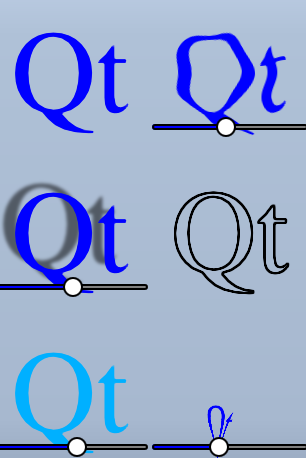
Este ejemplo demuestra un par de efectos visuales que puedes realizar con shaders en Qt Quick. Aplica cinco efectos diferentes sobre un texto y un par de imágenes. Para más información, visite Conceptos Importantes en Qt Quick - Graphical Effects
Ejecutar el ejemplo
Para ejecutar el ejemplo desde Qt Creator, abra el modo Welcome y seleccione el ejemplo de Examples. Para más información, consulte Qt Creator: Tutorial: Construir y ejecutar.
Usando ShaderEffect
El tipo ShaderEffect típicamente opera sobre otros tipos, usando un ShaderEffectSource:
ShaderEffectSource {
    id: theSource
    sourceItem: theItem
}
En el fragmento anterior, theItem es el ID de un objeto QML complejo en el archivo.
ShaderEffects puede utilizar este ShaderEffectSource como una textura en su fragment shader:
fragmentShader: "content/shaders/wobble.frag.qsb"
Con el fin de soportar múltiples APIs gráficas, no sólo OpenGL, la fuente del shader no está incrustada en QML. El archivo .qsb al que se hace referencia es un paquete de sombreadores pregenerado que contiene múltiples variantes del código del sombreador. Qt Quick elige el sombreador adecuado en tiempo de ejecución, en función de la API gráfica (Vulkan, Metal, Direct3D 11 u OpenGL) utilizada en ese momento. El archivo .qsb se genera fuera de línea y se incluye con el ejecutable a través del sistema de recursos de Qt.
Puede utilizar cualquier propiedad personalizada en el ShaderEffect en su shader. Esto hace que el código del shader animado sea muy fácil:
property variant source: theSource
property real bend
property real minimize
property real side: genieSlider.value
SequentialAnimation on bend {
    loops: Animation.Infinite
    NumberAnimation { to: 1; duration: 700; easing.type: Easing.InOutSine }
    PauseAnimation { duration: 1600 }
    NumberAnimation { to: 0; duration: 700; easing.type: Easing.InOutSine }
    PauseAnimation { duration: 1000 }
}
SequentialAnimation on minimize {
    loops: Animation.Infinite
    PauseAnimation { duration: 300 }
    NumberAnimation { to: 1; duration: 700; easing.type: Easing.InOutSine }
    PauseAnimation { duration: 1000 }
    NumberAnimation { to: 0; duration: 700; easing.type: Easing.InOutSine }
    PauseAnimation { duration: 1300 }
}
ShaderEffects también puede tener un shader vertext personalizado. Establecer la propiedad mesh en ShaderEffect proporciona más vértices para manipular, permitiendo más efectos.
mesh: Qt.size(10, 10)
vertexShader: "content/shaders/genie.vert.qsb"
© 2026 The Qt Company Ltd. Documentation contributions included herein are the copyrights of their respective owners. The documentation provided herein is licensed under the terms of the GNU Free Documentation License version 1.3 as published by the Free Software Foundation. Qt and respective logos are trademarks of The Qt Company Ltd. in Finland and/or other countries worldwide. All other trademarks are property of their respective owners.
