
Visualización de texto
Para mostrar texto, el módulo Qt Quick . Para usos relacionados, los tipos TextInput y TextEdit proporcionan controles de texto editables. Para el marcado HTML completo, véase el módulo Qt WebEngine.
Visualización y formateo de texto
Para mostrar texto en QML, cree un elemento Text y defina la propiedad text con el texto que desea mostrar. El elemento Texto mostrará ese texto.
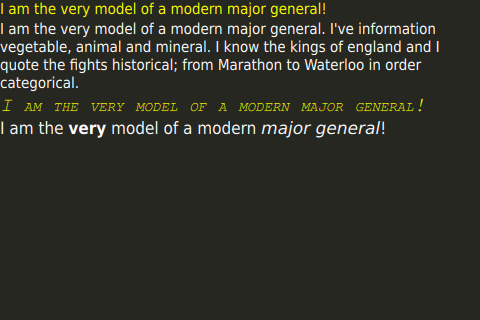
Se pueden establecer varias propiedades en el elemento Texto para dar estilo a todo el bloque de texto. Entre ellas se incluyen el color, la familia de fuentes, el tamaño de fuente, la negrita y la cursiva. Para obtener una lista completa de propiedades, consulte la documentación del tipo Text.
El texto enriquecido puede utilizarse para dar estilo de forma selectiva a secciones específicas de texto con un elemento Texto. Establezca Text::textFormat a Text.StyledText para utilizar esta funcionalidad. Encontrará más detalles en la documentación del tipo Text.
Disposición del texto
Por defecto, Text mostrará el texto como una sola línea a menos que contenga nuevas líneas incrustadas. Para envolver la línea, establezca la propiedad wrapMode y dé al texto una anchura explícita para que se envuelva. Si la anchura o la altura no están definidas explícitamente, la lectura de estas propiedades devolverá los parámetros del rectángulo delimitador del texto (si ha definido explícitamente la anchura o la altura, puede seguir utilizando paintedWidth y paintedHeight). Con estos parámetros en mente, el Texto puede ser posicionado como cualquier otro Item.
Código de ejemplo
import QtQuick

Item {
    id: root
    width: 480
    height: 320

    Rectangle {
        color: "#272822"
        width: 480
        height: 320
    }

    Column {
        spacing: 20

        Text {
            text: 'I am the very model of a modern major general!'

            // color can be set on the entire element with this property
            color: "yellow"

        }

        Text {
            // For text to wrap, a width has to be explicitly provided
            width: root.width

            // This setting makes the text wrap at word boundaries when it goes
            // past the width of the Text object
            wrapMode: Text.WordWrap

            // You can use \ to escape quotation marks, or to add new lines (\n).
            //  Use \\ to get a \ in the string
            text: 'I am the very model of a modern major general. I\'ve information \
                  vegetable, animal and mineral. I know the kings of england and I \
                  quote the fights historical; from Marathon to Waterloo in order categorical.'

            // color can be set on the entire element with this property
            color: "white"

        }

        Text {
            text: 'I am the very model of a modern major general!'

            // color can be set on the entire element with this property
            color: "yellow"

            // font properties can be set effciently on the whole string at once
            font { family: 'Courier'; pixelSize: 20; italic: true; capitalization: Font.SmallCaps }

        }

        Text {
            // HTML like markup can also be used
            text: '<font color="white">I am the <b>very</b> model of a modern <i>major general</i>!</font>'

            // This could also be written font { pointSize: 14 }. Both syntaxes are valid.
            font.pointSize: 14

            // StyledText format supports fewer tags, but is more efficient than RichText
            textFormat: Text.StyledText
        }
    }
}
Internacionalización y escalabilidad
Cuando se trabaja con textos, las aplicaciones deben tener en cuenta varios temas como la orientación del dispositivo y la configuración del idioma.
Las páginas siguientes tratan en detalle estos temas.
© 2026 The Qt Company Ltd. Documentation contributions included herein are the copyrights of their respective owners. The documentation provided herein is licensed under the terms of the GNU Free Documentation License version 1.3 as published by the Free Software Foundation. Qt and respective logos are trademarks of The Qt Company Ltd. in Finland and/or other countries worldwide. All other trademarks are property of their respective owners.
