
Qt Quick 3D - Renderizado por instancias personalizado
Muestra la instanciación con materiales personalizados y una tabla de instancias en C++.
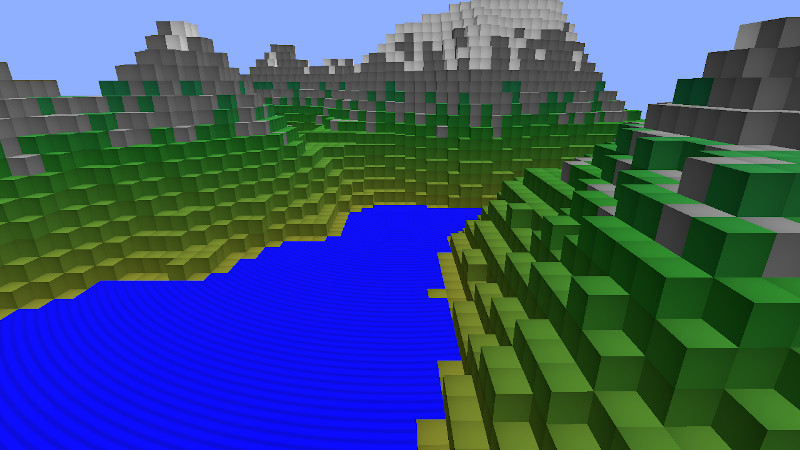
Este ejemplo muestra cómo crear datos de instancia mediante programación en C++ y cómo utilizar materiales personalizados con el renderizado instanciado.
Tabla de instanciación personalizada
Definimos nuestra tabla como una subclase de ` QQuick3DInstancing ` y añadimos algunas propiedades para poder controlarla desde QML:
class CppInstanceTable : public QQuick3DInstancing
{
    Q_OBJECT
    QML_ELEMENT

    Q_PROPERTY(int gridSize READ gridSize WRITE setGridSize NOTIFY gridSizeChanged)
    Q_PROPERTY(float gridSpacing READ gridSpacing WRITE setGridSpacing NOTIFY gridSpacingChanged)
    Q_PROPERTY(int randomSeed READ randomSeed WRITE setRandomSeed NOTIFY randomSeedChanged)
La función virtual ` getInstanceBuffer ` se reimplementa para devolver los datos de instanciación:
QByteArray CppInstanceTable::getInstanceBuffer(int *instanceCount)
{
    if (m_dirty) {
        BlockTable blocks(m_gridSize, m_randomSeed);
        m_instanceData.resize(0);

        auto idxToPos = [this](int i) -> float { return m_gridSpacing * (i - m_gridSize / 2); };

        int instanceNumber = 0;
        for (int i = 0; i < m_gridSize; ++i) {
            float xPos = idxToPos(i);
            for (int j = 0; j < m_gridSize; ++j) {
                float zPos = idxToPos(j);
                int lowest = blocks.lowestVisible(i, j);
                int highest = blocks.highestBlock(i, j);
                for (int k = lowest; k <= highest; ++k) {
                    float yPos = idxToPos(k);
                    QColor color = blocks.getBlockColor(i, j, k);
                    float waterAnimation = blocks.isWaterSurface(i, j, k) ? 1.0 : 0.0;
                    auto entry = calculateTableEntry({ xPos, yPos, zPos }, { 1.0, 1.0, 1.0 }, {}, color, { waterAnimation, 0, 0, 0 });
                    m_instanceData.append(reinterpret_cast<const char *>(&entry), sizeof(entry));
                    instanceNumber++;
                }
            }
        }
        m_instanceCount = instanceNumber;
        m_dirty = false;
    }
    if (instanceCount)
        *instanceCount = m_instanceCount;

    return m_instanceData;
}
Material personalizado
Utilizamos un material personalizado con sombreado, lo que significa que Qt nos proporciona la implementación básica y nosotros solo especificamos la lógica adicional.
La única personalización que necesitamos para el sombreador de vértices es la de pasar información al sombreador de fragmentos. Por defecto, Qt solo proporciona los datos de instancia al sombreador de vértices, por lo que los pasamos como ` vCustomData`. También calculamos la posición global del vértice y la ponemos a disposición como ` vGlobalPosition`.
// Copyright (C) 2023 The Qt Company Ltd.
// SPDX-License-Identifier: LicenseRef-Qt-Commercial OR BSD-3-Clause

VARYING vec4 vCustomData;
VARYING vec3 vGlobalPosition;
void MAIN()
{
    vCustomData = INSTANCE_DATA;

    // MODEL_MATRIX does not exist when instancing
    vec4 pos = INSTANCE_MODEL_MATRIX * vec4(VERTEX, 1.0);
    vGlobalPosition = pos.xyz;
}
El sombreador de fragmentos realiza una sencilla animación de ondas para las superficies de agua. El resto de elementos reciben un sutil degradado radial. La diferencia viene determinada por el primer elemento de los datos personalizados.
VARYING vec4 vCustomData;
VARYING vec3 vGlobalPosition;

void MAIN()
{
    METALNESS = 0.0;
    ROUGHNESS = 1.0;
    FRESNEL_POWER = 5.0;

    float c;

    if (vCustomData.x > 0)
        c = 1.0 - (1.0 + sin(sqrt(vGlobalPosition.x*vGlobalPosition.x + vGlobalPosition.z*vGlobalPosition.z) - uTime/200.0)) * 0.2;
    else
        c = 1.0 - 0.25 * (UV0.x*UV0.x + UV0.y*UV0.y);

    BASE_COLOR = vec4(c, c, c, 1.0);
}
Uso de la tabla y el material personalizados en QML
Creamos un material personalizado utilizando los sombreadores que hemos creado anteriormente y añadimos una nueva propiedad uTime. Esta propiedad se asigna automáticamente al uniforme correspondiente en el sombreador de fragmentos.
CustomMaterial {
    id: cubeMaterial
    property real uTime: frametimer.elapsedTime
    FrameAnimation {
        id: frametimer
        running: true
    }

    vertexShader: "cubeMaterial.vert"
    fragmentShader: "cubeMaterial.frag"
}
Por último, creamos nuestro modelo y le aplicamos el material personalizado y la tabla de instancias:
Model {
    id: instancedCube
    property real cubeSize: 15
    scale: Qt.vector3d(cubeSize/100, cubeSize/100, cubeSize/100)
    source: "#Cube"
    instancing: CppInstanceTable {
        gridSize: 65
        gridSpacing: instancedCube.cubeSize
        randomSeed: 1522562186
    }
    materials: [ cubeMaterial ]
}
Ten en cuenta que solo creamos un único cubo: todo el trabajo pesado lo realiza la GPU.
© 2026 The Qt Company Ltd. Documentation contributions included herein are the copyrights of their respective owners. The documentation provided herein is licensed under the terms of the GNU Free Documentation License version 1.3 as published by the Free Software Foundation. Qt and respective logos are trademarks of The Qt Company Ltd. in Finland and/or other countries worldwide. All other trademarks are property of their respective owners.
