
Qt Quick 3D - Ejemplo de renderizado volumétrico
Demuestra cómo hacer renderizado volumétrico en Qt Quick 3D.
Introducción
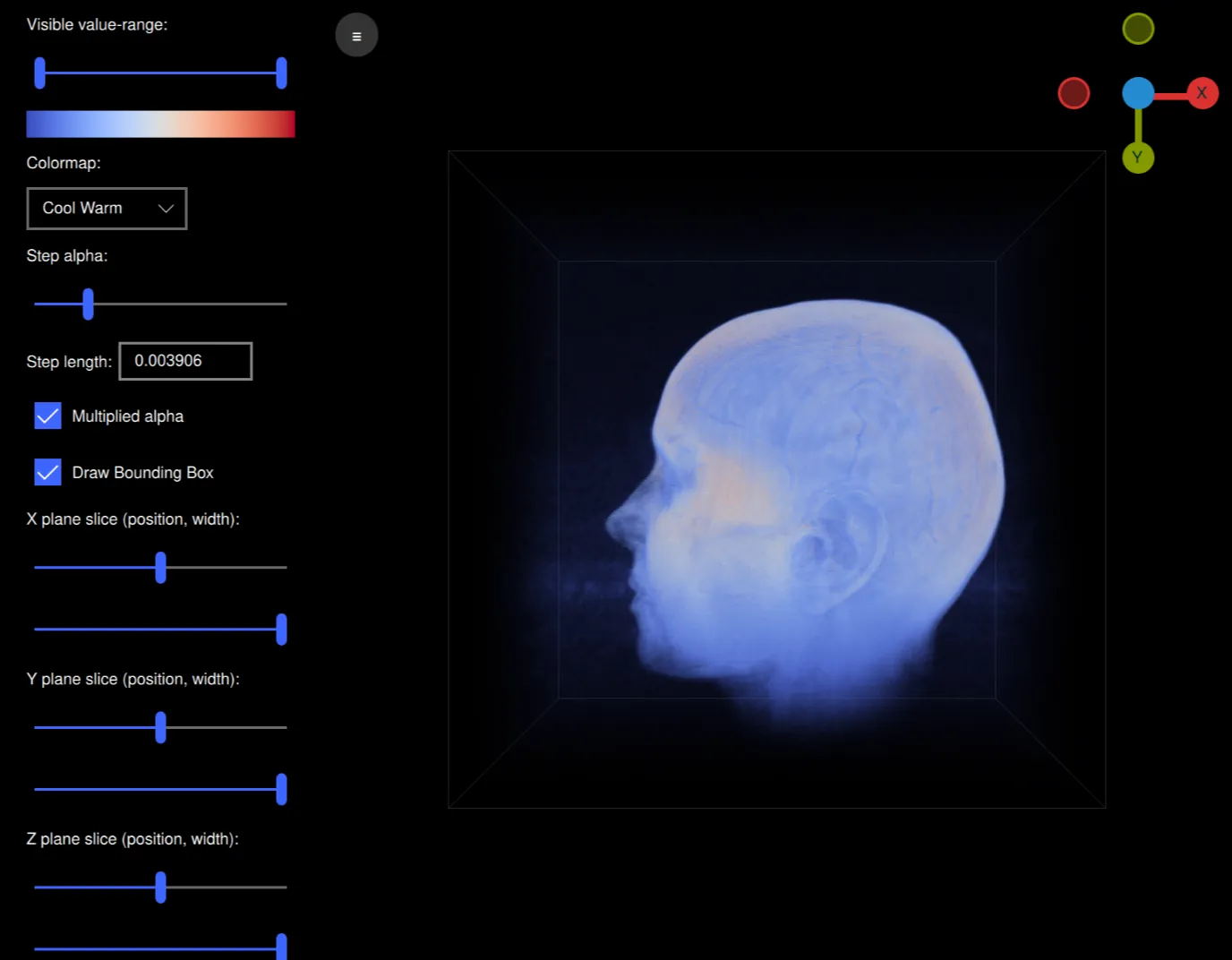
Este ejemplo demuestra como hacer render volumétrico usando un shader personalizado y una textura de volumen 3D con una técnica llamada Volume ray casting. Este ejemplo es una aplicación que puede leer archivos de volumen sin procesar y renderizarlos mientras es capaz de modificar interactivamente varios ajustes de renderizado como el mapa de color, alfa y planos de corte utilizados. Está diseñado para trabajar bien con los volúmenes alojados en https://klacansky.com/open-scivis-datasets/ y establecer automáticamente las dimensiones y el escalado correctos.
Implementación
La aplicación utiliza QML y es un ApplicationWindow con un View3D que contiene el volumen y un ScrollView que contiene los ajustes. Para renderizar nuestro volumen creamos una escena en nuestro objeto View3D con sólo un modelo de cubo en el centro.
Model {
    id: cubeModel
    source: "#Cube"
    visible: true
    materials: CustomMaterial {
        shadingMode: CustomMaterial.Unshaded
        vertexShader: "alpha_blending.vert"
        fragmentShader: "alpha_blending.frag"

        property TextureInput volume: TextureInput {
            texture: Texture {
                textureData: VolumeTextureData {
                    id: volumeTextureData
                    source: "file:///default_colormap"
                    dataType: dataTypeComboBox.currentText ? dataTypeComboBox.currentText : "uint8"
                    width: parseInt(dataWidth.text)
                    height: parseInt(dataHeight.text)
                    depth: parseInt(dataDepth.text)
                }
                minFilter: Texture.Nearest
                mipFilter: Texture.None
                magFilter: Texture.Nearest
                tilingModeHorizontal: Texture.ClampToEdge
                tilingModeVertical: Texture.ClampToEdge
                //tilingModeDepth: Texture.ClampToEdge // Qt 6.7
            }
        }

        property TextureInput colormap: TextureInput {
            enabled: true
            texture: Texture {
                id: colormapTexture
                tilingModeHorizontal: Texture.ClampToEdge
                source: window.getColormapSource(colormapCombo.currentIndex)
            }
        }
        property real stepLength: Math.max(0.0001, parseFloat(
                                               stepLengthText.text,
                                               1 / cubeModel.maxSide))
        property real minSide: 1 / cubeModel.minSide
        property real stepAlpha: stepAlphaSlider.value
        property bool multipliedAlpha: multipliedAlphaBox.checked

        property real tMin: tSlider.first.value
        property real tMax: tSlider.second.value
        property vector3d sliceMin: window.sliceSliderMin(
                                        xSliceSlider.value,
                                        xSliceWidthSlider.value,
                                        ySliceSlider.value,
                                        ySliceWidthSlider.value,
                                        zSliceSlider.value,
                                        zSliceWidthSlider.value)
        property vector3d sliceMax: window.sliceSliderMax(
                                        xSliceSlider.value,
                                        xSliceWidthSlider.value,
                                        ySliceSlider.value,
                                        ySliceWidthSlider.value,
                                        zSliceSlider.value,
                                        zSliceWidthSlider.value)

        sourceBlend: CustomMaterial.SrcAlpha
        destinationBlend: CustomMaterial.OneMinusSrcAlpha
    }
    property real maxSide: Math.max(parseInt(dataWidth.text),
                                    parseInt(dataHeight.text),
                                    parseInt(dataDepth.text))
    property real minSide: Math.min(parseInt(dataWidth.text),
                                    parseInt(dataHeight.text),
                                    parseInt(dataDepth.text))
    scale: Qt.vector3d(parseFloat(scaleWidth.text),
                       parseFloat(scaleHeight.text),
                       parseFloat(scaleDepth.text))

    Model {
        visible: drawBoundingBox.checked
        geometry: LineBoxGeometry {}
        materials: PrincipledMaterial {
            baseColor: "#323232"
            lighting: PrincipledMaterial.NoLighting
        }
        receivesShadows: false
        castsShadows: false
    }

    Model {
        visible: drawBoundingBox.checked
        geometry: LineBoxGeometry {}
        materials: PrincipledMaterial {
            baseColor: "#323232"
            lighting: PrincipledMaterial.NoLighting
        }
        receivesShadows: false
        castsShadows: false
        position: window.sliceBoxPosition(xSliceSlider.value,
                                   ySliceSlider.value,
                                   zSliceSlider.value,
                                   xSliceWidthSlider.value,
                                   ySliceWidthSlider.value,
                                   zSliceWidthSlider.value)
        scale: Qt.vector3d(xSliceWidthSlider.value,
                           ySliceWidthSlider.value,
                           zSliceWidthSlider.value)
    }
}
Este cubo utiliza un shader personalizado con una textura 3D para el volumen y una textura de imagen para el mapa de colores. También hay varias propiedades para la función de transferencia, planos de corte, etc. El textureData de la textura del volumen es un tipo QML personalizado llamado VolumeTextureData y está definido en volumetexturedata.cpp y volumetexturedata.h.
property TextureInput volume: TextureInput {
    texture: Texture {
        textureData: VolumeTextureData {
            id: volumeTextureData
            source: "file:///default_colormap"
            dataType: dataTypeComboBox.currentText ? dataTypeComboBox.currentText : "uint8"
            width: parseInt(dataWidth.text)
            height: parseInt(dataHeight.text)
            depth: parseInt(dataDepth.text)
        }
        minFilter: Texture.Nearest
        mipFilter: Texture.None
        magFilter: Texture.Nearest
        tilingModeHorizontal: Texture.ClampToEdge
        tilingModeVertical: Texture.ClampToEdge
        //tilingModeDepth: Texture.ClampToEdge // Qt 6.7
    }
}
Contiene las opciones source, dataType, width, height y depth que definen cómo debe interpretarse el archivo de volumen sin procesar. VolumeTextureData también contiene la función loadAsync para cargar un volumen de forma asíncrona. Enviará una señal a loadSucceeded o a loadFailed.
Este modelo de cubo también contiene dos modelos que contienen un LineBoxGeometry. Estas son cajas que muestran la caja delimitadora del volumen y los planos de corte.
Model {
    visible: drawBoundingBox.checked
    geometry: LineBoxGeometry {}
    materials: PrincipledMaterial {
        baseColor: "#323232"
        lighting: PrincipledMaterial.NoLighting
    }
    receivesShadows: false
    castsShadows: false
}

Model {
    visible: drawBoundingBox.checked
    geometry: LineBoxGeometry {}
    materials: PrincipledMaterial {
        baseColor: "#323232"
        lighting: PrincipledMaterial.NoLighting
    }
    receivesShadows: false
    castsShadows: false
    position: window.sliceBoxPosition(xSliceSlider.value,
                               ySliceSlider.value,
                               zSliceSlider.value,
                               xSliceWidthSlider.value,
                               ySliceWidthSlider.value,
                               zSliceWidthSlider.value)
    scale: Qt.vector3d(xSliceWidthSlider.value,
                       ySliceWidthSlider.value,
                       zSliceWidthSlider.value)
}
Echemos un vistazo a los shaders. El sombreador de vértices es muy simple y, aparte de la proyección MVP de la posición, calculará la dirección del rayo desde la cámara al modelo en el espacio del modelo:
void MAIN()
{
    POSITION = MODELVIEWPROJECTION_MATRIX * vec4(VERTEX, 1.0);
    ray_direction_model = VERTEX - (inverse(MODEL_MATRIX) * vec4(CAMERA_POSITION, 1.0)).xyz;
}
El sombreador de fragmentos empezará calculando dónde empezará nuestro rayo en el espacio modelo teniendo en cuenta los planos de corte. El bucle while avanzará a lo largo del rayo, muestreando los vóxeles a la misma distancia añadiendo el color y opactiy para el valor del vóxel en el mapa de colores.
void MAIN()
{
    FRAGCOLOR = vec4(0);

    // The camera position (eye) in model space
    const vec3 ray_origin_model = (inverse(MODEL_MATRIX) * vec4(CAMERA_POSITION, 1)).xyz;

    // Get the ray intersection with the sliced box
    float t_0, t_1;
    const vec3 top_sliced = vec3(100)*sliceMax - vec3(50);
    const vec3 bottom_sliced = vec3(100)*sliceMin - vec3(50);
    if (!ray_box_intersection(ray_origin_model, ray_direction_model, bottom_sliced, top_sliced, t_0, t_1))
        return; // No ray intersection with sliced box, nothing to render

    // Get the start/end points of the ray in original box
    const vec3 top = vec3(50, 50, 50);
    const vec3 bottom = vec3(-50, -50, -50);
    const vec3 ray_start = (ray_origin_model + ray_direction_model * t_0 - bottom) / (top - bottom);
    const vec3 ray_stop =  (ray_origin_model + ray_direction_model * t_1 - bottom) / (top - bottom);

    vec3 ray = ray_stop - ray_start;
    float ray_length = length(ray);
    vec3 step_vector = stepLength * ray / ray_length;

    vec3 position = ray_start;

    // Ray march until reaching the end of the volume, or color saturation
    while (ray_length > 0) {
        ray_length -= stepLength;
        position += step_vector;

        float val = textureLod(volume, position, 0).r;
        if (val == 0 || val < tMin || val > tMax)
            continue;

        const float alpha = multipliedAlpha ? val * stepAlpha : stepAlpha;
        vec4 val_color = vec4(textureLod(colormap, vec2(val, 0.5), 0).rgb, alpha);
        // Opacity correction
        val_color.a = 1.0 - pow(max(0.0, 1.0 - val_color.a), 1.0);
        FRAGCOLOR.rgb += (1.0 - FRAGCOLOR.a) * val_color.a * val_color.rgb;
        FRAGCOLOR.a += (1.0 - FRAGCOLOR.a) * val_color.a;
        if (FRAGCOLOR.a >= 0.95)
            break;
    }
}
Para controlar el modelo de volumen añadimos un Item personalizado llamado ArcballController que implementa un controlador arcball para que podamos rotar libremente el modelo. El DragHandler enviará comandos al ArcballController cuando hagamos clic y movamos el ratón. El WheelHandler añade zoom a la cámara.
ArcballController {
    id: arcballController
    controlledObject: cubeModel

    function jumpToAxis(axis) {
        cameraRotation.from = arcballController.controlledObject.rotation
        cameraRotation.to = originGizmo.quaternionForAxis(
                    axis, arcballController.controlledObject.rotation)
        cameraRotation.duration = 200
        cameraRotation.start()
    }

    function jumpToRotation(qRotation) {
        cameraRotation.from = arcballController.controlledObject.rotation
        cameraRotation.to = qRotation
        cameraRotation.duration = 100
        cameraRotation.start()
    }

    QuaternionAnimation {
        id: cameraRotation
        target: arcballController.controlledObject
        property: "rotation"
        type: QuaternionAnimation.Slerp
        running: false
        loops: 1
    }
}

DragHandler {
    id: dragHandler
    target: null
    acceptedModifiers: Qt.NoModifier
    onCentroidChanged: {
        arcballController.mouseMoved(toNDC(centroid.position.x,
                                           centroid.position.y))
    }

    onActiveChanged: {
        if (active) {
            view.forceActiveFocus()
            arcballController.mousePressed(toNDC(centroid.position.x,
                                                 centroid.position.y))
        } else
            arcballController.mouseReleased(toNDC(centroid.position.x,
                                                  centroid.position.y))
    }

    function toNDC(x, y) {
        return Qt.vector2d((2.0 * x / view.width) - 1.0,
                           1.0 - (2.0 * y / view.height))
    }
}

WheelHandler {
    id: wheelHandler
    orientation: Qt.Vertical
    target: null
    acceptedDevices: PointerDevice.Mouse | PointerDevice.TouchPad
    onWheel: event => {
                 let delta = -event.angleDelta.y * 0.01
                 cameraNode.z += cameraNode.z * 0.1 * delta
             }
}
Tenemos otro Item personalizado llamado OriginGizmo que es un pequeño gizmo para mostrar la orientación del modelo rotado.
OriginGizmo {
    id: originGizmo
    anchors.top: parent.top
    anchors.right: parent.right
    anchors.margins: 10
    width: 120
    height: 120
    targetNode: cubeModel

    onAxisClicked: axis => {
                       arcballController.jumpToAxis(axis)
                   }
}
Para controlar todos los ajustes tenemos ScrollView a la izquierda con un montón de elementos ui:
ScrollView {
    id: settingsPane
    height: parent.height
    property bool hidden: false

    function toggleHide() {
        if (settingsPane.hidden) {
            settingsPaneAnimation.from = settingsPane.x
            settingsPaneAnimation.to = 0
        } else {
            settingsPaneAnimation.from = settingsPane.x
            settingsPaneAnimation.to = -settingsPane.width
        }
        settingsPane.hidden = !settingsPane.hidden
        settingsPaneAnimation.running = true
    }

    NumberAnimation on x {
        id: settingsPaneAnimation
        running: false
        from: view.width
        to: view.width
        duration: 100
    }

    Column {
        topPadding: 10
        bottomPadding: 10
        leftPadding: 20
        rightPadding: 20

        spacing: 10

        Label {
            text: qsTr("Visible value-range:")
        }

        RangeSlider {
            id: tSlider
            from: 0
            to: 1
            first.value: 0
            second.value: 1
        }

        Image {
            width: tSlider.width
            height: 20
            source: window.getColormapSource(colormapCombo.currentIndex)
        }

        Label {
            text: qsTr("Colormap:")
        }

        ComboBox {
            id: colormapCombo
            model: [qsTr("Cool Warm"), qsTr("Plasma"), qsTr("Viridis"), qsTr("Rainbow"), qsTr("Gnuplot")]
        }

        Label {
            text: qsTr("Step alpha:")
        }

        Slider {
            id: stepAlphaSlider
            from: 0
            value: 0.2
            to: 1
        }

        Grid {
            horizontalItemAlignment: Grid.AlignHCenter
            verticalItemAlignment: Grid.AlignVCenter
            spacing: 5
            Label {
                text: qsTr("Step length:")
            }

            TextField {
                id: stepLengthText
                text: "0.00391" // ~1/256
                width: 100
            }
        }

        CheckBox {
            id: multipliedAlphaBox
            text: qsTr("Multiplied alpha")
            checked: true
        }

        CheckBox {
            id: drawBoundingBox
            text: qsTr("Draw Bounding Box")
            checked: true
        }

        CheckBox {
            id: autoRotateCheckbox
            text: qsTr("Auto-rotate model")
            checked: false
        }

        // X plane
        Label {
            text: qsTr("X plane slice (position, width):")
        }

        Slider {
            id: xSliceSlider
            from: 0
            to: 1
            value: 0.5
        }

        Slider {
            id: xSliceWidthSlider
            from: 0
            value: 1
            to: 1
        }

        // Y plane
        Label {
            text: qsTr("Y plane slice (position, width):")
        }

        Slider {
            id: ySliceSlider
            from: 0
            to: 1
            value: 0.5
        }

        Slider {
            id: ySliceWidthSlider
            from: 0
            value: 1
            to: 1
        }

        // Z plane
        Label {
            text: qsTr("Z plane slice (position, width):")
        }

        Slider {
            id: zSliceSlider
            from: 0
            to: 1
            value: 0.5
        }

        Slider {
            id: zSliceWidthSlider
            from: 0
            value: 1
            to: 1
        }

        // Dimensions
        Label {
            text: qsTr("Dimensions (width, height, depth):")
        }

        Row {
            spacing: 5
            TextField {
                id: dataWidth
                text: "256"
                validator: IntValidator {
                    bottom: 1
                    top: 2048
                }
            }
            TextField {
                id: dataHeight
                text: "256"
                validator: IntValidator {
                    bottom: 1
                    top: 2048
                }
            }
            TextField {
                id: dataDepth
                text: "256"
                validator: IntValidator {
                    bottom: 1
                    top: 2048
                }
            }
        }

        Label {
            text: qsTr("Scale (x, y, z):")
        }

        Row {
            spacing: 5
            TextField {
                id: scaleWidth
                text: "1"
                validator: DoubleValidator {
                    bottom: 0.001
                    top: 1000
                    decimals: 4
                }
            }
            TextField {
                id: scaleHeight
                text: "1"
                validator: DoubleValidator {
                    bottom: 0.001
                    top: 1000
                    decimals: 4
                }
            }
            TextField {
                id: scaleDepth
                text: "1"
                validator: DoubleValidator {
                    bottom: 0.001
                    top: 1000
                    decimals: 4
                }
            }
        }

        Label {
            text: qsTr("Data type:")
        }

        ComboBox {
            id: dataTypeComboBox
            model: ["uint8", "uint16", "int16", "float32", "float64"]
        }

        Label {
            text: qsTr("Load Built-in Volume:")
        }

        Row {
            spacing: 5

            Button {
                text: qsTr("Helix")
                onClicked: {
                    volumeTextureData.loadAsync("file:///default_helix",
                                                256, 256, 256, "uint8")
                    spinner.running = true
                }
            }

            Button {
                text: qsTr("Box")
                onClicked: {
                    volumeTextureData.loadAsync("file:///default_box", 256,
                                                256, 256, "uint8")
                    spinner.running = true
                }
            }

            Button {
                text: qsTr("Colormap")
                onClicked: {
                    volumeTextureData.loadAsync("file:///default_colormap",
                                                256, 256, 256, "uint8")
                    spinner.running = true
                }
            }
        }

        Button {
            text: qsTr("Load Volume...")
            onClicked: fileDialog.open()
        }
    }
}
Con todas estas partes trabajando juntas la aplicación es capaz de renderizar y controlar interactivamente nuestros volúmenes. Ten en cuenta que el tamaño de los volúmenes que este ejemplo puede renderizar, así como el rendimiento, estarán limitados por tu GPU específica.
© 2026 The Qt Company Ltd. Documentation contributions included herein are the copyrights of their respective owners. The documentation provided herein is licensed under the terms of the GNU Free Documentation License version 1.3 as published by the Free Software Foundation. Qt and respective logos are trademarks of The Qt Company Ltd. in Finland and/or other countries worldwide. All other trademarks are property of their respective owners.
