
Qt Quick Ejemplo de anclajes espaciales en 3D - XR
Demuestra cómo utilizar anclajes espaciales en Qt Quick 3D XR.
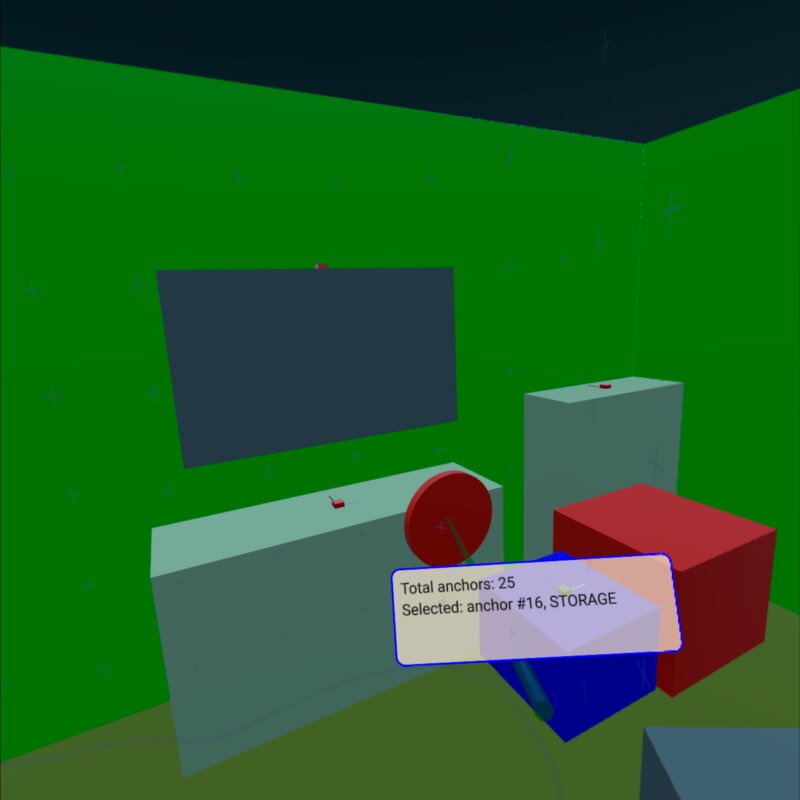
Este ejemplo muestra cómo utilizar XrSpatialAnchorListModel para mostrar e interactuar con objetos físicos reales en el entorno. Admite tanto el modo passthrough como el modo totalmente inmersivo. La estructura básica sigue el ejemplo xr_simple.
La parte más relevante del ejemplo es Repeater3D en un XrSpatialAnchorListModel. Para cada ancla, creamos una caja que rellena el volumen del ancla con un color. La elección del color depende de la clasificación del ancla. Este recuadro es invisible en modo passthrough. Además, visualizamos la posición y la orientación del ancla con pequeños recuadros:
Repeater3D {
    id: spatialAnchors
    model: XrSpatialAnchorListModel {

    }
    delegate: Node {
        id: anchorNode
        required property XrSpatialAnchor anchor
        required property int index
        position: anchor.position
        rotation: anchor.rotation

        Model {
            pickable: true
            z: anchorNode.anchor.has3DBounds ? anchorNode.anchor.offset3D.z / 2 * 100 : 0 // Position is center of 2D surface also for 3D anchors
            scale: anchorNode.anchor.has3DBounds ? anchorNode.anchor.extent3D : Qt.vector3d(anchorNode.anchor.extent2D.x, anchorNode.anchor.extent2D.y, 0.01)
            materials: PrincipledMaterial {
                // Make anchor objects invisible in passthrough mode
                baseColor: xrView.passthroughEnabled ? Qt.rgba(0, 0, 0, 0) : anchorColor(anchor)
                alphaMode: xrView.passthroughEnabled ? PrincipledMaterial.Blend : PrincipledMaterial.Opaque
                roughness: 0.7
            }
            source: anchorNode.anchor.has3DBounds ? "#Cube" : "#Rectangle"
            property string anchorInfo: "anchor #" + anchorNode.index + ", " + anchorNode.anchor.classificationString
        }

        Model {
            // Visualize anchor orientation
            materials: PrincipledMaterial {
                baseColor: anchorNode.anchor.has3DBounds ? anchorNode.anchor.has2DBounds ? "green" : "red" : "blue"
            }
            scale: Qt.vector3d(0.05, 0.05, 0.05)
            source: "#Cube"

            Model {
                materials: PrincipledMaterial {
                    baseColor: "black"
                }
                scale: Qt.vector3d(0.1, 3, 0.1)
                source: "#Cube"
                y: 150
            }
            Model {
                materials: PrincipledMaterial {
                    baseColor: "white"
                }
                scale: Qt.vector3d(3, 0.1, 0.1)
                source: "#Cube"
                x: 150
            }
        }
        visible: anchor.has2DBounds || anchor.has3DBounds
    }
}
La caja del ancla es seleccionable y tiene una propiedad de cadena anchorInfo que contiene el classificationString del ancla. A continuación, realizamos el picking basándonos en la posición del controlador. (Ver el ejemplo xr_input para más detalles.) Si golpeamos una de las cajas de ancla, mostramos una etiqueta con la información del ancla:
Node {
    id: labelNode
    position: rightController.position
    rotation: rightController.rotation

    property int numAnchors: spatialAnchors.count
    property string anchorInfo: "(no anchor)"

    Node {
        y: 15
        x: -15
        scale: Qt.vector3d(0.1, 0.1, 0.1)
        Rectangle {
            width: 300
            height: 100
            color: Qt.rgba(1,0.9,0.8,0.7)
            radius: 10
            border.width: 2
            border.color: "blue"
            Text {
                anchors.fill: parent
                anchors.margins: 10
                textFormat: Text.StyledText
                text: "Total anchors: " + labelNode.numAnchors + "<br>" + "Selected: " + labelNode.anchorInfo + "<br>" + "Press A to Capture/Update anchors"
            }
        }
    }
}
© 2026 The Qt Company Ltd. Documentation contributions included herein are the copyrights of their respective owners. The documentation provided herein is licensed under the terms of the GNU Free Documentation License version 1.3 as published by the Free Software Foundation. Qt and respective logos are trademarks of The Qt Company Ltd. in Finland and/or other countries worldwide. All other trademarks are property of their respective owners.
