
Qt Quick Física 3D - Ejemplo de cañón
Demuestra cómo generar objetos físicos.
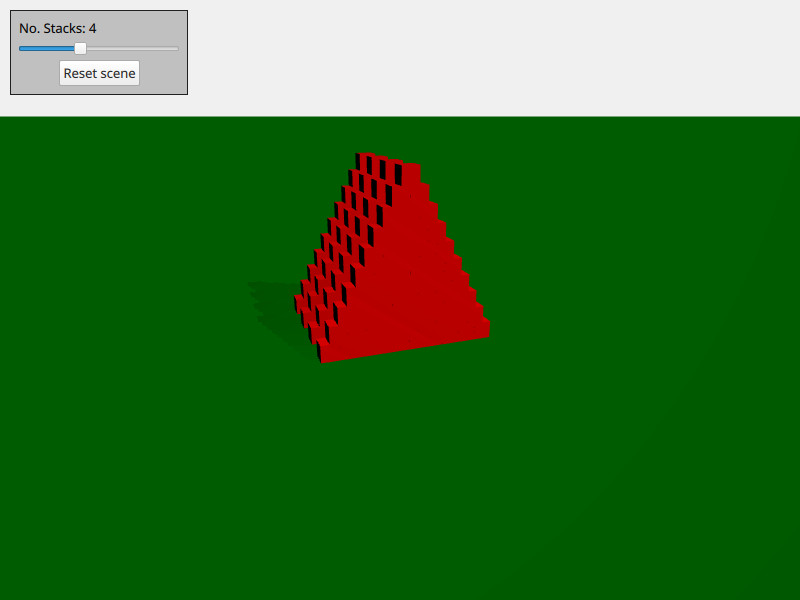
Este ejemplo demuestra cómo crear y eliminar objetos físicos bajo demanda. La escena consiste en una serie de pilas de cajas. Puedes moverte usando WASD y el ratón y disparar una bola pulsando space.
La escena está configurada con los objetos 3D habituales de Qt Quick, como la vista, la cámara y la luz:
PerspectiveCamera {
    id: camera
    position: Qt.vector3d(-4000, 5000, 10000)
    eulerRotation: Qt.vector3d(-20, -20, 0)
    clipFar: 200000
    clipNear: 100
}
DirectionalLight {
    eulerRotation: Qt.vector3d(-45, 45, 0)
    castsShadow: true
    brightness: 1
    shadowMapQuality: Light.ShadowMapQualityVeryHigh
    shadowMapFar: camera.clipFar
    shadowFactor: 50
    csmNumSplits: 2
    csmSplit1: 0.1
    csmSplit2: 0.3
    softShadowQuality: Light.PCF4
}
También añadimos un suelo estático:
StaticRigidBody {
    eulerRotation: Qt.vector3d(-90, 0, 0)
    collisionShapes: PlaneShape {}
    Model {
        source: "#Rectangle"
        scale: Qt.vector3d(2000, 2000, 1)
        materials: PrincipledMaterial {
            baseColor: "green"
        }
        castsShadows: false
        receivesShadows: true
    }
}
Creamos un Nodo que usamos como spawner de objetos y ponemos dentro de nuestra vista:
Node {
    id: shapeSpawner
    property var instancesBoxes: []
    property var instancesSpheres: []
    property int stackCount: 0
    property var boxComponent: Qt.createComponent("Box.qml")
    property var sphereComponent: Qt.createComponent("Sphere.qml")

    function createStack(stackZ, numStacks) {
        let size = 10
        let extents = 400

        for (var i = 0; i < size; i++) {
            for (var j = 0; j < size - i; j++) {
                let x = j * 2 - size + i
                let y = i * 2 + 1
                let z = 5 * (stackZ - numStacks)
                let center = Qt.vector3d(x, y, z).times(0.5 * extents)
                let box = boxComponent.incubateObject(shapeSpawner, {
                                                          "position": center,
                                                          "xyzExtents": extents
                                                      })
                instancesBoxes.push(box)
            }
        }
    }

    function createBall(position, forward) {
        var diameter = 600
        var speed = 20000
        let settings = {
            "position": position,
            "sphereDiameter": diameter
        }
        let sphere = sphereComponent.createObject(shapeSpawner, settings)
        sphere.setLinearVelocity(forward.times(speed))
        instancesSpheres.push(sphere)

        if (sphere === null) {
            console.log("Error creating object")
        }
    }

    function reset() {
        // Only run method if previous stack has been created fully
        for (var i = 0; i < instancesBoxes.length; i++)
            if (!instancesBoxes[i].object)
                return

        instancesSpheres.forEach(sphere => {
                                     sphere.collisionShapes = []
                                     sphere.destroy()
                                 })
        instancesBoxes.forEach(box => {
                                   box.object.collisionShapes = []
                                   box.object.destroy()
                               })
        instancesSpheres = []
        instancesBoxes = []

        for (var stackI = 0; stackI < stackSlider.value; stackI++) {
            shapeSpawner.createStack(stackI, stackSlider.value)
        }
    }
}
Tenemos tres métodos: createStack para crear una pila, createBall para crear una bola con velocidad y reset para reiniciar la escena. La caja real y la esfera que se spawn se almacena en sus propios archivos qml (box.qml y sphere.qml).
Archivos:
© 2026 The Qt Company Ltd. Documentation contributions included herein are the copyrights of their respective owners. The documentation provided herein is licensed under the terms of the GNU Free Documentation License version 1.3 as published by the Free Software Foundation. Qt and respective logos are trademarks of The Qt Company Ltd. in Finland and/or other countries worldwide. All other trademarks are property of their respective owners.
