
Qt Quick Física 3D: ejemplo de articulaciones
Muestra cómo utilizar las articulaciones en una escena física.
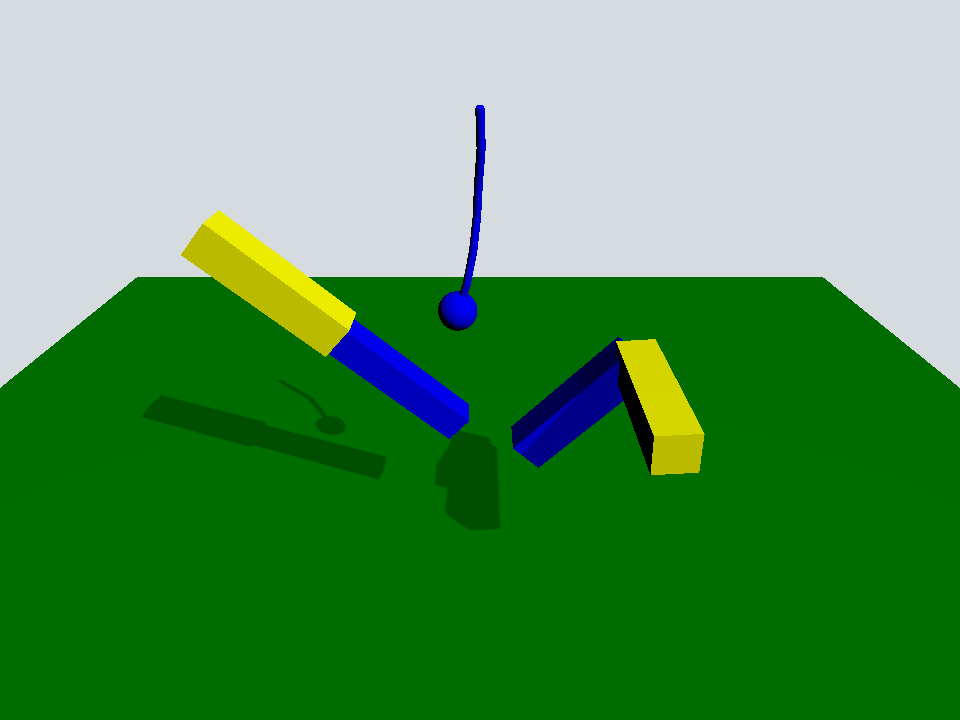
Este ejemplo muestra cómo utilizar algunas de las articulaciones disponibles en Quick 3D Physics.
La escena es una escena típica con un « PhysicsWorld », un « View3D » con un « PerspectiveCamera » y un « DirectionalLight »:
Window {
    width: 640
    height: 480
    visible: true
    title: qsTr("Qt Quick 3D Physics - Joints")

    PhysicsWorld {
        scene: viewport.scene
        running: true
    }

    View3D {
        id: viewport
        anchors.fill: parent

        environment: SceneEnvironment {
            clearColor: "#d6dbdf"
            backgroundMode: SceneEnvironment.Color
        }

        PerspectiveCamera {
            position: Qt.vector3d(0, 600, 700)
            eulerRotation: Qt.vector3d(-30, 0, 0)
            clipFar: 5000
            clipNear: 1
        }

        DirectionalLight {
            eulerRotation.x: -45
            eulerRotation.y: 45
            castsShadow: true
            brightness: 1
            shadowFactor: 50
            shadowMapQuality: Light.ShadowMapQualityHigh
        }

        Rope {
            eulerRotation: Qt.vector3d(0, 0, -90)
            position: Qt.vector3d(0, 500, 0)
        }

        Prismatic {
            id: prismatic
            position: Qt.vector3d(-250, 100, 0)
        }

        Revolute {
            id: revolute
            position: Qt.vector3d(200, 200, 100)
        }

        StaticRigidBody {
            position: Qt.vector3d(0, -100, 0)
            eulerRotation: Qt.vector3d(-90, 0, 0)
            collisionShapes: PlaneShape {}
            Model {
                source: "#Rectangle"
                scale: Qt.vector3d(20, 20, 1)
                materials: PrincipledMaterial {
                    baseColor: "green"
                }
                castsShadows: false
                receivesShadows: true
            }
        }

        FrameAnimation {
            id: animator
            running: true
            onTriggered: {
                prismatic.jointRotation.z += 1
                revolute.jointRotation.x += 0.95
            }
        }
    }
}
Hay un « StaticRigidBody » con un « PlaneShape » que actúa como suelo y tres objetos QML personalizados: «Rope», «Prismatic» y «Revolute».
Rope {
    eulerRotation: Qt.vector3d(0, 0, -90)
    position: Qt.vector3d(0, 500, 0)
}

Prismatic {
    id: prismatic
    position: Qt.vector3d(-250, 100, 0)
}

Revolute {
    id: revolute
    position: Qt.vector3d(200, 200, 100)
}
El objeto Rope es una serie de cápsulas y una esfera que están conectadas mediante una « spherical joints » para las cápsulas y una « fixed joint » para la esfera.
Node {
    id: root

    SphericalJoint {
        bodyB: shape0
        positionA: root.position
        positionB: Qt.vector3d(-20, 0, 0)
    }

    SphericalJoint {
        bodyA: shape0
        bodyB: shape1
        positionA: Qt.vector3d(20, 0, 0)
        positionB: Qt.vector3d(-20, 0, 0)
    }

    SphericalJoint {
        bodyA: shape1
        bodyB: shape2
        positionA: Qt.vector3d(20, 0, 0)
        positionB: Qt.vector3d(-20, 0, 0)
    }

    SphericalJoint {
        bodyA: shape2
        bodyB: shape3
        positionA: Qt.vector3d(20, 0, 0)
        positionB: Qt.vector3d(-20, 0, 0)
    }

    SphericalJoint {
        bodyA: shape3
        bodyB: shape4
        positionA: Qt.vector3d(20, 0, 0)
        positionB: Qt.vector3d(-20, 0, 0)
    }

    SphericalJoint {
        bodyA: shape4
        bodyB: shape5
        positionA: Qt.vector3d(20, 0, 0)
        positionB: Qt.vector3d(-20, 0, 0)
    }

    FixedJoint {
        bodyA: shape5
        bodyB: sphere
        positionA: Qt.vector3d(20, 0, 0)
        positionB: Qt.vector3d(0, 0, 0)
    }

    DynamicRigidBody {
        id: shape0
        position: Qt.vector3d(0, 0, 0)
        collisionShapes: CapsuleShape {
            diameter: 10
            height: 40
        }
        Model {
            geometry: CapsuleGeometry {
                diameter: 10
                height: 40
            }
            materials: PrincipledMaterial {
                baseColor: "blue"
            }
        }
    }

    DynamicRigidBody {
        id: shape1
        position: Qt.vector3d(40, 0, 0)
        collisionShapes: CapsuleShape {
            diameter: 10
            height: 40
        }
        Model {
            geometry: CapsuleGeometry {
                diameter: 10
                height: 40
            }
            materials: PrincipledMaterial {
                baseColor: "blue"
            }
        }
    }

    DynamicRigidBody {
        id: shape2
        position: Qt.vector3d(80, 0, 0)
        collisionShapes: CapsuleShape {
            diameter: 10
            height: 40
        }
        Model {
            geometry: CapsuleGeometry {
                diameter: 10
                height: 40
            }
            materials: PrincipledMaterial {
                baseColor: "blue"
            }
        }
    }

    DynamicRigidBody {
        id: shape3
        position: Qt.vector3d(120, 0, 0)
        collisionShapes: CapsuleShape {
            diameter: 10
            height: 40
        }
        Model {
            geometry: CapsuleGeometry {
                diameter: 10
                height: 40
            }
            materials: PrincipledMaterial {
                baseColor: "blue"
            }
        }
    }

    DynamicRigidBody {
        id: shape4
        position: Qt.vector3d(160, 0, 0)
        collisionShapes: CapsuleShape {
            diameter: 10
            height: 40
        }
        Model {
            geometry: CapsuleGeometry {
                diameter: 10
                height: 40
            }
            materials: PrincipledMaterial {
                baseColor: "blue"
            }
        }
    }

    DynamicRigidBody {
        id: shape5
        position: Qt.vector3d(200, 0, 0)
        collisionShapes: CapsuleShape {
            diameter: 10
            height: 40
        }
        Model {
            geometry: CapsuleGeometry {
                diameter: 10
                height: 40
            }
            materials: PrincipledMaterial {
                baseColor: "blue"
            }
        }
    }

    DynamicRigidBody {
        id: sphere
        position: Qt.vector3d(240, 0, 0)
        scale: Qt.vector3d(0.5, 0.5, 0.5)
        collisionShapes: SphereShape {}
        Model {
            source: "#Sphere"
            materials: PrincipledMaterial {
                baseColor: "blue"
            }
        }
    }
}
El objeto Prismatic consta de dos barras fijadas mediante una « prismatic joint » a lo largo del eje x de ambas. Con esta unión, la barra más pequeña puede moverse libremente a lo largo de este eje x hasta alcanzar su límite de restricción « upper » y « lower ».
Node {
    id: root
    property vector3d jointRotation : Qt.vector3d(0, 0, 0)

    PrismaticJoint {
        bodyA: prismaticBoxA
        bodyB: prismaticBoxB
        lowerLimit: -200
        upperLimit: 0
        positionA: Qt.vector3d(100, 0, 0)
        positionB: Qt.vector3d(-100, 0, 0)
    }

    DynamicRigidBody {
        id: prismaticBoxA
        kinematicPosition: Qt.vector3d(0, 200, 0)
        kinematicEulerRotation: root.jointRotation
        isKinematic: true
        scale: Qt.vector3d(2, 0.5, 0.5)
        collisionShapes: BoxShape {}
        Model {
            source: "#Cube"
            materials: PrincipledMaterial {
                baseColor: "yellow"
            }
        }
    }

    DynamicRigidBody {
        id: prismaticBoxB
        position: Qt.vector3d(0, 0, 0)
        scale: Qt.vector3d(2, 0.4, 0.4)
        collisionShapes: BoxShape {}
        Model {
            source: "#Cube"
            materials: PrincipledMaterial {
                baseColor: "blue"
            }
        }
    }
}
El objeto «Revolute» está formado por dos barras giradas 90 grados y unidas mediante una « revolute joint ».
Node {
    id: root
    property vector3d jointRotation : Qt.vector3d(0, 90, 0)

    RevoluteJoint {
        bodyA: revoluteBoxA
        bodyB: revoluteBoxB
        positionA: Qt.vector3d(100, 0, 0)
        positionB: Qt.vector3d(100, 0, 0)
        orientationB: Quaternion.fromEulerAngles(0, 0, 90)
        angularLimitLower: -Math.PI / 4
        angularLimitUpper: Math.PI / 4
        enableAngularLimit: true
    }

    DynamicRigidBody {
        id: revoluteBoxA
        kinematicPosition: Qt.vector3d(0, 0, 0)
        kinematicEulerRotation: root.jointRotation
        isKinematic: true
        scale: Qt.vector3d(2, 0.5, 0.5)
        collisionShapes: BoxShape {}
        Model {
            source: "#Cube"
            materials: PrincipledMaterial {
                baseColor: "yellow"
            }
        }
    }

    DynamicRigidBody {
        id: revoluteBoxB
        position: Qt.vector3d(0, 100, -100)
        eulerRotation: Qt.vector3d(0, 90, -90)
        scale: Qt.vector3d(2, 0.5, 0.5)
        collisionShapes: BoxShape {}
        Model {
            source: "#Cube"
            materials: PrincipledMaterial {
                baseColor: "blue"
            }
        }
    }
}
Volviendo a la escena principal, hay un objeto « FrameAnimation » que hace girar las articulaciones cinemáticas prismatic y revolute.
FrameAnimation {
    id: animator
    running: true
    onTriggered: {
        prismatic.jointRotation.z += 1
        revolute.jointRotation.x += 0.95
    }
}
Con todas estas piezas móviles, podemos ver cómo interactúan las diferentes articulaciones en una escena física.
Archivos:
© 2026 The Qt Company Ltd. Documentation contributions included herein are the copyrights of their respective owners. The documentation provided herein is licensed under the terms of the GNU Free Documentation License version 1.3 as published by the Free Software Foundation. Qt and respective logos are trademarks of The Qt Company Ltd. in Finland and/or other countries worldwide. All other trademarks are property of their respective owners.
