
Ejemplo 1: Conexión directa mediante una fuente estática
- Crear un objeto «source»
Para crear este objeto «Source», primero creamos el archivo de definición,
simpleswitch.rep. Este archivo describe las propiedades y los métodos del objeto y se introduce en el compilador « Qt Remote Objects » ( repc). Este archivo solo define las interfaces que es necesario exponer a las réplicas.simpleswitch.repclass SimpleSwitch { PROP(bool currState=false); SLOT(server_slot(bool clientState)); };En
simpleswitch.rep,currStatecontiene el estado actual del interruptor.server_slot()nos permite interactuar con la fuente; se conectará a la señal «echoSwitchState(bool newstate)».
Para que repc procese este archivo, añade la siguiente línea a tu archivo «
cmake»:qt6_add_repc_sources(directconnectserver simpleswitch.rep )Si utilizas
qmake:REPC_SOURCE = simpleswitch.repEstas instrucciones solo son aplicables al módulo Qt Remote Objects, por lo que también tendrás que añadirlo a tu proyecto. Si utilizas CMake, añade:
find_package(Qt6 REQUIRED COMPONENTS RemoteObjects)
target_link_libraries(directconnectserver PRIVATE Qt6::RemoteObjects)
Si utilizas
qmake:QT += remoteobjectsrepc crea el archivo de cabecera «
rep_SimpleSwitch_source.h» en el directorio de compilación que especifiques. Para obtener más información, consulta «Source».repc crea tres clases auxiliares para su uso con QtRO. Para este ejemplo, utilizamos la clase básica: `
SimpleSwitchSimpleSource`. Se trata de una clase abstracta, definida en `rep_SimpleSwitch_source.h`. Derivamos de ella para definir nuestra clase de implementación `SimpleSwitch`, tal y como se muestra a continuación:simpleswitch.h#ifndef SIMPLESWITCH_H #define SIMPLESWITCH_H #include "rep_simpleswitch_source.h" class SimpleSwitch : public SimpleSwitchSimpleSource { Q_OBJECT public: SimpleSwitch(QObject *parent = nullptr); ~SimpleSwitch(); void server_slot(bool clientState) override; public Q_SLOTS: void timeout_slot(); private: QTimer *stateChangeTimer; }; #endifEn
simpleswitch.h,stateChangeTimerhay un QTimer que se utiliza para cambiar el estado de nuestro SimpleSwitch.timeout_slot()está conectado a la señal timeout() destateChangeTimer.server_slot()—que se invoca automáticamente en la fuente cada vez que una réplica llama a su versión de la ranura— emite el valor recibido.currStateChanged(bool), definida en el `rep_SimpleSwitch_source.h` generado por repc, se emite cada vez que «currState» cambia de estado. En este ejemplo, ignoramos la señal en el lado de origen y la gestionamos más tarde en el lado de la réplica.
A continuación se muestra la definición de nuestra clase `
SimpleSwitch`:simpleswitch.cpp#include "simpleswitch.h" // constructor SimpleSwitch::SimpleSwitch(QObject*parent) : SimpleSwitchSimpleSource(parent) { stateChangeTimer = new QTimer(this); // Inicializar el temporizador QObject::connect(stateChangeTimer, &QTimer::timeout, this, &SimpleSwitch::timeout_slot); // Conecta la señal timeout() de stateChangeTimer a timeout_slot() de SimpleSwitch stateChangeTimer->start(2000); // Inicia el temporizador y establece el tiempo de espera en 2 segundos qDebug() << "Source Node Started"; } // destructor SimpleSwitch::~SimpleSwitch() { stateChangeTimer->stop(); } void SimpleSwitch::server_slot(bool clientState) { qDebug() << "Replica state is " << clientState; // print switch state echoed back by client } void SimpleSwitch::timeout_slot() { // Slot llamado al agotarse el tiempo de espera del temporizador if (currState()) // comprueba si el estado actual es «true»; currState() se define en el archivo rep_simpleswitch_source.h generado por REPC setCurrState(false); // establece el estado en falso else setCurrState(true); // establece el estado en verdadero qDebug() << "Source State is "<<currState(); } - Crear un
registro. Dado que este ejemplo utiliza una conexión directa entre nodos, podemos omitir este paso.
- Crear un
nodo
host.El nodo host se crea como se muestra a continuación:
QRemoteObjectHost srcNode(QUrl(QStringLiteral("local:replica"))); - Objeto «Source» del host y
«remoting
».Las siguientes instrucciones instancian el objeto «Source» y lo pasan al host para habilitar el «remoting», que es el proceso de hacer que un objeto sea visible para la red QtRO:
SimpleSwitch srcSwitch; // create simple switch
srcNode.enableRemoting(&srcSwitch); // enable remoting
El contenido de un fichero «
main.cpp» que implementa los pasos descritos anteriormente es el siguiente:main.cpp#include <QCoreApplication> #include "simpleswitch.h" int main(int argc, char *argv[]) { QCoreApplication a(argc, argv); SimpleSwitch srcSwitch; // create simple switch // Create host node without Registry: QRemoteObjectHost srcNode(QUrl(QStringLiteral("local:replica"))); srcNode.enableRemoting(&srcSwitch); // enable remoting/sharing return a.exec(); }Compila y ejecuta este proyecto del lado del origen. La salida, sin que se haya creado ninguna réplica, debería tener el aspecto que se muestra a continuación, con el estado del conmutador alternando entre «
true» y «false» cada dos segundos.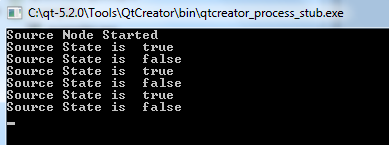
Los pasos siguientes sirven para crear la parte de réplicas de la red, que en este ejemplo obtiene el estado del conmutador desde la fuente y lo devuelve.
Código de la réplica
- Utiliza repc para añadir una réplica a tu
proyecto. Utilizamos el mismo archivo de definición de API que en el lado de origen,
SimpleSwitch.rep, para crear un archivo de encabezado de réplica mediante repc. Si utilizascmake, incluye la siguiente línea en tu archivo del lado del clientecmake, especificando un archivo de entrada.rep:qt6_add_repc_replicas(directconnectclient simpleswitch.rep )Si utilizas
qmake, añade la siguiente línea a tu archivo del lado del cliente.pro:REPC_REPLICA = simpleswitch.repLa herramienta repc genera un archivo
rep_SimpleSwitch_replica.hen el directorio de compilación. Para obtener más información, consulta Replica. - Crea un nodo para conectarte con el
nodo
anfitrión de origen. El siguiente código instancia el segundo nodo en la red y lo conecta con el nodo anfitrión de origen:
QRemoteObjectNode repNode; // create remote object node repNode.connectToNode(QUrl(QStringLiteral("local:replica"))); // connect with remote host node - Llama al método acquire() del nodo para crear un puntero a una réplica
En primer lugar, instanciamos una réplica:
QSharedPointer<SimpleSwitchReplica> ptr;
ptr.reset(repNode.acquire<SimpleSwitchReplica>()); // acquire replica of source from host node
Nota: acquire() devuelve un puntero a la réplica, pero no gestiona su ciclo de vida. Este ejemplo muestra el proceso recomendado de envolver el puntero devuelto en un QSharedPointer o un QScopedPointer para garantizar que el puntero siempre se elimine correctamente.
main.cppimplementa los pasos descritos anteriormente e instancia nuestro objeto:main.cpp#include <QCoreApplication> #include "client.h" int main(int argc, char *argv[]) { QCoreApplication a(argc, argv); QSharedPointer<SimpleSwitchReplica> ptr; // shared pointer to hold source replica QRemoteObjectNode repNode; // create remote object node repNode.connectToNode(QUrl(QStringLiteral("local:replica"))); // connect with remote host node ptr.reset(repNode.acquire<SimpleSwitchReplica>()); // acquire replica of source from host node Client rswitch(ptr); // create client switch object and pass reference of replica to it return a.exec(); }La declaración y definición completas de la clase `
Client` son las siguientes:client.h#ifndef _CLIENT_H #define _CLIENT_H #include <QObject> #include <QSharedPointer> #include "rep_simpleswitch_replica.h" class Client : public QObject { Q_OBJECT public: Client(QSharedPointer<SimpleSwitchReplica> ptr); ~Client() override = default; void initConnections();// Function to connect signals and slots of source and client Q_SIGNALS: void echoSwitchState(bool switchState);// this signal is connected with server_slot(..) on the source object and echoes back switch state received from source public Q_SLOTS: void recSwitchState_slot(bool); // slot to receive source state private: bool clientSwitchState; // holds received server switch state QSharedPointer<SimpleSwitchReplica> reptr;// holds reference to replica }; #endifclient.cpp#include "client.h" // constructor Client::Client(QSharedPointer<SimpleSwitchReplica> ptr) : QObject(nullptr),reptr(ptr) { // Conectar la señal de la réplica inicializada con el slot de inicialización. initConnections(); // Podemos conectarnos a las señales y slots de SimpleSwitchReplica // directamente porque nuestra réplica fue generada por repc. } void Client::initConnections() { // Inicializar las conexiones entre señales y ranuras // Conectar la señal currStateChanged() de la réplica de origen con la ranura recSwitchState() del cliente para recibir el estado actual de la fuente QObject::connect(reptr.data(), &SimpleSwitchReplica::currStateChanged, this, &Client::recSwitchState_slot); // Conectar la señal echoSwitchState(..) del cliente con el slot server_slot(..) de la réplica para devolver el estado recibido QObject::connect(this, &Client::echoSwitchState, reptr.data(), &SimpleSwitchReplica::server_slot); } void Client::recSwitchState_slot(bool value) { qDebug() << "Received source state "<< value << reptr.data()->currState(); clientSwitchState = reptr.data()->currState(); Q_EMIT echoSwitchState(clientSwitchState); // Emite una señal para devolver el estado recibido al servidor }Al compilar y ejecutar este ejemplo junto con el ejemplo del lado del servidor, se obtiene el siguiente resultado:
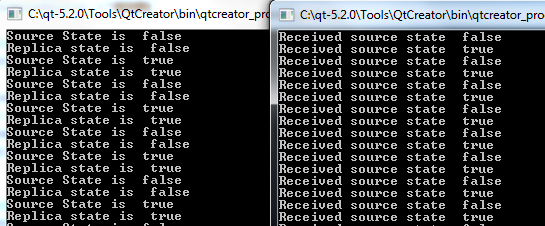
© 2026 The Qt Company Ltd. Documentation contributions included herein are the copyrights of their respective owners. The documentation provided herein is licensed under the terms of the GNU Free Documentation License version 1.3 as published by the Free Software Foundation. Qt and respective logos are trademarks of The Qt Company Ltd. in Finland and/or other countries worldwide. All other trademarks are property of their respective owners.
