
Utilisation d'axes de valeurs logarithmiques
Remarque : ceci fait partie de l'exemple « Charts with Widgets Gallery ».
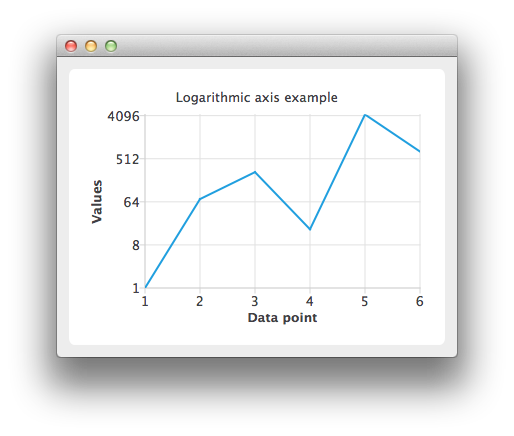
Créez une instance QLineSeries et ajoutez-y des données.
auto series = new QLineSeries;
*series << QPointF(1.0, 1.0) << QPointF(2.0, 73.0) << QPointF(3.0, 268.0) << QPointF(4.0, 17.0)
        << QPointF(5.0, 4325.0) << QPointF(6.0, 723.0);
Pour afficher les données sur le graphique, nous avons besoin d'une instance QChart. Ajoutez-y la série, masquez la légende et définissez le titre du graphique.
auto chart = new QChart;
chart->addSeries(series);
chart->legend()->hide();
chart->setTitle("Logarithmic Axis");
Créez les axes. Ajoutez-les au graphique et associez-les à la série.
auto axisX = new QValueAxis;
axisX->setTitleText("Data point");
axisX->setLabelFormat("%i");
axisX->setTickCount(series->count());
chart->addAxis(axisX, Qt::AlignBottom);
series->attachAxis(axisX);

auto axisY = new QLogValueAxis;
axisY->setTitleText("Values");
axisY->setLabelFormat("%g");
axisY->setBase(8.0);
axisY->setMinorTickCount(-1);
chart->addAxis(axisY, Qt::AlignLeft);
series->attachAxis(axisY);
Créez ensuite un objet QChartView en passant QChart comme paramètre.
createDefaultChartView(chart);Le graphique est prêt à être affiché.
© 2026 The Qt Company Ltd. Documentation contributions included herein are the copyrights of their respective owners. The documentation provided herein is licensed under the terms of the GNU Free Documentation License version 1.3 as published by the Free Software Foundation. Qt and respective logos are trademarks of The Qt Company Ltd. in Finland and/or other countries worldwide. All other trademarks are property of their respective owners.
