
Qt Quick 3D - Exemple de rendu instancié
Illustre comment réaliser un rendu instancié dans Qt Quick 3D.
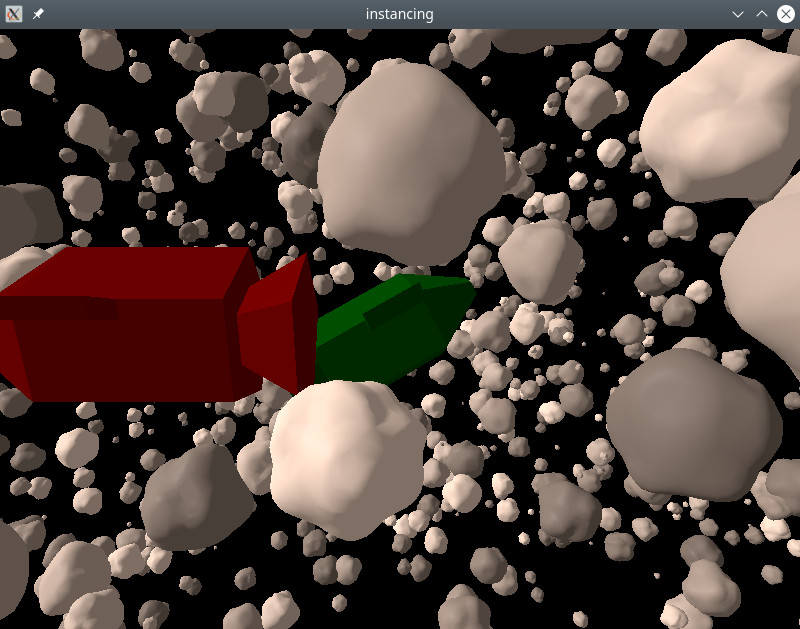
Cet exemple montre comment réaliser un rendu instancié à l'aide de l'API QML de base.
Les modèles du vaisseau spatial et de l'astéroïde ont été créés à l'aide de l'outil de modélisation 3D Blender, puis importés avec Balsam.
Instanciation aléatoire
Nous utilisons ` RandomInstancing ` pour générer une table aléatoire qui définit notre champ d’astéroïdes :
RandomInstancing {
    id: randomInstancing
    instanceCount: 1500

    position: InstanceRange {
        from: Qt.vector3d(-300, -200, -500)
        to: Qt.vector3d(300, 200, 200)
    }
    scale: InstanceRange {
        from: Qt.vector3d(1, 1, 1)
        to: Qt.vector3d(10, 10, 10)
        proportional: true
    }
    rotation: InstanceRange {
        from: Qt.vector3d(0, 0, 0)
        to: Qt.vector3d(360, 360, 360)
    }
    color: InstanceRange {
        from: "grey"
        to: "white"
        proportional: true
    }

    randomSeed: 2021
}
La position et la rotation peuvent varier librement. La mise à l'échelle est définie pour être uniforme dans toutes les directions et les couleurs sont en niveaux de gris. Pour ce faire, on définit l'attribut ` proportional `.
Les vaisseaux spatiaux sont placés manuellement à l’aide de l’ InstanceList:
InstanceListEntry {
    id: redShip
    eulerRotation: Qt.vector3d(0, 180, 0)
    color: "red"
    PropertyAnimation on position {
        from: Qt.vector3d(50, 10, 100)
        to: Qt.vector3d(-70, 10, 100)
        duration: 8000
    }
}

InstanceListEntry {
    id: greenShip
    position: Qt.vector3d(0, 0, -60)
    eulerRotation: Qt.vector3d(-10, 0, 30)
    color: "green"
}

InstanceListEntry {
    id: blueShip
    position: Qt.vector3d(-100, -100, 0)
    color: "blue"
}

InstanceList {
    id: manualInstancing
    instances: [ redShip, greenShip, blueShip ]
}
Les propriétés de ` InstanceListEntry ` sont liables : ici, nous animons le vaisseau rouge pour qu’il croise la trajectoire de la caméra.
Enfin, nous appliquons les tables d’instanciation aux objets :
Asteroid {
    instancing: randomInstancing
    NumberAnimation on eulerRotation.x {
        from: 0
        to: 360
        duration: 11000
        loops: Animation.Infinite
    }
}

SimpleSpaceship {
    instancing: manualInstancing
}
En animant la rotation du modèle d’astéroïde, toutes les instances tourneront sans qu’il soit nécessaire de modifier le contenu de la table d’instances. Comme les instances d’astéroïdes ont des rotations aléatoires, tous les astéroïdes tourneront autour d’axes différents.
© 2026 The Qt Company Ltd. Documentation contributions included herein are the copyrights of their respective owners. The documentation provided herein is licensed under the terms of the GNU Free Documentation License version 1.3 as published by the Free Software Foundation. Qt and respective logos are trademarks of The Qt Company Ltd. in Finland and/or other countries worldwide. All other trademarks are property of their respective owners.
