
QCanvasImage Class
QCanvasImage は、QCanvasPainter 用の画像クラスです。詳細...
| ヘッダー: | #include <QCanvasImage> |
| CMake: | find_package(Qt6 REQUIRED COMPONENTS CanvasPainter) target_link_libraries(mytarget PRIVATE Qt6::CanvasPainter) |
| 以下より: | Qt 6.11 |
パブリック関数
| QCanvasImage() | |
| QCanvasImage(const QCanvasImage &image) | |
| QCanvasImage(QCanvasImage &&other) | |
| ~QCanvasImage() | |
| qreal | devicePixelRatio() const |
| int | height() const |
| int | id() const |
| bool | isNull() const |
| void | setTintColor(QColor color) |
| QSize | size() const |
| qsizetype | sizeInBytes() const |
| void | swap(QCanvasImage &other) |
| QColor | tintColor() const |
| int | width() const |
| operator QVariant() const | |
| QCanvasImage & | operator=(QCanvasImage &&other) |
| QCanvasImage & | operator=(const QCanvasImage &image) |
関連する非メンバー
| bool | operator!=(const QCanvasImage &lhs, const QCanvasImage &rhs) |
| bool | operator==(const QCanvasImage &lhs, const QCanvasImage &rhs) |
詳細な説明
QCanvasImageは、QCanvasPainter で使用される画像クラスです。画像を描画するには、まずQCanvasPainter::addImage()などを使用して画像を読み込む必要があります。その後、QCanvasPainter::drawImage()を使用して画像をそのまま描画したり、QCanvasImagePattern ブラシを使用して塗りつぶしやストロークを行ったりすることができます。
以下に簡単な例を示します:
static QImage logoImage(":/qtlogo.png");
// Paint an image pattern.
QCanvasImage bg = painter.addImage(logoImage,
             QCanvasPainter::ImageFlag::Repeat |
             QCanvasPainter::ImageFlag::GenerateMipmaps);
QCanvasImagePattern ip(bg, 0, 0, 44, 32);
painter.setFillStyle(ip);
painter.fillRect(50, 50, 320, 230);
// Paint a single image, with tint color.
QCanvasImage logo = painter.addImage(logoImage);
logo.setTintColor("#2cde85");
painter.drawImage(logo, 100, 80);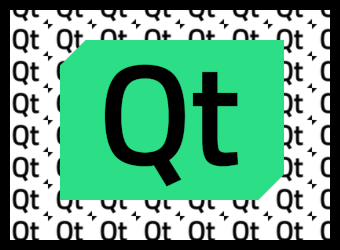
上記の例では、QImage は静的であり、再描画のたびにaddImage()が呼び出されます。画像とフラグが同じままである限り、addImage()は画像を再度テクスチャとしてアップロードするのではなく、キャッシュから取得するため、これは問題になりません。 しかし、より一般的なアプローチは、QCanvasImage変数をクラスのメンバとして保持し、例えばQCanvasPainterItemRenderer::initializeResources()内でQCanvasPainter::addImage()を呼び出すことです。
QCanvasBrush やQCanvasOffscreenCanvas と同様に、QCanvasImageは明示的に共有されます。詳細については、「暗黙的なデータ共有」および「QSharedDataPointer 」を参照してください。
注: QCanvasImageオブジェクトには、 テクスチャなどのグラフィックリソースへのハンドルしか含まれていません。detach が発生した場合でも、実際のリソース(つまり、基盤となるテクスチャおよびその中の画像データ)が実際にコピーされたり複製されたりすることは決してありません。 実際のグラフィックリソース(例:QRhiTexture )の真の所有者は、addImage() を通じて QCanvasImage を割り当てたQCanvasPainter です。
QCanvasImage は常に、それを作成したQCanvasPainter に属します。画像を手動で削除するには、removeImage() を呼び出します。ただし、ほとんどの場合、ペインターは自身の破棄時に自動的にすべての画像を破棄するため、この操作は必要ありません。
メンバ関数のドキュメント
QCanvasImage::QCanvasImage()
デフォルトの画像を作成します。
QCanvasImage::QCanvasImage(const QCanvasImage &image)
指定されたimage のコピーとなる画像を作成します。
[constexpr noexcept default] QCanvasImage::QCanvasImage(QCanvasImage &&other)
other から新しい QCanvasImage をムーブコンストラクタで生成します。
[noexcept] QCanvasImage::~QCanvasImage()
そのイメージを台無しにする。
qreal QCanvasImage::devicePixelRatio() const
画像のデバイスピクセル比を返します。これは、デバイスピクセルとデバイス非依存ピクセルの比率です。
デバイス・ピクセル比が 1 より大きい `QCanvasImage ` を使用すると、その画像を使用する際にそのスケーリング係数が適用されます。たとえば、`drawImage(image, 0, 0) ` は `drawImage(image, 0, 0, image.width() / image.devicePixelRatio(), image.height() / image.devicePixelRatio())` と同等になります。
デフォルト値は 1.0 です。
この値は、QCanvasImage が作成されたQImage から引き継がれます。textureまたはoffscreen canvas から作成されたQCanvasImage のデバイスピクセル比は、常に1になります。
「QImage」も参照してください 。
int QCanvasImage::height() const
この画像の高さをピクセル単位で返します。
int QCanvasImage::id() const
この画像のテクスチャIDを返します。画像がまだ割り当てられていない場合は、0が返されます。
isNull()も参照してください 。
bool QCanvasImage::isNull() const
画像がまだ割り当てられていない場合、true を返します。詳細については、QCanvasPainter::addImage() を参照してください。
void QCanvasImage::setTintColor(QColor color)
画像のティント(color )を設定します。この色は画像の色と掛け合わされ、画像に色付けされます。これは、例えばアイコンを強調表示したり、テーマに合わせて画像を調整したりするために使用できます。
tintColor()も参照してください 。
QSize QCanvasImage::size() const
この画像のサイズ(幅と高さ)をピクセル単位で返します。
qsizetype QCanvasImage::sizeInBytes() const
この画像のサイズをバイト単位で返します。
QCanvasPainter addImage()が返った後、CPU側の データのコピーは保持されません。ソースが である場合、そもそもCPU側の画像データは存在しません。したがって、この関数の結果は、基になるテクスチャに使用されるGPUメモリの近似値となります。QImage offscreen canvas
注:この 値は 、画像フォーマットと寸法に基づいた推定値に過ぎません。Qtは、GPU側のメモリにおいてテクスチャのデータがどのように格納され、配置されているかについては認識していません。
注:この関数は 、ミップマップやマルチサンプルデータを考慮していません。
[noexcept] void QCanvasImage::swap(QCanvasImage &other)
この画像をother と入れ替えます。この処理は非常に高速で、失敗することはありません。
QColor QCanvasImage::tintColor() const
画像の色調を返します。デフォルト値は `Qt::white` です。
setTintColor()も参照してください 。
int QCanvasImage::width() const
この画像の幅をピクセル単位で返します。
QCanvasImage::operator QVariant() const
画像をQVariant として返します。
[noexcept] QCanvasImage &QCanvasImage::operator=(QCanvasImage &&other)
other をこのQCanvasImage インスタンスに割り当てます。
QCanvasImage &QCanvasImage::operator=(const QCanvasImage &image)
指定されたimage をこの画像に割り当て、この画像への参照を返します。
関連する非メンバー
[noexcept] bool operator!=(const QCanvasImage &lhs, const QCanvasImage &rhs)
画像ハンドル `lhs ` が `rhs` と異なる場合は `true ` を返し、それ以外の場合は `false ` を返します。
operator==()も参照してください 。
[noexcept] bool operator==(const QCanvasImage &lhs, const QCanvasImage &rhs)
画像ハンドル `lhs ` が `rhs` と等しい場合は `true ` を返し、それ以外の場合は `false ` を返します。
注:等価とは 、2つの画像オブジェクトが同じグラフィックリソースを参照しており、色調が同じであることを意味します。内容(ピクセルデータ)は比較されません。
operator!=()も参照してください 。
© 2026 The Qt Company Ltd. Documentation contributions included herein are the copyrights of their respective owners. The documentation provided herein is licensed under the terms of the GNU Free Documentation License version 1.3 as published by the Free Software Foundation. Qt and respective logos are trademarks of The Qt Company Ltd. in Finland and/or other countries worldwide. All other trademarks are property of their respective owners.
