
ドーナツ型内訳図の作成
注:これは 「ウィジェット付きグラフギャラリー」のサンプルの一部です。
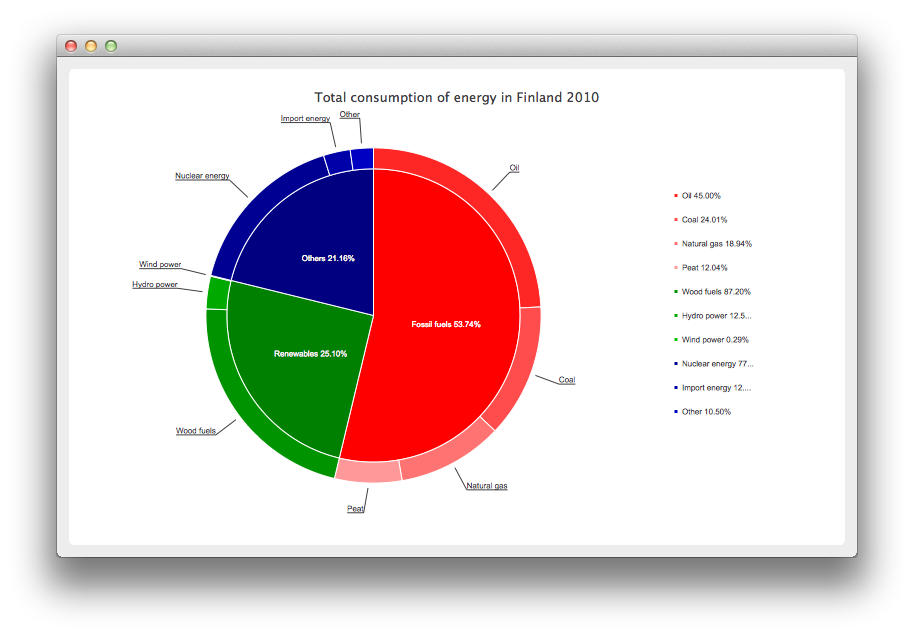
ドーナツ型内訳グラフの作成
まず、グラフに使用するデータを定義しましょう。
// Graph is based on data of 'Total consumption of energy increased by 10 per cent in 2010'
// Statistics Finland, 13 December 2011
// http://www.stat.fi/til/ekul/2010/ekul_2010_2011-12-13_tie_001_en.html

auto series1 = new QPieSeries;
series1->setName("Fossil fuels");
series1->append("Oil", 353295);
series1->append("Coal", 188500);
series1->append("Natural gas", 148680);
series1->append("Peat", 94545);

auto series2 = new QPieSeries;
series2->setName("Renewables");
series2->append("Wood fuels", 319663);
series2->append("Hydro power", 45875);
series2->append("Wind power", 1060);

auto series3 = new QPieSeries;
series3->setName("Others");
series3->append("Nuclear energy", 238789);
series3->append("Import energy", 37802);
series3->append("Other", 32441);
次に、そのデータを追加するチャートを作成します。これは QChart から派生させた独自のチャートである点に注意してください。
auto donutBreakdown = new DonutBreakdownChart;
donutBreakdown->setAnimationOptions(QChart::AllAnimations);
donutBreakdown->setTitle("Total consumption of energy in Finland 2010");
donutBreakdown->legend()->setAlignment(Qt::AlignRight);
donutBreakdown->addBreakdownSeries(series1, Qt::red);
donutBreakdown->addBreakdownSeries(series2, Qt::darkGreen);
donutBreakdown->addBreakdownSeries(series3, Qt::darkBlue);
この独自のチャートは、コンストラクタ内でメインシリーズを作成し、そのメインシリーズが内訳シリーズから提供されたデータを集計するという仕組みになっています。これが中央にある円グラフです。
DonutBreakdownChart::DonutBreakdownChart(QGraphicsItem *parent, Qt::WindowFlags wFlags)
    : QChart(QChart::ChartTypeCartesian, parent, wFlags)
{
    // create the series for main center pie
    m_mainSeries = new QPieSeries;
    m_mainSeries->setPieSize(0.7);
    QChart::addSeries(m_mainSeries);
}
内訳シリーズが追加されると、そのデータはメインシリーズ内のスライスを作成するために使用され、内訳シリーズ自体は、メインシリーズの対応するスライスと位置が揃うように配置されたドーナツのセグメントを作成するために使用されます。
void DonutBreakdownChart::addBreakdownSeries(QPieSeries *breakdownSeries, QColor color)
{
    QFont font("Arial", 8);

    // add breakdown series as a slice to center pie
    auto mainSlice = new DonutBreakdownMainSlice(breakdownSeries);
    mainSlice->setName(breakdownSeries->name());
    mainSlice->setValue(breakdownSeries->sum());
    m_mainSeries->append(mainSlice);

    // customize the slice
    mainSlice->setBrush(color);
    mainSlice->setLabelVisible();
    mainSlice->setLabelColor(Qt::white);
    mainSlice->setLabelPosition(QPieSlice::LabelInsideHorizontal);
    mainSlice->setLabelFont(font);

    // position and customize the breakdown series
    breakdownSeries->setPieSize(0.8);
    breakdownSeries->setHoleSize(0.7);
    breakdownSeries->setLabelsVisible();
    const auto slices = breakdownSeries->slices();
    for (QPieSlice *slice : slices) {
        color = color.lighter(115);
        slice->setBrush(color);
        slice->setLabelFont(font);
    }

    // add the series to the chart
    QChart::addSeries(breakdownSeries);

    // recalculate breakdown donut segments
    recalculateAngles();

    // update customize legend markers
    updateLegendMarkers();
}
ドーナツセグメントの開始角度と終了角度の計算方法は以下の通りです。
void DonutBreakdownChart::recalculateAngles()
{
    qreal angle = 0;
    const auto slices = m_mainSeries->slices();
    for (QPieSlice *slice : slices) {
        QPieSeries *breakdownSeries = qobject_cast<DonutBreakdownMainSlice *>(slice)->breakdownSeries();
        breakdownSeries->setPieStartAngle(angle);
        angle += slice->percentage() * 360.0; // full pie is 360.0
        breakdownSeries->setPieEndAngle(angle);
    }
}
凡例マーカーは、内訳の割合が表示されるようにカスタマイズされています。メインレベルのスライスのマーカーは非表示になっています。
void DonutBreakdownChart::updateLegendMarkers()
{
    // go through all markers
    const auto allseries = series();
    for (QAbstractSeries *series : allseries) {
        const auto markers = legend()->markers(series);
        for (QLegendMarker *marker : markers) {
            auto pieMarker = qobject_cast<QPieLegendMarker *>(marker);
            if (series == m_mainSeries) {
                // hide markers from main series
                pieMarker->setVisible(false);
            } else {
                // modify markers from breakdown series
                pieMarker->setLabel(QString("%1 %2%")
                                    .arg(pieMarker->slice()->label())
                                    .arg(pieMarker->slice()->percentage() * 100, 0, 'f', 2));
                pieMarker->setFont(QFont("Arial", 8));
            }
        }
    }
}
その代わり、メインレベルのスライスにはラベルにパーセンテージが表示されます。
DonutBreakdownMainSlice::DonutBreakdownMainSlice(QPieSeries *breakdownSeries, QObject *parent)
    : QPieSlice(parent),
      m_breakdownSeries(breakdownSeries)
{
    connect(this, &DonutBreakdownMainSlice::percentageChanged,
            this, &DonutBreakdownMainSlice::updateLabel);
}
    ...
void DonutBreakdownMainSlice::updateLabel()
{
    setLabel(QString("%1 %2%").arg(m_name).arg(percentage() * 100, 0, 'f', 2));
}
チャートの定義が完了したので、いよいよ QChartView を作成してチャートを表示できます。
createDefaultChartView(donutBreakdown);© 2026 The Qt Company Ltd. Documentation contributions included herein are the copyrights of their respective owners. The documentation provided herein is licensed under the terms of the GNU Free Documentation License version 1.3 as published by the Free Software Foundation. Qt and respective logos are trademarks of The Qt Company Ltd. in Finland and/or other countries worldwide. All other trademarks are property of their respective owners.
