
凡例マーカーの使用
注:これは 「ウィジェット付きチャート」ギャラリーのサンプルの一部です。
この例では、QLegendMarkerのclickedシグナルを使用して、チャート内の対応する系列を表示/非表示にするアプリケーションを作成します。「マーカーを接続」ボタンは、凡例内のすべてのマーカーからのclickedシグナルを、handleMarkerClickedスロットに接続します。
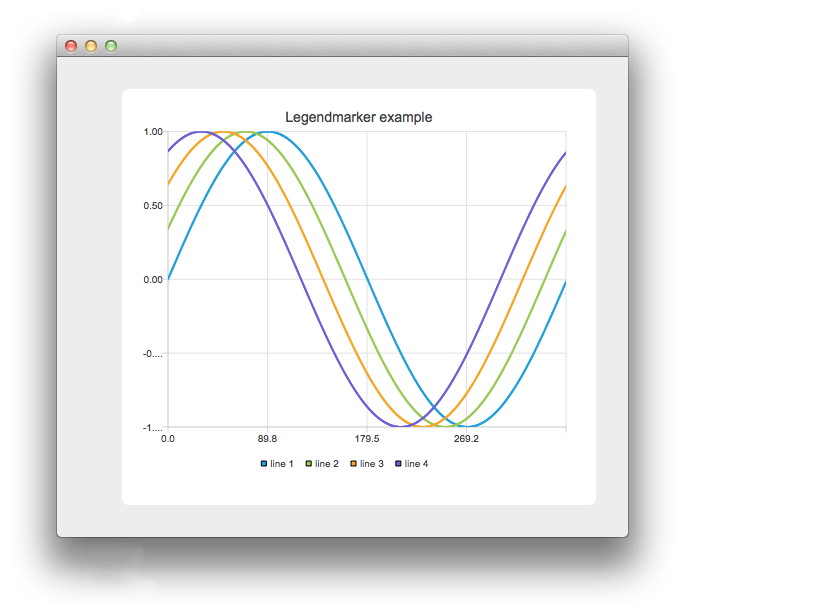
このアプリケーションには、チャートにシリーズを追加または削除するためのボタンと、レジェンドマーカーの `clicked` シグナルをハンドラに接続または切断するためのボタンがあります。上の画像では、マーカーを接続し、そのうちの 1 つをクリックしています。
    // Connect all markers to handler
    const auto markers = m_chart->legend()->markers();
    for (QLegendMarker *marker : markers) {
        // Disconnect possible existing connection to avoid multiple connections
        QObject::disconnect(marker, &QLegendMarker::clicked,
                            this, &LegendMarkersWidget::handleMarkerClicked);
        QObject::connect(marker, &QLegendMarker::clicked,
                         this, &LegendMarkersWidget::handleMarkerClicked);
    }
ここでは、凡例のマーカーをハンドラーに接続します。同じマーカーを複数回接続しないように、まず接続を解除します。
    const auto markers = m_chart->legend()->markers();
    for (QLegendMarker *marker : markers) {
        QObject::disconnect(marker, &QLegendMarker::clicked,
                            this, &LegendMarkersWidget::handleMarkerClicked);
    }
ここでは、すべてのマーカーをハンドラから解除します。
    auto marker = qobject_cast<QLegendMarker *>(sender());
    Q_ASSERT(marker);
ハンドラ内では、まずイベントの送信元を QLegendMarker にキャストします。
switch (marker->type())次に、マーカーの型を確認します。これは、マーカーの詳細なメソッドにアクセスし、正しい型にキャストしたい場合に必要です。QAbstractSeriesへのポインタだけが必要な場合は、キャストは不要です。 円グラフや棒グラフの場合、関連する QPieSlice や QBarSet へのポインタが必要になることがあります。
        // Toggle visibility of series
        marker->series()->setVisible(!marker->series()->isVisible());

        // Turn legend marker back to visible, since hiding series also hides the marker
        // and we don't want it to happen now.
        marker->setVisible(true);
マーカーがクリックされた際に、シリーズの表示状態を切り替えたいとします。そのためには、マーカーから関連するシリーズへのポインタを取得し、その表示状態を切り替えます。レジェンドのマーカーはデフォルトでシリーズの表示状態に従うため、マーカー自体も再び表示されるように設定します。 そうしないと、マーカーが凡例上で非表示になり、クリックできなくなってしまいます。
        // Dim the marker, if series is not visible
        qreal alpha = 1.0;

        if (!marker->series()->isVisible())
            alpha = 0.5;

        QColor color;
        QBrush brush = marker->labelBrush();
        color = brush.color();
        color.setAlphaF(alpha);
        brush.setColor(color);
        marker->setLabelBrush(brush);

        brush = marker->brush();
        color = brush.color();
        color.setAlphaF(alpha);
        brush.setColor(color);
        marker->setBrush(brush);

        QPen pen = marker->pen();
        color = pen.color();
        color.setAlphaF(alpha);
        pen.setColor(color);
        marker->setPen(pen);
シリーズが非表示になったときにマーカー自体を非表示にする代わりに、マーカーの色を暗くします。ここでは、labelBrushの色を変更することでこれを実現しています。
© 2026 The Qt Company Ltd. Documentation contributions included herein are the copyrights of their respective owners. The documentation provided herein is licensed under the terms of the GNU Free Documentation License version 1.3 as published by the Free Software Foundation. Qt and respective logos are trademarks of The Qt Company Ltd. in Finland and/or other countries worldwide. All other trademarks are property of their respective owners.
