
Android向けQt 言語間連携
Androidアプリケーションにおいて、QtからJavaおよびKotlinコードを呼び出す方法、およびJavaやKotlinからQtコードを呼び出す方法を示します。
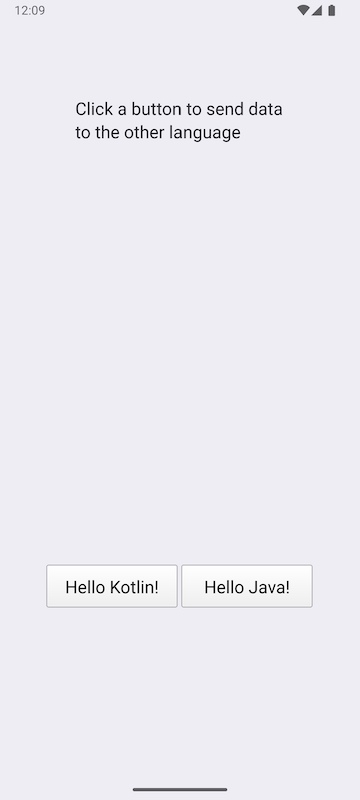
いずれかのボタンをクリックして、JavaおよびKotlinクラスに文字列を送信し、変更された文字列を受け取ります。
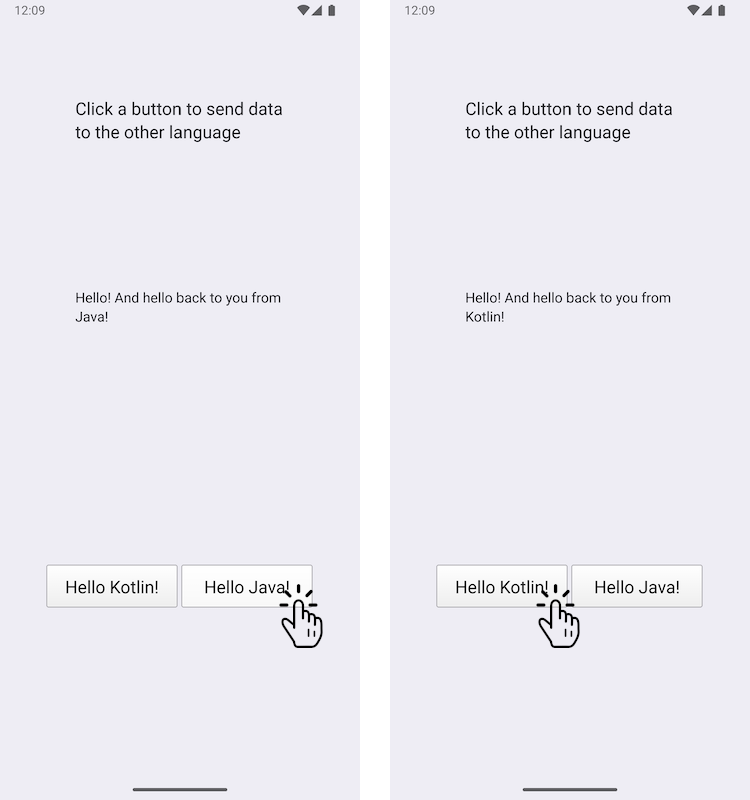
この例では、Android アプリケーションにカスタム Java クラスとカスタム Kotlin クラスを追加する方法、および Qt の JNI 便利 API を使用してそれらを呼び出す方法を示します。逆に、Java クラスと Kotlin クラスから Qt 関数を呼び出すことも可能です。
例の実行
このサンプルは、以下の手順で実行できます。
- Qt Creator
Welcome モードを開き、Examples からこのサンプルを選択してください。詳細については、Qt Creator の「チュートリアル:ビルドと実行」を参照してください。
- Qt Extension for Visual Studio Code
Command Palette から `Qt: Open Qt examples ` コマンドを実行し、リストからサンプルを選択します。詳細については、Qt Extension for Visual Studio Code: チュートリアル: ビルドと実行を参照してください。
注:この サンプルは Android 端末でのみ実行可能です。
Qtシグナルを使用したC++とJava/Kotlin間のデータ交換
JavaExchanger.java ファイル内で、JavaExchanger というカスタム Java クラスを定義します。
package org.qtproject.example.androidlanguageexchange;

public class JavaExchanger
{
    private long mCppExchanger;

    private native void connectToCppExchanger(long cppExchanger);
    private native void fromOther(long cppExchanger, String str);

    public JavaExchanger(long cppExchanger) {
        mCppExchanger = cppExchanger;
        connectToCppExchanger(cppExchanger);
    }
    public void fromCpp(int type, String str) {
        if (type == OtherLanguageType.Java.getCode()) {
            String msg = str + " And hello back to you from\nJava!";
            fromOther(mCppExchanger, msg);
        }
    }
}
KotlinExchanger.kt ファイル内で、KotlinExchanger という名前のカスタムKotlinクラスを定義します:
package org.qtproject.example.androidlanguageexchange;

class KotlinExchanger(private val cppExchanger: Long) {

    private external fun connectToCppExchanger(cppExchanger: Long)
    private external fun fromOther(cppExchanger: Long, str: String)

    init {
        connectToCppExchanger(cppExchanger)
    }

    fun fromCpp(type: Int, str: String) {
        if (type == OtherLanguageType.Kotlin.code) {
            val msg = "$str And hello back to you from\nKotlin!"
            fromOther(cppExchanger, msg)
        }
    }
}これらのクラスはどちらも、QObject* をlong型にキャストしただけのlong整数を受け取ります。connectToCppExchanger 関数の呼び出しの結果としてfromCpp の関数が呼び出されると、それらは入力された文字列を変更し、long整数と共にfromOther へ返します。
DataExchangerのC++クラスヘッダーファイルdataexchanger.h では、C++とKotlin/Javaの間でデータをやり取りするためのシンプルなC++ APIを宣言しています。 これは、前述のように、C++ コードからボタンへの応答として送信される `fromCpp ` シグナルを持つ `QObject ` と、Java/Kotlin コードが C++ コードに文字列を送信するために使用する `fromOther ` シグナルで構成されています。
// A simple data exchanger. All this class does is convey semi-abstract data
// back and forth. For the purposes of this example, treat it as an opaque
// and not necessarily modifiable engine object that just happens to have
// a signal that's directly consumable by the code in other languages. The
// rest of the glue is done in OtherLanguageHandler.
class DataExchanger : public QObject
{
    Q_OBJECT
public:
    explicit DataExchanger(QObject *parent = nullptr);

    enum OtherLanguageType {Java, Kotlin};
signals:
    void fromCpp(OtherLanguageType type, const QString& str);
    void fromOther(const QString& str);
};
Javaメソッドの呼び出しには、Java Native Interface (JNI) APIを利用してJava/Kotlinと通信するQJniObject が使用されます。long整数の引数はDataExchanger 型にキャストされ、fromCpp シグナルは、Java/KotlinのfromCpp 関数を呼び出すラムダ式に接続されます。
// We provide this function so that the Java/Kotlin objects can register themselves
// as signal observers. The C++ code doesn't decide where and when that happens.
void connectToCppExchanger(JNIEnv* /*env*/, jobject thiz, jlong cppExchanger)
{
    DataExchanger* exchanger = reinterpret_cast<DataExchanger*>(cppExchanger);
    QJniObject androidExchanger(thiz);
    QObject::connect(exchanger, &DataExchanger::fromCpp, exchanger,
                     // Intentional, and important capture by value of the QJniObject.
                     // This keeps the underlying Java/Kotlin object alive until the call
                     // to it is performed.
                     [androidExchanger](DataExchanger::OtherLanguageType type, const QString& str) {
                         androidExchanger.callMethod("fromCpp",
                                                     static_cast<int>(type), str);
                     });
}Java/Kotlinクラスのネイティブメソッドの呼び出しは、再びlong整数をDataExchanger に変換し、その型のfromOther シグナルを呼び出すことで、DataExchanger クラスに転送されます。
// The Java/Kotlin code calls this. The C++ code doesn't decide where and when
// it is called.
// Note that the function must be registered with the Qt native method
// registration facilities because it relies on the Qt wrapping that knows how to
// convert a jstring to a QString.
void fromOther(JNIEnv* /*env*/, jobject /*thiz*/,
                       jlong cppExchanger, const QString &str)
{
    DataExchanger* exchanger = reinterpret_cast<DataExchanger*>(cppExchanger);
    exchanger->fromOther(str);
}
ボタンが意図したとおりに動作することを確認するために、Java/Kotlinに文字列を送信し、変更された文字列を受け取るための以下のコードを追加します:
    QObject::connect(&javaButton, &QPushButton::clicked, &javaButton, [&]() {
        dataExchanger.fromCpp(DataExchanger::Java, "Hello!");
    });

    QObject::connect(&kotlinButton, &QPushButton::clicked, &kotlinButton, [&]() {
        dataExchanger.fromCpp(DataExchanger::Kotlin, "Hello!");
    });
    QObject::connect(&dataExchanger, &DataExchanger::fromOther,
                     &dataExchanger, [&](const QString& str) {
        fromOtherLabel.setText(str);
});Qt for Androidも参照してください 。
© 2026 The Qt Company Ltd. Documentation contributions included herein are the copyrights of their respective owners. The documentation provided herein is licensed under the terms of the GNU Free Documentation License version 1.3 as published by the Free Software Foundation. Qt and respective logos are trademarks of The Qt Company Ltd. in Finland and/or other countries worldwide. All other trademarks are property of their respective owners.
