
ウィンドウホスティングの例
Qtアプリケーション内でQt以外のUI要素をホストする方法のデモです。
Qt は、Qt Widgets およびQt Quick ベースのアプリケーション向けに幅広い UI コントロールを提供していますが、プラットフォームのネイティブ UI ツールキットなど、他の UI ツールキットのコントロールを使用したい場合もあるでしょう。
これらのコントロールを統合するには、Qt のQWindow 抽象化を基盤として、ネイティブ UI コントロールのQWindow 表現を作成し、それを Qt UI 内でホストできるようにします。この方法で作成されたウィンドウは、Qt にとって「外部」の UI ツールキットによって作成されたコントロールを表しているため、Qt では「外部ウィンドウ」と呼ばれます。
外部ウィンドウの作成
QWindow の表現を作成するには、QWindow::fromWinId() を使用し、不透明な WId 型で表されるネイティブウィンドウハンドルへの参照を渡します。
各プラットフォームは、不透明型 WId がどのネイティブ型に対応するかを定義します。
| プラットフォーム | WId 型の対応関係 |
|---|---|
| macOS | NSView* |
| Windows | HWND |
| X11 | xcb_window_t |
| iOS | UIView* |
| Android | 表示 |
| WebAssembly | emscripten::val* |
その結果、ネイティブのウィンドウハンドルを表す `QWindow ` が得られます。
注: Qt は 、外部ウィンドウを作成する際にネイティブウィンドウハンドルを(排他的に)所有するわけではないため、アプリケーションは、外部のQWindow の存続期間中、ネイティブウィンドウを維持する責任を負います。
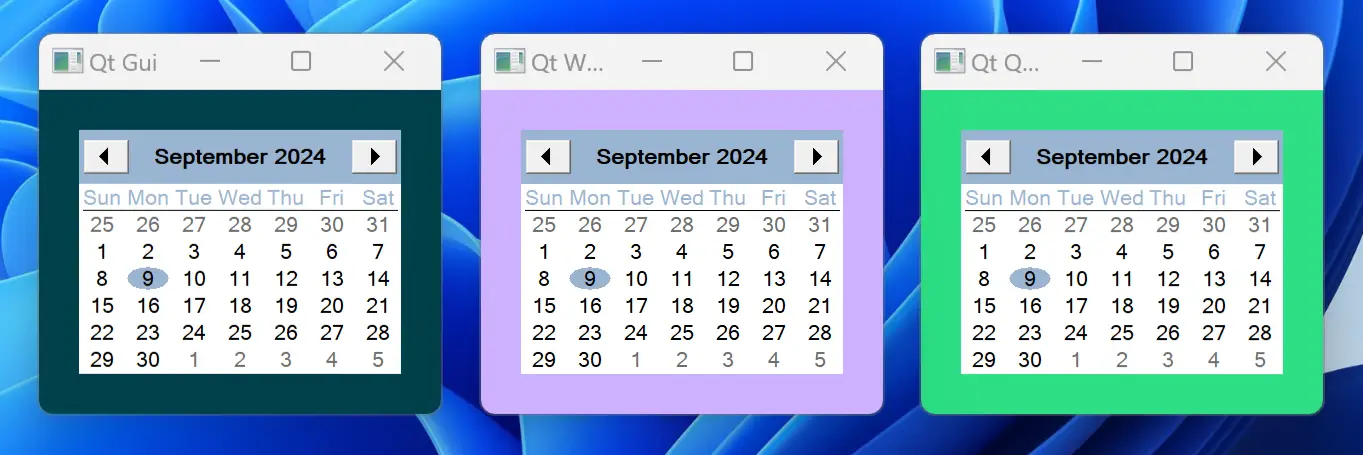
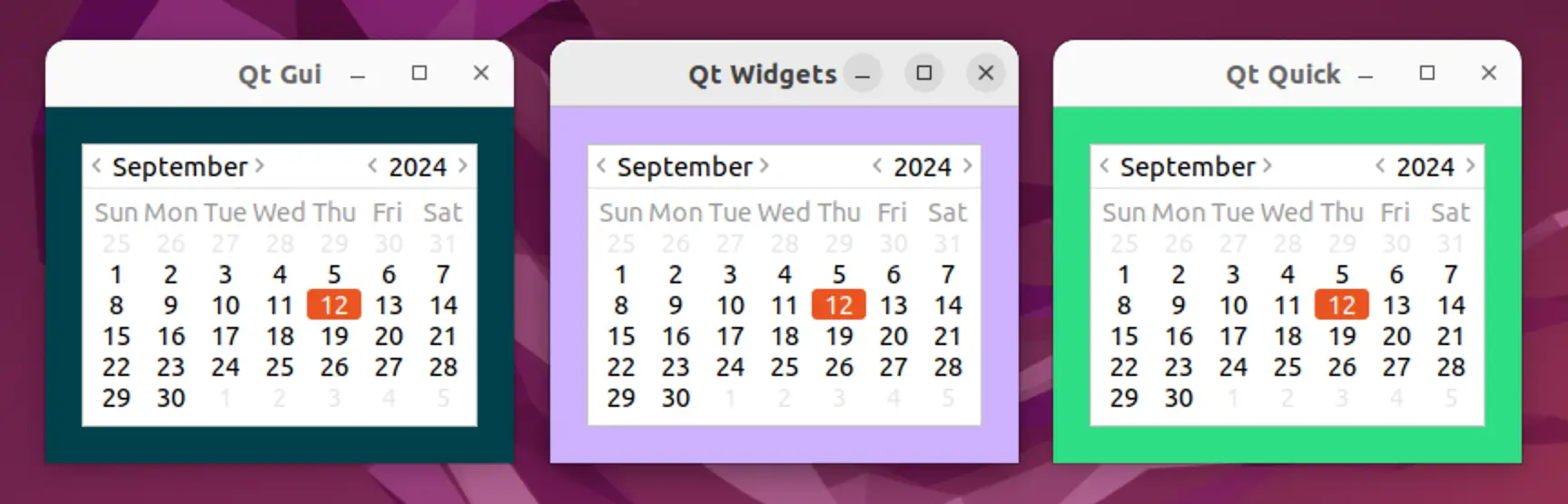
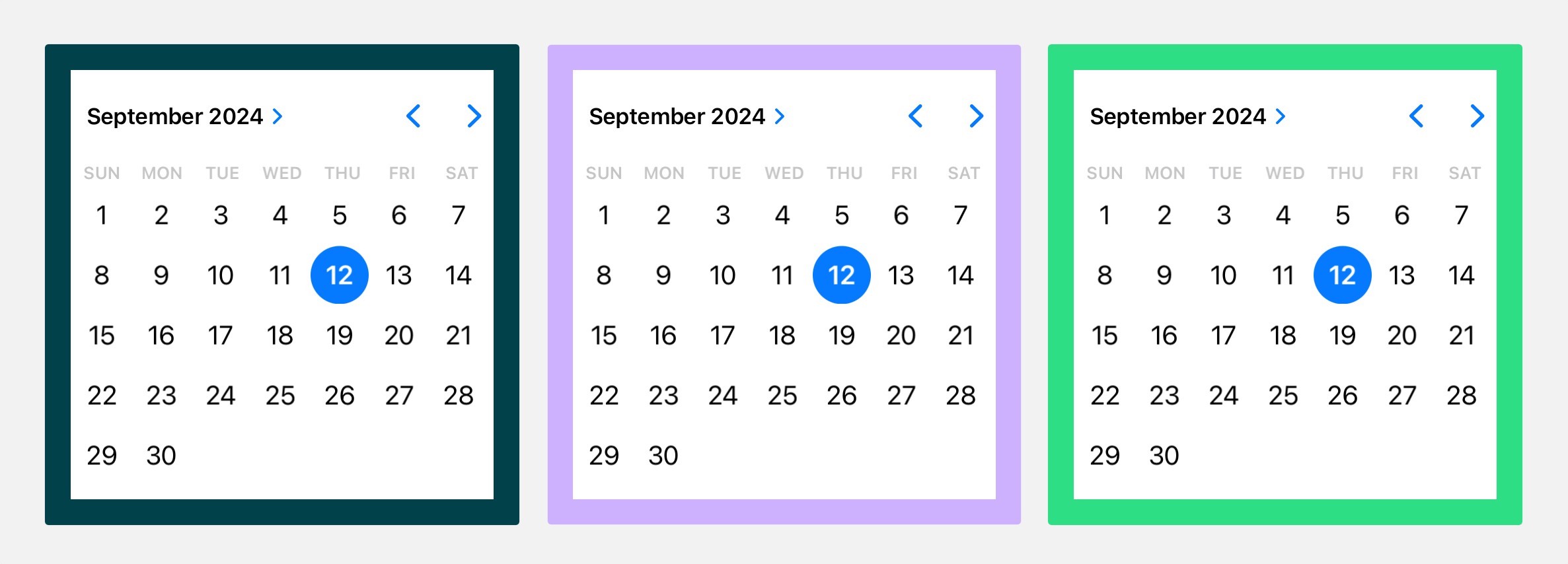
さて、QWindow::fromWinId() を使用してQWindow を作成するには、ネイティブウィンドウハンドルが必要です。この例では、ほとんどのプラットフォームのネイティブ UI ツールキットに用意されているか、あるいは容易に入手できる月単位のカレンダーコントロールをホストします。各プラットフォームでカレンダーを作成する方法の詳細については、以下のコードスニペットに示されています。
ネイティブハンドルが存続しつつ、アプリケーション終了時には適切にクリーンアップされるようにするため、main() から戻る前に実行するクリーンアップ関数のリストを管理しています。
ネイティブウィンドウハンドルを作成してそれをQWindow に変換するだけでなく、ネイティブツールキットが報告するカレンダーコントロールの推奨最小サイズに基づいて、結果として得られるQWindow の最小サイズも設定します。これにより
Qtがホストされた外部ウィンドウを適切にレイアウトできるようになります。
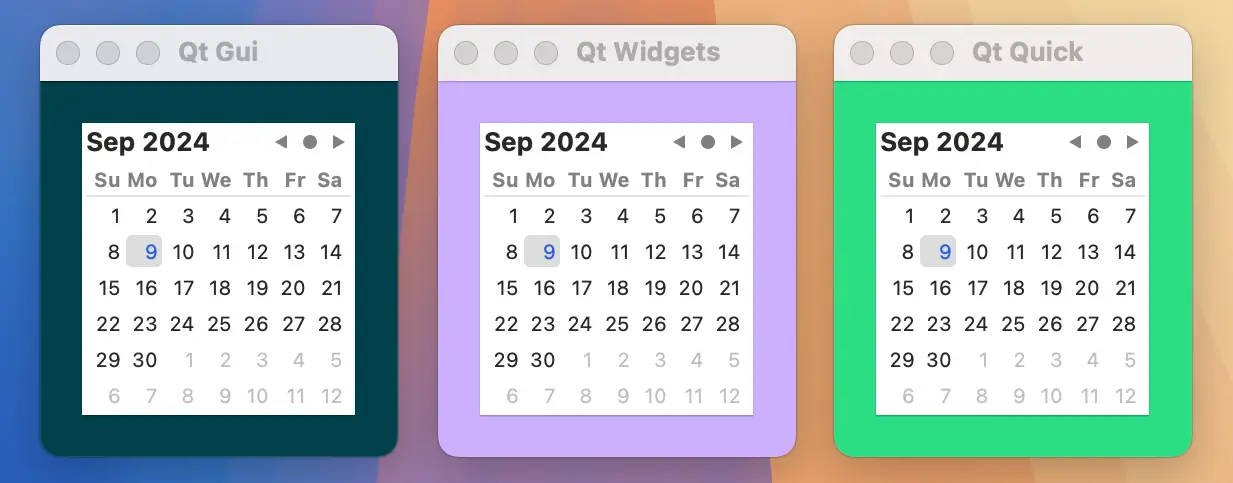
#include <AppKit/NSDatePicker.h>
#include <AppKit/NSLayoutConstraint.h>

QWindow *createCalendarWindow()
{
    auto *datePicker = [NSDatePicker new];
    cleanupFunctions.push_back([=]{ [datePicker release]; });

    datePicker.datePickerStyle = NSDatePickerStyleClockAndCalendar;
    datePicker.datePickerElements = NSDatePickerElementFlagYearMonthDay;
    datePicker.drawsBackground = YES;
    datePicker.dateValue = [NSDate now];

    auto *calendarWindow = QWindow::fromWinId(WId(datePicker));
    calendarWindow->setMinimumSize(QSizeF::fromCGSize(datePicker.fittingSize).toSize());

    return calendarWindow;
}
#include <windows.h>
#include <commctrl.h>

QWindow *createCalendarWindow()
{
    static bool initializedDateControl = []{
        INITCOMMONCONTROLSEX icex;
        icex.dwSize = sizeof(icex);
        icex.dwICC = ICC_DATE_CLASSES;
        return InitCommonControlsEx(&icex);
    }();
    Q_ASSERT(initializedDateControl);

    HWND monthCalendar = CreateWindow(MONTHCAL_CLASSW,
        nullptr, MCS_NOTODAYCIRCLE | MCS_NOTODAY, 0, 0, 0, 0,
        nullptr, nullptr, GetModuleHandle(nullptr), nullptr);
    cleanupFunctions.push_back([=]{ DestroyWindow(monthCalendar); });

    auto *calendarWindow = QWindow::fromWinId(WId(monthCalendar));

    RECT minimumSize;
    MonthCal_GetMinReqRect(monthCalendar, &minimumSize);
    const auto dpr = calendarWindow->devicePixelRatio();
    calendarWindow->setMinimumSize(QSize(
        minimumSize.right / dpr,minimumSize.bottom / dpr));

    return calendarWindow;
}
#include <gtk/gtk.h>
#include <gtk/gtkx.h>

QWindow *createCalendarWindow()
{
    static bool initializedGTK = []{
        qputenv("GDK_BACKEND", "x11");
        return gtk_init_check(nullptr, nullptr);
    }();
    Q_ASSERT(initializedGTK);

    auto *plug = gtk_plug_new(0);
    g_signal_connect(GTK_WIDGET(plug), "delete-event", G_CALLBACK(+[]{
        return true; // Don't destroy on close
    }), nullptr);
    cleanupFunctions.push_back([=]{ gtk_widget_destroy(GTK_WIDGET(plug)); });

    auto *calendar = gtk_calendar_new();
    gtk_container_add(GTK_CONTAINER(plug), GTK_WIDGET(calendar));
    gtk_widget_show_all(plug);

    auto *calendarWindow = QWindow::fromWinId(gtk_plug_get_id(GTK_PLUG(plug)));

    GtkRequisition minimumSize;
    gtk_widget_get_preferred_size(calendar, &minimumSize, NULL);
    calendarWindow->setMinimumSize(QSize(minimumSize.width, minimumSize.height));

    return calendarWindow;
}
#include <UIKit/UIDatePicker.h>

QWindow *createCalendarWindow()
{
    auto *datePicker = [UIDatePicker new];
    cleanupFunctions.push_back([=]{ [datePicker release]; });

    datePicker.datePickerMode = UIDatePickerModeDate;
    datePicker.preferredDatePickerStyle = UIDatePickerStyleInline;
    datePicker.backgroundColor = UIColor.systemBackgroundColor;

    auto *calendarWindow = QWindow::fromWinId(WId(datePicker));
    calendarWindow->setMinimumSize(QSizeF::fromCGSize(datePicker.frame.size).toSize());

    return calendarWindow;
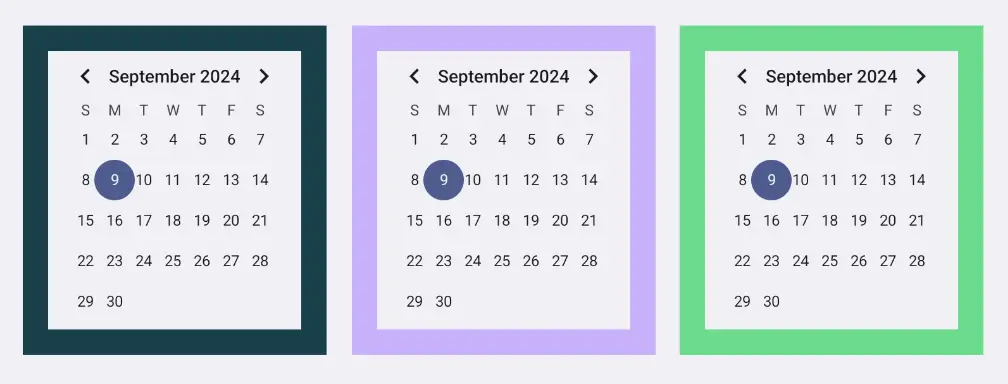
}
Q_DECLARE_JNI_CLASS(CalendarView, "android/widget/CalendarView")
Q_DECLARE_JNI_CLASS(Color, "android/graphics/Color")

QWindow *createCalendarWindow()
{
    using namespace QtJniTypes;
    using namespace QNativeInterface;

    auto *androidApp = qGuiApp->nativeInterface<QAndroidApplication>();
    Q_ASSERT(androidApp);

    auto *calendarView = new CalendarView(androidApp->context());
    cleanupFunctions.push_back([=]{ delete calendarView; });

    // Resolving Android default colors is not trivial, so let's ask Qt
    QColor paletteColor = qGuiApp->palette().color(QPalette::Window);
    int backgroundColor = Color::callStaticMethod<int>("rgb",
        paletteColor.red(), paletteColor.green(), paletteColor.blue());
    calendarView->callMethod<void>("setBackgroundColor", backgroundColor);

    auto *calendarWindow = QWindow::fromWinId(WId(calendarView->object()));
    calendarWindow->setMinimumSize(QSize(200, 220));

    return calendarWindow;
}
#include <emscripten.h>
#include <emscripten/val.h>
using emscripten::val;
using emscripten::EM_VAL;

EM_JS(EM_VAL, createCalendarElement, (), {
    var calendar = document.createElement("calendar-date");
    calendar.innerHTML = "<calendar-month></calendar-month>";
    return Emval.toHandle(calendar);
});

QWindow *createCalendarWindow()
{
    static bool initializedCalendarComponent = []{
        return EM_ASM_INT(
            var script = document.createElement('script');
            script.src = "https://unpkg.com/cally";
            script.type = "module";
            document.head.appendChild(script);
            return true;
        );
    }();
    Q_ASSERT(initializedCalendarComponent);

    val *calendarElement = new val(val::take_ownership(createCalendarElement()));
    cleanupFunctions.push_back([calendarElement]{ delete calendarElement; });

    QWindow *window = QWindow::fromWinId(WId(calendarElement));
    window->setMinimumSize(QSize(250, 300));
    return window;
}
外部ウィンドウの表示
外部のQWindow が用意できたので、これをQt UI内でホストすることができます。これには、以下で説明する通り、いくつかの選択肢があります。
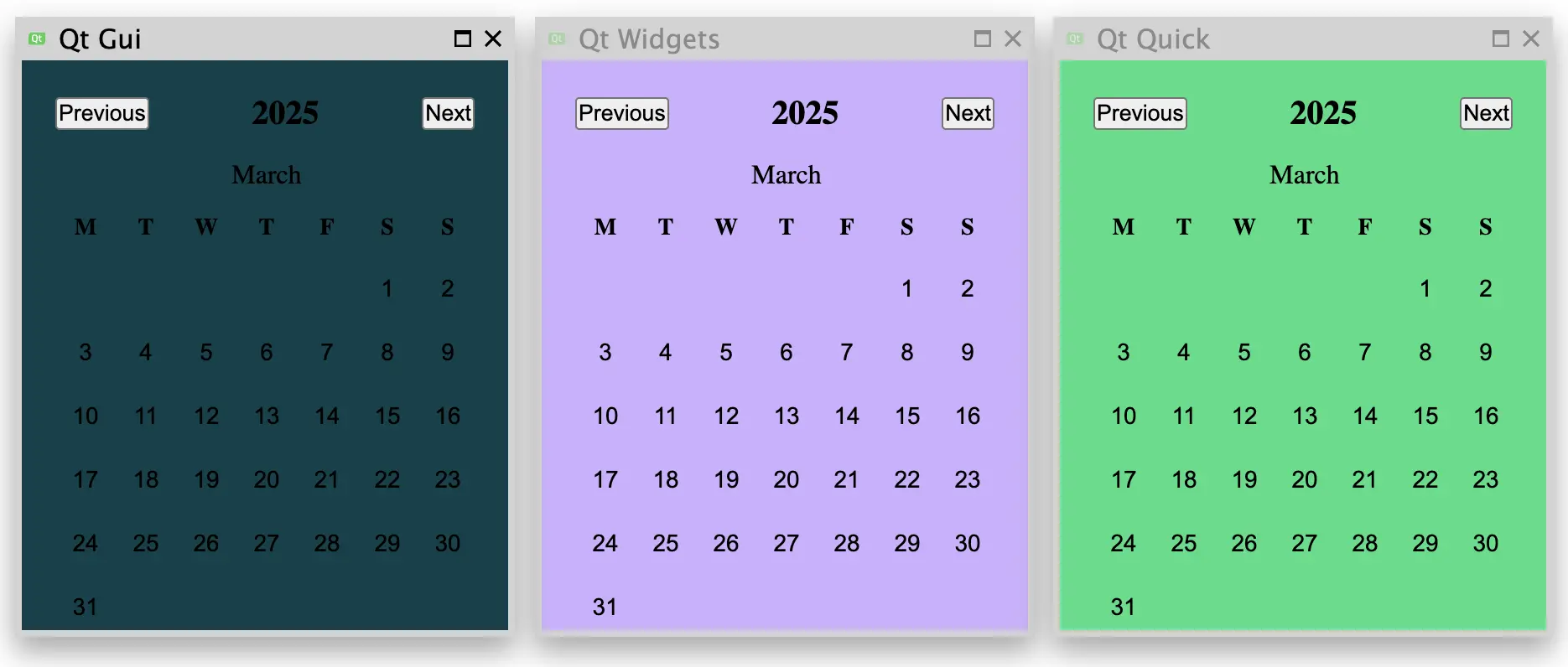
ホスト先としてQt GUI
最も低レベルな方法として、QWindow::setParent() を使用して、外部ウィンドウを別のQWindow に再親付けすることでホストすることができます。このアプローチでは、ホストされた子ウィンドウの位置決め、サイズ変更、およびその他の管理に関する処理がアプリケーション開発者に委ねられるため、可能であれば、このレベルでの統合は一般的に推奨されません
このレベルでの統合は、可能な限り避けることを推奨します。
この例では、まず最小限のコンテナウィンドウの実装を作成します。
class ContainerWindow : public QRasterWindow
{
protected:
    bool event(QEvent *event) override
    {
        if (event->type() == QEvent::ChildWindowAdded) {
            auto *childWindow = static_cast<QChildWindowEvent*>(event)->child();
            childWindow->resize(childWindow->minimumSize());
            setMinimumSize(childWindow->size().grownBy(contentsMargins));
            resize(minimumSize());
        }

        return QRasterWindow::event(event);
    }

    void showEvent(QShowEvent *) override
    {
        findChild<QWindow*>()->setVisible(true);
    }

    void resizeEvent(QResizeEvent *) override
    {
        auto *containedWindow = findChild<QWindow*>();
        containedWindow->setPosition(
            (width() / 2)  - containedWindow->width() / 2,
            (height() / 2) - containedWindow->height() / 2
        );
    }

    void paintEvent(QPaintEvent *) override
    {
        QPainter painter(this);
        painter.fillRect(0, 0, width(), height(), "#00414A");
    }
};
その後、このコンテナウィンドウに外部ウィンドウを再親付けします。
ContainerWindow window;
window.setTitle("Qt Gui");

auto *calendarWindow = createCalendarWindow();
calendarWindow->setParent(&window);xml-ph-0000@deepl.internalでのホスティングQt Widgets
Qt Widgets UI スタックに基づいて構築されたアプリケーションの場合、QWindow::fromWinId() と同じアプローチに従い、QWidget::createWindowContainer() を通じてQWindow のQWidget 表現を作成します。
その後、QWidget::setParent() を使用して、そのウィジェットを別のウィジェットの子として再配置することができます。この際、前述のQt GUI の例と同様に、配置やサイズ変更などを手動で管理する必要があるという注意点があります。この例では、ウィンドウコンテナウィジェットをQVBoxLayout に追加することを選択しています。これにより、最上位のウィジェット内で外部ウィンドウを自動的に中央に配置できるようになります。
QWidget widget;
widget.setPalette(QColor("#CDB0FF"));
widget.setWindowTitle("Qt Widgets");
widget.setLayout(new QVBoxLayout);
widget.layout()->setContentsMargins(contentsMargins);
widget.layout()->setAlignment(Qt::AlignCenter);

auto *calendarWidget = QWidget::createWindowContainer(createCalendarWindow());
widget.layout()->addWidget(calendarWidget);ホスティング先Qt Quick
最後に、Qt Quick UIスタックに基づいて構築されたアプリケーションの場合、WindowContainer アイテムを使用して外部ウィンドウを管理します。
Window {
    id: root
    title: "Qt Quick"
    color: "#2CDE85"

    property alias calendarWindow: calendar.window

    property int contentsMargins: 20

    minimumWidth: calendarWindow.minimumWidth + contentsMargins * 2
    minimumHeight: calendarWindow.minimumHeight + contentsMargins * 2

    WindowContainer {
        id: calendar
        width: window.minimumWidth
        height: window.minimumHeight
        anchors.centerIn: parent
    }
}
この例では、外部ウィンドウは初期プロパティとして QML エンジンに公開されていますが、アプリケーションのニーズに応じて、さまざまな方法で解決することができます。
QQmlApplicationEngine engine;
engine.setInitialProperties({{ "calendarWindow", QVariant::fromValue(createCalendarWindow()) }});
engine.loadFromModule("windowhosting", "Main");© 2026 The Qt Company Ltd. Documentation contributions included herein are the copyrights of their respective owners. The documentation provided herein is licensed under the terms of the GNU Free Documentation License version 1.3 as published by the Free Software Foundation. Qt and respective logos are trademarks of The Qt Company Ltd. in Finland and/or other countries worldwide. All other trademarks are property of their respective owners.
