
音声出力の例
QAudioSink クラスを使用したオーディオ再生の有効化。
「オーディオ出力」は、QAudioSink の基本的な使用例を示しています。
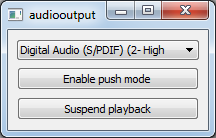
この例では、連続的なオーディオ再生を行うトーンジェネレータを提供します。UI を使用すると、ユーザーはオーディオ出力デバイスの選択、再生の一時停止および再開、動作モードの切り替え、音量の調整、オーディオフォーマットパラメータの変更を行うことができます。
例の動作
このサンプルは、以下の手順で実行できます。
- Qt Creator
Welcome モードを開き、Examples からこのサンプルを選択します。詳細については、Qt Creator の「チュートリアル:ビルドと実行」を参照してください。
- Qt Extension for Visual Studio Code
Command Palette から `Qt: Open Qt examples ` コマンドを実行し、リストからこのサンプルを選択します。詳細については、Qt Extension for Visual Studio Code の「チュートリアル:ビルドと実行」を参照してください。
© 2026 The Qt Company Ltd. Documentation contributions included herein are the copyrights of their respective owners. The documentation provided herein is licensed under the terms of the GNU Free Documentation License version 1.3 as published by the Free Software Foundation. Qt and respective logos are trademarks of The Qt Company Ltd. in Finland and/or other countries worldwide. All other trademarks are property of their respective owners.
