
Qt Quick サンプル - Canvas
こちらは、QMLのCanvasに関するサンプル集です。
Canvasは、Canvas 型に関連する小規模なQMLサンプル集です。各サンプルは、特定の型や機能を強調した小さなQMLファイルです。
例の動作確認
サンプルは以下の手順で実行できます:
- Qt Creator
Welcome モードを開き、Examples からサンプルを選択します。詳細については、Qt Creator の「チュートリアル:ビルドと実行」を参照してください。
- Qt Extension for Visual Studio Code
Command Palette から `Qt: Open Qt examples ` コマンドを実行し、リストから例を選択します。詳細については、Qt Extension for Visual Studio Code の「チュートリアル: ビルドと実行」を参照してください。
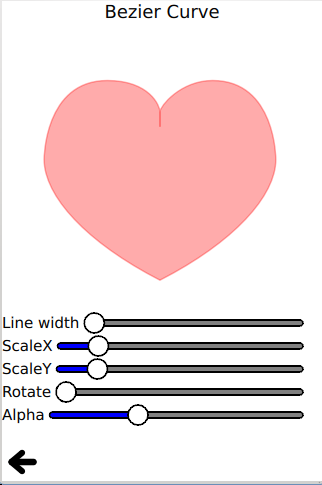
赤いハート
Red Heart は、ベジエ曲線 API を使用して、赤いハートの輪郭を描画し、塗りつぶします。
ctx.beginPath()
ctx.moveTo(75,40)
ctx.bezierCurveTo(75,37,70,25,50,25)
ctx.bezierCurveTo(20,25,20,62.5,20,62.5)
ctx.bezierCurveTo(20,80,40,102,75,120)
ctx.bezierCurveTo(110,102,130,80,130,62.5)
ctx.bezierCurveTo(130,62.5,130,25,100,25)
ctx.bezierCurveTo(85,25,75,37,75,40)
ctx.closePath()
吹き出し
「トークバブル」では、quadraticCurveTo() API を使用して、カスタマイズされたトークバブルのストロークと塗りつぶしを行います。
ctx.beginPath()
ctx.moveTo(75, 25)
ctx.quadraticCurveTo(25, 25, 25, 62.5)
ctx.quadraticCurveTo(25, 100, 50, 100)
ctx.quadraticCurveTo(50, 120, 30, 125)
ctx.quadraticCurveTo(60, 120, 65, 100)
ctx.quadraticCurveTo(125, 100, 125, 62.5)
ctx.quadraticCurveTo(125, 25, 75, 25)
ctx.closePath()
この例では、fillText() API の使用方法も紹介しています:
ctx.fillStyle = "white"
ctx.font = "bold 17px sans-serif"
ctx.fillText("Qt Quick", 40, 70)
スクイークル
「スクイクル」では、シンプルな moveTo() および lineTo() パス API を組み合わせて、滑らかなスクイクルを描画します。
角丸長方形
角丸長方形では、lineTo() および arcTo() といった一連のパス API を使用して、角丸長方形を描画しています。
笑顔
スマイルフェイスは、いくつかのパスを使用して、笑顔を描画し、塗りつぶします。
Clip
クリップでは、clip API を使用して指定された画像を切り抜きます。
ctx.clip()
ctx.drawImage(canvas.imagefile, 0, 0)
トラ
「Tiger」は、SVGパスAPIを使用して、一連のSVGパス文字列からトラを描画します。
for (let i = 0; i < Tiger.tiger.length; i++) {
    if (Tiger.tiger[i].width !== undefined)
        ctx.lineWidth = Tiger.tiger[i].width

    if (Tiger.tiger[i].path !== undefined)
        ctx.path = Tiger.tiger[i].path

    if (Tiger.tiger[i].fill !== undefined) {
        ctx.fillStyle = Tiger.tiger[i].fill
        ctx.fill()
    }

    if (Tiger.tiger[i].stroke !== undefined) {
        ctx.strokeStyle = Tiger.tiger[i].stroke
        ctx.stroke()
    }
}© 2026 The Qt Company Ltd. Documentation contributions included herein are the copyrights of their respective owners. The documentation provided herein is licensed under the terms of the GNU Free Documentation License version 1.3 as published by the Free Software Foundation. Qt and respective logos are trademarks of The Qt Company Ltd. in Finland and/or other countries worldwide. All other trademarks are property of their respective owners.
